EasyManua.ls Logo

Boss RC-505 mkII - User Manual

Boss RC-505 mkII
26 pages
Print Icon
To Next Page IconTo Next Page
Loading...
Owners Manual
USING THE UNIT SAFELY ............................ 2
IMPORTANT NOTES ................................. 2
How the RC-505mkll Is Organized. . . . . . . . . . . . . . . . . . . 3
Getting Ready ....................................... 4
Top Panel ............................................. 4
Rear Panel (Connecting Your Equipment) ................ 7
Turning the Power On/O .............................. 7
Phantom Power Settings ............................... 7
Switching Between Play Screens ........................ 8
Adjusting the Input/Output Level ....................... 8
Creating a Loop Phrase ............................. 9
Recording on a Single Track. . . . . . . . . . . . . . . . . . . . . . . . . . . . . 9
Recording on Multiple Tracks ........................... 10
Recording with Input FX ................................ 11
Record While Listening to the Rhythm Sound ............ 11
Sounding a Rhythm ..................................... 11
Setting the Tempo of Rhythm ............................. 11
Saving a Memory .................................... 12
Saving a Memory (WRITE) .............................. 12
Erasing Data from a Memory (CLEAR) .................... 12
Editing a Memory ................................... 13
Editing the Settings of a Memory ....................... 13
Editing the Track Settings .............................. 14
Editing the Rhythm Settings ............................ 15
Changing How the Rhythm Starts and Stops ................. 15
Editing the Input FX/Track FX Settings ................... 16
System Settings (MENU) ............................ 17
Connecting to a Computer via USB ................. 19
Backing Up or Recovering Data ......................... 19
Controlling Devices via MIDI
........................... 20
MIDI Settings .......................................... 20
Controlling an External MIDI Device from the RC-505mkll ...... 20
Controlling the RC-505mkll from an External MIDI Device ...... 21
Connecting Two RC-505mkll Units. . . . . . . . . . . . . . . . . . . . . . . 21
Appendix ............................................ 22
Troubleshooting ....................................... 22
Error Message List ..................................... 23
Restoring the Factory Default Settings (Factory Reset) .... 24
Main Specications .................................... 25
Owners Manual (this document)
Read this rst. It explains the basic things you need to know in order to
use the RC-505mkll.
Parameter Guide (download from the Web)
This explains all of the parameters of the RC-505mkll.
Before using this unit, carefully read “USING THE UNIT SAFELY and “IMPORTANT NOTES” (the leaet “USING THE UNIT SAFELY and the
Owners Manual (p. 2)). After reading, keep the document(s) where it will be available for immediate reference.
© 2021 Roland Corporation
To obtain the Parameter Guide
1. Enter the following URL on your computer.
https://www.boss.info/manuals/
2. Choose “RC-505mkll” as the product name.

Other manuals for Boss RC-505 mkII

Questions and Answers

Summary

Using the Unit Safely

Safety Warnings and Precautions

Critical warnings and cautions for safe operation and device protection.

Important Notes

Operational and Maintenance Advice

Guidance on power supply, data backup, repairs, and general precautions.

Intellectual Property Notice

Legal information concerning copyright and usage rights.

How the RC-505 mkll Is Organized

Core Components and Concepts

Overview of tracks, effects, memories, system settings, and rhythms.

Recording Terminology

Defines "recording" versus "overdubbing".

Getting Ready

Top Panel Controls Overview

Identifies and explains the functions of the RC-505mkll's top panel controls.

Getting Ready

Tempo and Rhythm Operations

Using the TAP TEMPO button and rhythm controls.

Track and Effect Controls

Managing track effects and track playback/recording operations.

MARK BACK Function

Functionality for undoing or redoing specific recorded phrases.

Getting Ready

Rear Panel and Connectivity

Explains rear panel jacks, power, USB, and MIDI connections.

Input;Output Jacks

Details on connecting instruments, microphones, speakers, and headphones.

Getting Ready

Connecting and Operating Footswitches

Guide to connecting and configuring footswitches.

Powering and Phantom Power

Instructions for turning the unit on/off and managing phantom power.

Getting Ready

Navigating Play Screens

How to switch between and understand different play screen layouts.

Adjusting Audio Levels

Using the MIXER screen to set input and output audio levels.

Creating a Loop Phrase

Single Track Recording and Overdubbing

Detailed steps for recording audio onto a single track and overdubbing.

Undo;Redo Operations

How to utilize the undo and redo functions for recorded phrases.

Creating a Loop Phrase

Multi-Track Recording and Overdubbing

Guide to recording and overdubbing across tracks 1 through 5.

Stopping and Saving Loops

Instructions for stopping all tracks and saving recorded phrases.

Creating a Loop Phrase

Applying Input FX and Rhythm

How to use input effects and rhythms during recording.

Saving a Memory

Saving and Clearing Memories

Instructions for saving current settings and erasing memory data.

Editing a Memory

Memory Setting Configuration

Detailed steps to edit various memory parameters.

Editing a Memory

Configuring Track Parameters

Detailed guide to adjust track volume, playback, and other settings.

Editing a Memory

Rhythm Configuration and Control

Adjusting rhythm settings and how rhythms start and stop.

Editing a Memory

Input and Track FX Settings

Procedure for editing the parameters of input and track effects.

System Settings (MENU)

Input and Output Configuration

Settings for input/output jacks, EQ, dynamics, and master effects.

Control and Assignment Settings

Configuring CTL/EXP functions, preferences, and custom assignments.

System Settings (MENU)

USB and MIDI Configuration

Settings for USB connectivity and MIDI communication.

Display and System Options

Adjusting display settings, knob functions, and the auto-off feature.

Connecting to a Computer via USB

USB Computer Connection

How to connect the RC-505mkll to a computer via USB for various functions.

Data Backup and Recovery

Procedures for backing up and restoring the unit's data.

Controlling Devices via MIDI

MIDI Connection and Data Transmission

Connecting MIDI devices and transmitting tempo, start/stop, and control data.

Program Change Message Transmission

How memory selection is transmitted using Program Change messages.

Controlling Devices via MIDI

External MIDI Control of RC-505 mkll

Using external MIDI to control tempo, playback, and memory changes.

Synchronizing Multiple Units

Connecting and synchronizing two RC-505mkll units via MIDI.

Appendix

Troubleshooting Sound and Operation

Diagnosing and resolving issues related to sound output and device operation.

MIDI and USB Connectivity Problems

Addressing problems with MIDI messages and computer communication.

Appendix

Error Message Reference

A comprehensive list of error messages and troubleshooting actions.

Appendix

Factory Reset Procedure

Steps to restore the unit to its original factory settings.

Appendix

Technical Specifications

Detailed technical specifications of the RC-505mkll.

Overview

The BOSS RC-505mkII LOOP STATION is a versatile device designed for creating and manipulating loop phrases, offering extensive control over audio recording, playback, and effects. It allows users to record audio from microphones or musical instruments onto multiple tracks, apply various effects, and synchronize performances with a built-in rhythm section.

Function Description

The core function of the RC-505mkII is to enable the creation of "memories," which are comprehensive sets of settings including tracks, input FX, track FX, and rhythm. Users can store up to 99 such memories, facilitating diverse musical arrangements and live performances.

Tracks: The device features five tracks for recording and playing back audio. These tracks can be used individually or combined to build complex loop phrases. The recording process supports both initial "recording" onto an empty track and subsequent "overdubbing" to layer new audio onto existing recordings. Each track has its own volume slider and can be configured with specific playback methods (normal or reverse, one-shot or loop), stereo position (pan), playback level, start/stop modes, and overdubbing methods. Tracks also support "LOOP SYNC" to align phrases at the beginning and "TEMPO SYNC" to match their playback speed to a specified tempo.

Input FX and Track FX: The RC-505mkII offers a wide array of effects, categorized as "input FX" (applied to incoming audio) and "track FX" (applied to recorded tracks). Users can register up to 16 input/track FX (across 4 banks with 4 types each) to dedicated buttons for quick access. The [INPUT FX] and [TRACK FX] knobs allow real-time control over effect parameters. Effects can be turned on/off for individual tracks, and their settings can be customized and saved within a memory. The device supports switching between different FX banks and editing individual effect parameters.

Rhythm: A built-in rhythm section allows users to play rhythms alongside their loops. This feature is particularly useful for recording, as users can record while listening to a rhythm at a specified tempo. The rhythm settings include genre, pattern, variation, drum kit, time signature (beat), and various start/stop trigger methods (e.g., "LOOP START," "REC END," "BEFORE LOOP," "STOP TRIG," "OFF"). Users can also configure intro/ending sections and fill-ins for the rhythm, as well as timing for variation changes.

System Settings: Beyond individual memories, the RC-505mkII provides "system settings" that apply globally to the device. These include display contrast, USB and MIDI settings, input/output EQ, dynamics (compressor/noise suppressor), routing for audio outputs, master FX, and CTL/EXP assignments. The "ASSIGN" section allows users to map various parameters to physical controls (buttons, knobs, footswitches, expression pedals) or external MIDI devices, offering extensive customization for control.

USB Connectivity: The device can connect to a computer via USB 2.0, enabling several functions:

  • Backup and Recovery: Users can back up the RC-505mkII's data to their computer and restore it later.
  • USB Audio: The device can function as a USB audio interface, allowing computer audio to play through it and vice versa.
  • USB MIDI: It supports MIDI synchronization with DAW software on a computer.
  • BOSS TONE STUDIO: Integration with BOSS TONE STUDIO allows importing and backing up loop phrases (audio files).
  • Rhythm Converter: A dedicated rhythm converter can be used to import and utilize original rhythm patterns.

MIDI Control: The RC-505mkII supports MIDI IN and OUT connections, allowing it to control external MIDI devices or be controlled by them. It can transmit tempo data (MIDI Clock), start/stop messages (MIDI Start/Stop), and Program Change messages (for switching memories). It can also receive Control Change messages to control its functions, offering deep integration into a larger MIDI setup. Two RC-505mkII units can be synchronized via MIDI for expanded looping possibilities.

Usage Features

Intuitive Interface: The RC-505mkII features a clear display and a well-organized control panel with dedicated buttons and knobs for tracks, effects, rhythm, and system functions. The [1]-[4] knobs are context-sensitive, adjusting parameters shown on the screen. The [] [] buttons facilitate navigation through menus and play screen variations.

Real-time Control: Dedicated [INPUT FX] and [TRACK FX] knobs allow for dynamic, real-time manipulation of effects, crucial for expressive performances. Track sliders provide immediate volume control for each loop.

Undo/Redo Functionality: The [UNDO/REDO] button offers a safety net for performances. When lit, track buttons can be used to undo or redo the most recent recording or overdub. The "MARK BACK" function further enhances this by allowing users to mark an overdubbed phrase and revert to that specific state later, even after multiple subsequent overdubs.

Memory Management: Users can easily save their created loop phrases and settings as "memories" to prevent data loss. The device also allows clearing memories to free up space or start fresh. Each memory can be assigned a custom name.

Flexible Input/Output: The RC-505mkII supports various input sources, including microphones (with phantom power for condenser mics) and instruments (guitar/bass, keyboards). Multiple output options (MAIN, SUB 1, SUB 2, PHONES) allow for flexible routing of audio, including parallel output configurations and headphone-specific monitoring.

Footswitch/Expression Pedal Support: External footswitches and expression pedals (sold separately) can be connected to CTL/EXP jacks, providing hands-free control over a wide range of functions, which is essential for live looping.

Tempo Control: The [TAP TEMPO] button allows users to set the tempo by tapping, with the option to return to the previous tempo by long-pressing. The tempo can also be precisely set using a knob.

Play Screen Variations: The device offers multiple play screens to display different information, such as memory number, track status, loop progress, FX status, and loop levels, allowing users to choose the most relevant view for their workflow.

Maintenance Features

Data Backup and Recovery: The USB connection facilitates easy backup of all device data to a computer, safeguarding valuable recordings and settings. In case of data corruption or accidental deletion, users can restore backed-up data.

Factory Reset: The "Factory Reset" function allows users to restore all settings to their default values, which can be useful for troubleshooting or starting with a clean slate. Users can choose to reset only memories, only system settings, or both.

Troubleshooting Guide: The manual includes a comprehensive troubleshooting section that addresses common issues related to sound, operation, MIDI, and USB connectivity, providing clear steps for diagnosis and resolution.

Error Message List: A dedicated list of error messages helps users understand and resolve issues indicated by the device, such as "DATA DAMAGED," "MEMORY FULL," or "TOO BUSY."

Safe Usage Guidelines: The manual emphasizes important safety precautions, including using only the supplied AC adaptor and power cord, careful handling of the ground terminal, and proper management of phantom power to prevent damage or malfunction. It also advises on proper power-on/off sequences and cautions against data loss if the unit is turned off without saving.

Regular Backups: Users are encouraged to make regular backups of their data to protect against irretrievable loss due to equipment failure or incorrect operation.

Software Updates: While not explicitly detailed in the provided text, BOSS devices typically support firmware updates via USB, ensuring the unit remains up-to-date with the latest features and bug fixes.

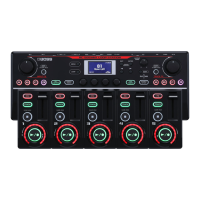
Boss RC-505 mkII Specifications

General IconGeneral
Loop Tracks5
USB Audio InterfaceYes
MIDIYes
Power SupplyAC adaptor
TypeTabletop Loop Station
Sampling Frequency44.1 kHz
AD/DA Conversion24-bit
EffectsInput FX, Track FX, Master FX
Rhythm Patterns200 patterns
Maximum Recording Time1.5 hours (stereo)
ConnectorsMIDI (IN, OUT)
Maximum Phrase LengthApprox. 1.5 hours (1 track)
Bit Depth24 bits
Inputs2 (L/MONO, R)
Outputs2 (L/MONO, R)
USBUSB Type-B

Related product manuals