

EasyManua.ls Logo

BougeRV FLASH-300 - User Manual

BougeRV FLASH-300
20 pages
Print Icon
To Next Page IconTo Next Page
Loading...
BougeRV
FLASH-300
Portable
Power
Station
User
Manual
Question and Answer IconNeed help?

Do you have a question about the BougeRV FLASH-300 and is the answer not in the manual?

Summary

Warranty

Limited Warranty

Provides a one-year warranty for customers purchasing on BougeRV's Amazon store and official website.

Warranty Period

The warranty starts from the date of purchase and requires proof of order for verification.

Customer Support

Contact information including email, phone, and website for user assistance.

Warranty Exclusions

Damage Due to Consumer Actions

Warranty excludes damage from not following recommendations or unauthorized disassembly.

Exclusion of Non-Official Purchases

Warranty does not apply to products purchased outside BougeRV's Amazon store or official website.

Battery Charging Compliance

Warranty excludes battery cell issues if not charged within 7 days and every 6 months thereafter.

Product Safety Guidelines

Product Use Precautions

Avoid liquids, extreme temperatures, electrostatic environments, and heavy objects.

Product Charging Safety

Use approved cables, charge on a clear surface, and do not leave unattended or charge immediately after heavy load.

Specifications

Input;Output Ports

Details AC, Solar, and USB-C charging input specifications and output port types.

Environmental Operating Temperature

Defines operating, discharge, charge, and storage temperature ranges in Fahrenheit and Celsius.

Battery and General Information

Provides cell chemistry, cycle life, net weight, dimensions, capacity, and certifications.

Key Features

Fast Charging Capability

Highlights fastest power station source, 600W Max Input, 0.5H Full Charge 0%-90%.

Smart LED Screen

Displays real-time conditions of the FLASH-300, showing actual status.

AC Frequency Identification

Automatic identification, no manual switch, protects connected appliances.

Power Efficiency & Fan Control

Reduces power consumption and intelligently adjusts fan speed for efficiency and noise reduction.

Safety Features

Features 10 Error Codes and a Triple Protection System for enhanced user and device safety.

Operating Instructions

Power and LED Controls

Instructions for turning on/off the device, screen, and controlling LED light modes.

Port Activation

How to turn on/off AC, USB (TypeC), and DC ports for power output.

Frequency Switching

Procedure to switch between 50Hz and 60Hz frequencies for AC output.

Display Screen and Functions

Details display auto-off, wake-up, ECO modes, and alarm indications.

Smart Display Indicators

Power and Time Indicators

Shows current input/output power, remaining battery capacity, and estimated operating time.

Charging Source Indicators

Lights indicating if charging from solar panels, wall outlets, or car charging port.

Frequency and Temperature Indicators

Shows current AC frequency and indicates high inverter or low ambient temperatures.

Overload and Error Codes

Indicator for overload conditions and display for 10 different error codes.

AC Charging

AC Charging Technology

Features 600W max input power and an overload protection switch for safety.

Car Charging

Car Charging Port

Supports 13.5V chargers and 10A max current; vehicle must be started before charging.

PV Solar Charging

Series and Parallel Connection

Solar panels can be connected in series/parallel; voltage/current limits must be observed.

MPPT Controller Function

Automatically recognizes input voltage to track maximum voltage for optimal power input.

Series Charging Method

Instructions on wiring solar panels in series to produce the expected voltage output.

Parallel Charging Method

Instructions on wiring solar panels in parallel to produce the expected current output.

Series-Parallel Solar Charging

Configuration for 600 W Input

Using four 200W panels in series-parallel supports 600W max input.

Optimizing Solar Input

Light/angle affect output; recommend 800W panels for achieving maximum 600W input.

Recharge Time

Charging Time Estimates

Estimated times for AC, Solar, Car, and USB-C charging from 0% to 90%.

Running Time

Device Usage Estimates

Estimated hours or number of charges for various devices using the power station.

Error Code & Troubleshooting

Inverter Error Codes (E01-E05)

Explains inverter overload, over-temperature, over/under-voltage, and short circuit protection errors.

FAQ

Charging and Usage Tips

Discusses pass-through charging, display inconsistencies, and general usage advice.

Car Cigarette Port Charging

Details how to use the car cigarette port for charging with an adaptor and its max input.

Solar Panel and Video Resources

Recommends solar panels and directs to YouTube for operation videos.

Daily Use Precautions

Key points for daily use: maintain charge, operate within temperature range, ensure dry storage.

Summary

Warranty

Limited Warranty

Provides a one-year warranty for customers purchasing on BougeRV's Amazon store and official website.

Warranty Period

The warranty starts from the date of purchase and requires proof of order for verification.

Customer Support

Contact information including email, phone, and website for user assistance.

Warranty Exclusions

Damage Due to Consumer Actions

Warranty excludes damage from not following recommendations or unauthorized disassembly.

Exclusion of Non-Official Purchases

Warranty does not apply to products purchased outside BougeRV's Amazon store or official website.

Battery Charging Compliance

Warranty excludes battery cell issues if not charged within 7 days and every 6 months thereafter.

Product Safety Guidelines

Product Use Precautions

Avoid liquids, extreme temperatures, electrostatic environments, and heavy objects.

Product Charging Safety

Use approved cables, charge on a clear surface, and do not leave unattended or charge immediately after heavy load.

Specifications

Input;Output Ports

Details AC, Solar, and USB-C charging input specifications and output port types.

Environmental Operating Temperature

Defines operating, discharge, charge, and storage temperature ranges in Fahrenheit and Celsius.

Battery and General Information

Provides cell chemistry, cycle life, net weight, dimensions, capacity, and certifications.

Key Features

Fast Charging Capability

Highlights fastest power station source, 600W Max Input, 0.5H Full Charge 0%-90%.

Smart LED Screen

Displays real-time conditions of the FLASH-300, showing actual status.

AC Frequency Identification

Automatic identification, no manual switch, protects connected appliances.

Power Efficiency & Fan Control

Reduces power consumption and intelligently adjusts fan speed for efficiency and noise reduction.

Safety Features

Features 10 Error Codes and a Triple Protection System for enhanced user and device safety.

Operating Instructions

Power and LED Controls

Instructions for turning on/off the device, screen, and controlling LED light modes.

Port Activation

How to turn on/off AC, USB (TypeC), and DC ports for power output.

Frequency Switching

Procedure to switch between 50Hz and 60Hz frequencies for AC output.

Display Screen and Functions

Details display auto-off, wake-up, ECO modes, and alarm indications.

Smart Display Indicators

Power and Time Indicators

Shows current input/output power, remaining battery capacity, and estimated operating time.

Charging Source Indicators

Lights indicating if charging from solar panels, wall outlets, or car charging port.

Frequency and Temperature Indicators

Shows current AC frequency and indicates high inverter or low ambient temperatures.

Overload and Error Codes

Indicator for overload conditions and display for 10 different error codes.

AC Charging

AC Charging Technology

Features 600W max input power and an overload protection switch for safety.

Car Charging

Car Charging Port

Supports 13.5V chargers and 10A max current; vehicle must be started before charging.

PV Solar Charging

Series and Parallel Connection

Solar panels can be connected in series/parallel; voltage/current limits must be observed.

MPPT Controller Function

Automatically recognizes input voltage to track maximum voltage for optimal power input.

Series Charging Method

Instructions on wiring solar panels in series to produce the expected voltage output.

Parallel Charging Method

Instructions on wiring solar panels in parallel to produce the expected current output.

Series-Parallel Solar Charging

Configuration for 600 W Input

Using four 200W panels in series-parallel supports 600W max input.

Optimizing Solar Input

Light/angle affect output; recommend 800W panels for achieving maximum 600W input.

Recharge Time

Charging Time Estimates

Estimated times for AC, Solar, Car, and USB-C charging from 0% to 90%.

Running Time

Device Usage Estimates

Estimated hours or number of charges for various devices using the power station.

Error Code & Troubleshooting

Inverter Error Codes (E01-E05)

Explains inverter overload, over-temperature, over/under-voltage, and short circuit protection errors.

FAQ

Charging and Usage Tips

Discusses pass-through charging, display inconsistencies, and general usage advice.

Car Cigarette Port Charging

Details how to use the car cigarette port for charging with an adaptor and its max input.

Solar Panel and Video Resources

Recommends solar panels and directs to YouTube for operation videos.

Daily Use Precautions

Key points for daily use: maintain charge, operate within temperature range, ensure dry storage.

Overview

The BougeRV FLASH-300 is a portable power station designed to provide reliable power for various devices and applications. It features a robust set of input and output ports, smart display functionalities, and multiple charging options, making it a versatile solution for both indoor and outdoor use.

Function Description:

The FLASH-300 serves as a portable power source, capable of charging and powering a wide range of electronic devices. It supports AC, solar, car, and USB-C charging inputs, offering flexibility in how it is recharged. For output, it provides AC, USB-A, USB-A QC3.0, USB-C, cigarette port, and wireless charging options, catering to diverse power needs. The device is equipped with a smart LED screen that displays real-time information about its status, including input/output power, remaining charge time, capacity, and error codes. It also incorporates an ECO function to conserve power by automatically turning off ports when output is low or after a period of inactivity. Safety features include overload protection, over-temperature protection, over/under-voltage protection, and short circuit protection for both inverter and PV inputs, as well as overcurrent and overheating protection for AC charging.
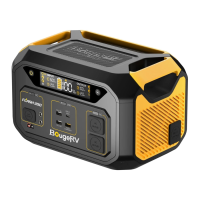
Important Technical Specifications:

Input Ports:

  • AC Charge: 100-115V, 600W Max
  • Solar Charge: 12-45V, 25A 600W Max
  • USB-C Charge: 20V/5A, 100W Max

Output Ports:

  • AC (×2): 50/60Hz Pure Sine Wave, 600W Max
  • USB-A (×2): 5V/2.4A, 12W
  • USB-A QC3.0 (×1): 5V/3A, 15W; 9V/2A, 18W
  • USB-C: 5/9/12/15/20V, 5A 100W Max
  • Cigarette Port: 13.5V/10A, 135W Max
  • Wireless Charge: 5V/3A, 15W Max

Environmental Operating Temperature:

  • Operating Temperature: 32°F to 105°F (0°C to 40°C)
  • Discharge Temperature: 14°F to 113°F (-10°C to 45°C)
  • Charge Temperature: 32°F to 113°F (0°C to 45°C)
  • Storage Temperature: 32°F to 100°F (0°C to 38°C)

Battery Info:

  • Cell Chemistry: Li(NiCoMn)O2
  • Cycle Life: 700+ Cycles to 80% Capacity

General Info:

  • Net Weight: 6.6kg/14.6LBS
  • Product Dimensions: 271819 inches
  • Capacity: 286WH
  • Certification: FCC, PSE, ROHS, UN38.3

Recharge Time (0-90%):

  • AC Charging: Around 0.5 hours
  • Solar Charging: Around 0.5 hours
  • Car Charging: Around 2.4 hours
  • USB-C Charging: Around 3 hours

Usage Features:

  • Fast Charging: The FLASH-300 boasts fast charging capabilities, with AC/PV 600W Max Input allowing for a 0-90% charge in just 0.5 hours.
  • Smart LED Screen: A clear LED screen provides comprehensive real-time information, including input/output power, remaining recharge time, current capacity (0-100%), remaining power supply time, and various indicators for charging status (MPPT, wall outlets, car charging), temperature warnings, and overload alerts. It also displays the current electricity frequency.
  • AC Frequency Automatic Identification: The device automatically identifies and saves the AC frequency (default 60Hz) upon connection, eliminating the need for manual switching and protecting appliances.
  • Reduced Standby and Running Power: Optimized power management reduces standby and running power consumption, extending usage time by 10-15% compared to similar capacity power stations.
  • Infinitely Variable Speed Fan: The cooling fan intelligently adjusts its speed based on temperature and output power, minimizing noise during operation.
  • Safety Protection System: Features 10 error codes and a triple protection system to prevent potential safety hazards, including overload, over-temperature, over/under-voltage, and short circuit protections.
  • ECO Function: Automatically turns off after 5 minutes of no input or output. USB ports turn off if output is lower than 3W for one hour, and DC & AC ports turn off if output is lower than 5W for one hour, conserving battery life.
  • Alarm Function: All abnormal states are accompanied by error codes or buzzer warnings, and the FLASH-300 can resume operation automatically once the abnormality is resolved.
  • Multiple Charging Options: Supports charging via AC wall outlets, solar panels (series and parallel connections, with MPPT controller), car cigarette lighter, and USB-C.
  • Pass-Through Charging: The FLASH-300 allows charging while simultaneously powering devices, though this is not recommended for battery longevity.

Maintenance Features:

  • Regular Recharging: To prevent damage and maintain battery health, charge the product before storing if a low-battery warning appears. Keep the FLASH-300 fully recharged at least once a month (0%-100%), and recharge when the display capacity is less than 20%.
  • Temperature Management: Store and use the product within the recommended temperature range of 32°F to 105°F (0°C to 40°C) to prolong battery life. Avoid extreme cold (below freezing) or heat (above 140°F/60°C) as these can severely affect performance and battery capacity.
  • Dry Environment Storage: Store the product in a dry environment, away from water, direct sunlight, fire sources, or heating stoves.
  • Avoid Physical Damage: Do not expose the product to liquids, immerse it in water, or place heavy objects on it. Avoid strong electrostatic or electromagnetic environments.
  • Authorized Accessories: ONLY use BougeRV approved charging cables to prevent damage and ensure warranty validity.
  • Charging Safety: When charging, place the product on the ground away from flammable or combustible materials. Do not leave unattended during charging. Allow the battery to cool to normal temperature after a long period of heavy load before recharging.
  • No Disassembly: Do not disassemble the machine without authorization or attempt maintenance by non-designated sites, as this voids the warranty.
  • Warranty Conditions: The limited warranty requires the battery cell to be fully charged within seven days of purchase and at least once every 6 months thereafter.
  • Travel Notice: Do not bring this product on flights.

BougeRV FLASH-300 Specifications

General IconGeneral
BrandBougeRV
ModelFLASH-300
CategoryAmplifier
LanguageEnglish