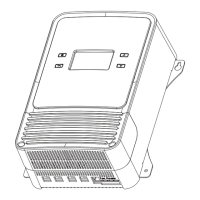
This document provides a comprehensive user manual for the BougeRV 12V 2000W High Frequency Pure Sine Wave Inverter, outlining its functions, features, installation, operation, and maintenance. The inverter is designed to provide reliable and efficient AC power from a 12V DC battery source, making it suitable for various off-grid and mobile applications.
Function Description
The BougeRV inverter converts 12V DC power from a battery into 110V/115V/120V AC pure sine wave power, suitable for operating a wide range of electrical appliances. It features multiple output interfaces, including two AC output terminals and dual USB outputs, allowing for versatile connectivity. The device incorporates advanced SPWM modulation technology to ensure high-quality power output with low harmonic distortion.
Key functions include:
- Power Conversion: Transforms DC battery power into stable AC power.
- Multiple Output Options: Provides two AC output terminals for higher power loads and two USB ports for charging mobile devices.
- Operating Modes: Offers three distinct operating modes: ON (normal AC output), OFF (idle/standby with no AC output), and ECO (energy-saving mode with intermittent AC output).
- Communication Interfaces: Equipped with RS485 and TTL communication interfaces for monitoring and control, as well as a Bluetooth module for mobile APP connectivity.
- Protection Functions: Integrates comprehensive protection mechanisms, including input overvoltage, input low voltage, output overload, output short circuit, equipment over-temperature, and fan failure protection.
- External Control: Supports an external switch contact interface for remote start/stop control of the inverter.
Usage Features
The inverter is designed for ease of use and flexibility, offering several features to enhance user experience and power management:
- Reliable Performance: Utilizes advanced SPWM modulation technology to deliver high-quality pure sine wave output, ensuring compatibility with sensitive electronics. High power density and long-life components are selected for sustained operation at full power.
- Efficient Operation: Boasts high conversion efficiency, low power loss, and low harmonic distortion. The three-speed operation mode (ON/OFF/ECO) helps maximize power saving, with the ECO mode automatically shutting off AC output when the load power is below a set threshold and restarting when a significant load is detected.
- Smart Monitoring and Control: Features standard Bluetooth connectivity, allowing users to monitor device operating parameters, fault status, and adjust settings in real-time via a mobile application (Solars APP). This includes viewing battery voltage, AC output voltage, current, frequency, power, and internal temperature. The APP also provides historical data on electricity usage and allows for factory resets and firmware updates.
- Flexible Installation: Can be installed in wall-mounted or horizontal configurations, with specific recommendations for heat dissipation space (at least 200mm/7.9in around air inlets/outlets).
- Safety Measures: Emphasizes strict adherence to safety instructions, including correct DC voltage matching, ensuring output power exceeds appliance requirements, proper positive and negative pole wiring, and grounding the inverter shell. It also warns against touching high voltage wiring or internal components when the inverter is operating or before capacitors are fully discharged.
- Overload Management: In case of output overload, the inverter provides three automatic recovery attempts with increasing delays (5s, 10s, 15s) before requiring a manual restart after troubleshooting.
- User-Adjustable Parameters: Many operating parameters, such as rated output voltage, output frequency, ECO startup power, and ECO interval time, can be adjusted via the mobile APP, allowing for customization based on specific needs.
Maintenance Features
To ensure long-term performance and reliability, the manual outlines several maintenance recommendations:
- Regular Inspections: It is recommended to check the inverter twice a year for optimal performance. This includes:
- Wiring Integrity: Inspect exposed wire insulation for damage from sun exposure, friction, dry rot, insects, or rodents. Repair or replace damaged wires as needed.
- Indicator and Display Consistency: Verify that indicator lights and display readings are consistent with the actual operation of the equipment. Correct any inconsistencies or errors promptly.
- Terminal Inspection: Check terminals for signs of corrosion, damaged insulation, high temperature, or burning/discoloration. Ensure terminal screws are tightened securely.
- Cleanliness: Inspect for dirt, nesting insects, and corrosion. Clean the inverter as required to maintain proper operation and heat dissipation.
- Safety Precautions During Maintenance: A critical warning is issued regarding electric shock. Before performing any checks or operations, users must ensure the inverter power supply is disconnected and the power in the capacitors is fully discharged.
- Arrester Replacement: If an arrester has failed, it should be replaced immediately to prevent lightning damage to the inverter or other connected equipment.
- Fan Operation Check: Regularly check the fan operation to ensure it runs normally and is not blocked by oil or wires. This is crucial for reliable and stable operation at full power, especially given the fan failure protection mechanism that limits output power if the fan is not running.
- Troubleshooting Guide: The manual includes a "Common Problems and Solutions" section with a table that lists symptoms (e.g., red light flashing, buzzer sounds), potential causes (e.g., low input voltage, overload, high temperature, fan failure), possible reasons, and corresponding solutions. This helps users diagnose and resolve common issues efficiently.
- Software Updates: The mobile APP allows users to check for and apply firmware updates, ensuring the inverter operates with the latest features and improvements.

 Need help?
 General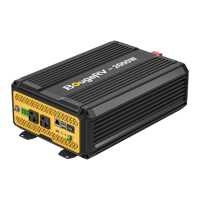

 To Next Page