Need help?
Do you have a question about the Boult Audio AIRBASS PROBUDS and is the answer not in the manual?
Activate Google Assistant/Siri by clicking the multi-function button three times.
Manage music playback and calls via single or double clicks on the multi-function button.
Increase or decrease volume by long-pressing the multi-function button on the respective earbud.
Turn earbuds On/Off by long-pressing the multi-function button.
This document outlines the user manual for the Boult Audio Airbass Probuds, a pair of wireless earbuds designed for audio playback and communication. The manual provides instructions for initial setup, pairing, various functions, and safety precautions to ensure optimal use and longevity of the device.
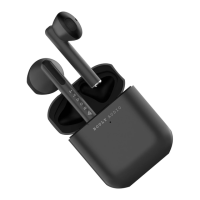
The Boult Audio Airbass Probuds are designed to provide a wireless audio experience, allowing users to listen to music, make and receive calls, and interact with voice assistants. The earbuds come with a charging case that not only protects them but also recharges them on the go. Each earbud features a multi-function button and LED indicators, while the charging case includes a Type-C charging port and LED indicators to show the charging status.
To begin using the Airbass Probuds, ensure they are fully charged. Open the charging case with the earbuds inside and wait for 3-4 seconds. Both earbuds will display a red LED light for this duration, indicating they are pairing with each other. Once successfully paired, one earbud will show flashing red and blue LED lights, signifying they are ready to connect to your device. Next, activate Bluetooth on your device and scan for available devices. Select "Boult Audio Probass" from the list to pair. After successful pairing, the red and blue flashing LED light on the earbud will turn off, and you can start enjoying your music or calls.
For subsequent uses, simply turn on Bluetooth on your device. Open the charging case, and the earbuds will automatically pair with each other within 3-4 seconds. They should then automatically connect to your previously paired device. If automatic connection does not occur, manually select "Boult Audio Probass" from your device's Bluetooth settings.
The earbuds can also be used individually as mono headsets. To do this, open the case with both earbuds inside. Take out one earbud and close the case. The single earbud will start flashing red and blue LED lights, indicating it's ready to connect to a Bluetooth device. If it doesn't flash, long-press the multi-function button to switch it off, then release and re-press it to switch it back on. The earbud will then be ready to pair.
To use both earbuds as mono headsets with different devices, connect one earbud to your first device and the second earbud to your second device. It's crucial that the first connected earbud remains in its case with the lid closed or is at least 10-15 meters away from the second earbud to prevent them from pairing with each other.
The charging case features four LED lights on its front, which indicate the available battery power. Each LED light represents 25% of the battery capacity. To charge the case, connect a Type-C charging cable to its port. The LED lights will flash while the case is charging and will become steady once charging is complete.
To charge the earbuds, simply place both earbuds inside the charging case and close the lid. The case will then begin to charge the earbuds.
To ensure your safety and extend the lifespan of your Boult Audio Airbass Probuds, it is important to follow these guidelines:
 General
| Driver Size | 10mm |
|---|---|
| Water Resistance | IPX5 |
| Frequency Response | 20Hz - 20kHz |
| Impedance | 32Ω |
| Microphone | Yes |
| Touch Controls | Yes |


 To Next Page