
 Need help?
Do you have a question about the Boult Audio AIRBASS Y1 and is the answer not in the manual?
Controls for music playback, including play, pause, next, and previous tracks using the MFB.
Instructions for answering, ending, and rejecting calls via double taps or long presses on earbuds.
Steps to power the earbuds on and off by pressing and holding the MFB for 2 seconds.
How to activate the voice assistant by tapping the MFB of either earbud three times.
Notification system for low battery levels and automatic power-off when depleted.
Advisories against using corrosive detergents, improper storage, and high volume usage.
Guidelines for product care, warranty validity, and non-covered damages.
The Boult Audio Airbass Y1 is a True Wireless Stereo (TWS) Bluetooth headset designed for an immersive audio experience. This user manual provides comprehensive instructions for its operation, from initial pairing to advanced controls and maintenance.
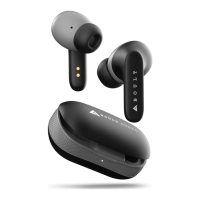
The Airbass Y1 functions as a wireless audio device, allowing users to listen to music, make and receive calls, and interact with their device's voice assistant without the need for physical cables. The headset consists of two earbuds and a charging case. The earbuds are equipped with Multi-Function Buttons (MFB) and microphones, enabling a range of interactive controls. The charging case serves as a portable power bank for the earbuds and features an Input Type-C charging port for recharging the case itself. Indicator lights on both the earbuds and the charging case provide visual feedback on their status, such as power, pairing, and charging.
Upon opening the charging case, the Airbass Y1 earbuds automatically enter pairing mode. They are designed to directly connect with your mobile phone, appearing as "Boult Audio Airbass Y1" in your device's Bluetooth settings. For optimal sound quality, it is recommended to use the headset with devices running iOS 8.0/Android 4.3 or above operating systems.
The Airbass Y1 provides seamless control over phone calls:
For hands-free convenience, the Airbass Y1 allows you to activate your device's voice assistant. Simply tap the MFB of either earbud three times to summon the voice assistant.
The headset is equipped with a low battery warning system. When the earbud battery runs low, you will hear a "Do-Do" beep sound to remind you to recharge. The earbuds will automatically power off once they run out of power to protect the battery and ensure longevity.
The provided warranty card is valid for products purchased through legal and formal channels. The warranty covers non-human damage products, but it does not extend to private disassembly, improper use, or natural disasters. The warranty is valid for a specified period, and the company reserves the right of final interpretation regarding warranty claims. This ensures that users receive support for manufacturing defects while encouraging proper handling and use of the device.
 General
| Bluetooth Version | 5.3 |
|---|---|
| Water Resistance | IPX5 |
| Driver Size | 13mm |
| Microphone | Yes |
| Frequency Response | 20Hz - 20kHz |
| Impedance | 32Ω |
| Weight (per earbud) | 4g |
| Weight (charging case) | 35g |
| Touch Controls | Yes |
| Voice Assistant Support | Yes |
| Warranty | 1 year |
| Charging Time | 1.5 hours |

 To Next Page