EasyManua.ls Logo

Bowers & Wilkins PI5 - User Manual

Bowers & Wilkins PI5
12 pages
Print Icon
To Next Page IconTo Next Page
Loading...
PI5 Manual
Question and Answer IconNeed help?

Do you have a question about the Bowers & Wilkins PI5 and is the answer not in the manual?

Summary

Bowers & Wilkins PI5 Carton Contents

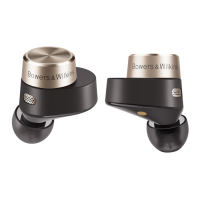
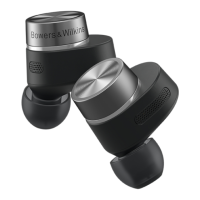
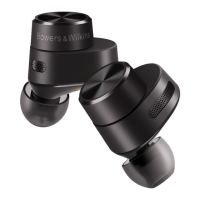
Bowers & Wilkins PI5 Earphone Overview

PI5 Earphone Power Management

Automatic power on/off and low power mode for conserving battery.

PI5 Earphone Controls and Functions

How to use the multi-function buttons for media and calls.

Bowers & Wilkins PI5 Battery Charging Guide

PI5 Battery and Case Status Indicator

Understanding the LED indicator lights for battery charge levels.

Bowers & Wilkins PI5 Stowing Earbuds

Bowers & Wilkins PI5 Bluetooth Pairing

PI5 Bluetooth Device Pairing Instructions

Step-by-step guide to pair PI5 with new or subsequent Bluetooth devices.

Bowers & Wilkins PI5 Usage Guide

PI5 Bluetooth Audio Playback

Connecting to and playing audio from Bluetooth sources.

PI5 Voice Assistant Integration

Activating and using voice services with the PI5 earphones.

Bowers & Wilkins PI5 Factory Reset

Bowers & Wilkins PI5 Care and Cleaning

Bowers & Wilkins PI5 Technical Specifications

Bowers & Wilkins PI5 Service and Support

Overview

The Bowers & Wilkins PI5 are true wireless earphones designed for a seamless audio experience. This manual provides comprehensive guidance on their use, from initial setup and charging to advanced features and maintenance.

Function Description

The PI5 earphones are designed to deliver high-quality audio wirelessly from Bluetooth-enabled devices such as smartphones, tablets, and computers. They incorporate Active Noise Cancellation (ANC) to minimize ambient distractions, allowing for an immersive listening experience. The earphones feature a multi-function button on each earbud, providing intuitive control over media playback and phone calls. Power management is automatic, with the earbuds charging when placed in their case and entering a low-power mode when not in use to conserve battery. The PI5 also supports voice services, which can be activated through the multi-function button.

Usage Features

Carton Contents:

Upon unboxing, you should find the PI5 Headphones with medium ear tips pre-installed, a charge case, a USB-C charging cable, additional small and large ear tips, and a literature pack.

Switching On/Off:

The PI5 earphones do not have a manual power switch. Their power management is automatic. They are ready for use when removed from the charging case and will automatically enter a low power mode to conserve energy if left out of the case and unused.

Earphone Controls:

Each earbud features a multi-function button located on its flat, round section. These buttons provide control over various functions:

  • Media Playback:
    • Play or Pause: Press the Multi-function button once.
    • Play Next Track: Press the Multi-function button twice in quick succession.
    • Play Previous Track: Press the Multi-function button three times in quick succession.
    • Initiate Voice Service: Press and hold the Multi-function button.
  • Phone Call Functionality:
    • Answer an Incoming Call: Press the Multi-function button on either earbud once.
    • End a Call: Press the Multi-function button on either earbud once during the call.
    • Decline an Incoming Call: Press the Multi-function button twice in quick succession when a call is incoming.

Battery Charging:

The PI5 earphones come partially charged and can be used immediately. However, it is recommended to fully charge them before first use, which typically takes up to 3 hours. The earphones can be used while charging.

  • Charging the PI5 Earbuds:
    1. Place the PI5 earbuds into the charge case.
    2. Close the charge case lid.
  • Charging the PI5 Charge Case with Cable:
    1. Use the supplied USB charging cable. Connect the USB plug to a USB wall charger or a powered computer USB socket.
    2. Connect the USB-C end of the cable to the USB-C socket on the charge case.
    • Note: During cable charging, the charge case indicator will blink green. Once fully charged, the indicator will remain illuminated. The charge case can be charged with or without the earbuds inside.
  • Charging the PI5 Charge Case with a Wireless Charging Station:
    1. Place the charging case onto a wireless charging station.
    2. Ensure that the rear of the charging case is on the charging station, with the case indicator facing up.
    • Note: During wireless charging, the charge case indicator will blink green. When fully charged, the indicator will remain illuminated.

Status Indicator:

The status indicator is located on the charge case.

  • When the earbuds are in the charge case, the indicator shows the battery charge level of the earbuds.
  • When the earbuds are removed from the charge case, the indicator shows the battery charge level of the charging case.
    • Green (case lid open): Battery charge > 40%
    • Amber (case lid open): Battery charge > 20%
    • Red (case lid open): Battery charge > 10%
    • Red flashing (case lid open): Battery charge < 10%
    • Blue blinking: Pairing Mode Enabled
    • Blue (3 sec solid): Pairing successful

Stowing the Earbuds:

When not in use, the PI5 earbuds can be stored and charged inside the charge case. They are magnetically held in place and can only be stowed in one orientation.

  • Note: When wearing the earphones, be careful that hair or accessories do not get trapped between your ears and the earbuds, as this may interfere with proximity sensing.

Bluetooth Connectivity:

Pairing:

The PI5 earphones are designed to stream music wirelessly from Bluetooth audio devices. To do this, the earphones and the device must first be paired.

  • Initial Pairing (First Device):
    1. Open the charge case lid with the earbuds inside.
    2. The charge case indicator will flash blue, indicating pairing mode.
    3. Go to the Bluetooth pairing menu on your device.
    4. Select "Bowers & Wilkins PI5" from the device list.
    5. The charge case indicator will change to solid blue, confirming successful pairing.
  • Pairing to a Subsequent Device:
    1. Open the charge case lid with the earbuds inside.
    2. Press and hold the button inside the charge case for 1 to 5 seconds.
    3. The charge case indicator will flash blue.
    4. Go to the Bluetooth pairing menu on your device.
    5. Select "Bowers & Wilkins PI5" from the device list.
    6. The charge case indicator will change to solid blue, confirming successful pairing.
  • The earphones can remember up to eight paired Bluetooth devices. Repeat the above steps to pair more devices.
  • Note: The earphones will automatically exit Bluetooth pairing mode if no device is paired within 5 minutes. If pairing fails, the indicator will rapidly flash blue; in this case, please try pairing again.

Bluetooth Audio:

Once paired to a Bluetooth audio source, you can connect to the PI5, and all audio from the source device should play through the headphones.

Voice Services:

The PI5 supports connections to any voice service available on a paired and connected device. Pressing and holding the multi-function button will trigger the inbuilt voice service.

Reset:

The PI5 earphones can be reset to factory settings. To do this, open the charge case with the earbuds placed inside. Press and hold the button on the inside of the charge case for between 5 and 15 seconds, then release. The indicator on the charge case will turn red to confirm the reset.

Maintenance Features

Caring For Your Earphones:

Your earphones can be cleaned with a damp cloth. Gently dab the cloth until the earphones are clean. Do not use cleaning detergents, rubbing alcohol, or chemical cleaners/polish, as these can damage your earphones.

Service / Support:

If you encounter any specific problems or have questions, consult the Headphone support section of the Bowers & Wilkins website: www.bowerswilkins.com.

Bowers & Wilkins PI5 Specifications

General IconGeneral
Product typeHeadset
Product colorWhite
Wearing styleIn-ear
LED indicatorsYes
Operating keysAnswer/end call, Play/pause, Track \u003C, Track >, Volume +, Volume -
Volume controlTouch
Country of originChina
Recommended usageCalls/Music
Package depth104 mm
Package width103 mm
Package height74 mm
Package weight264 g
Quantity1
Charging case typeWired
Accessories included in set3 sizes silicone eartips
Charging case connector typeUSB Type-C
Bluetooth version5.0
Bluetooth profilesA2DP, AVRCP, HFP, HSP
Connectivity technologyTrue Wireless Stereo (TWS)
Export Control Classification Number (ECCN)-
Driver unit9.2 mm
Headphone frequency10 - 20000 Hz
Total Harmonic Distortion (THD)0.3 %
Microphone typeBuilt-in
Recommended genderBoy/Girl
Battery typeBuilt-in battery
Commodity Classification Automated Tracking System (CCATS)8518300000
Weight and Dimensions IconWeight and Dimensions
Charging case weight47 g
Left earpiece weight8 g

Videos

How to Fix Bluetooth Pairing Issues with Bowers & Wilkins Pi5 S2

How to Hard Reset Bowers & Wilkins Pi5 S2

How to Fix Bowers & Wilkins Pi5 S2 – Earbuds Automatically Start or Pause Music

How to Fix Bowers & Wilkins Pi5 S2 – Only One Earbud is Working

How to Add Bowers & Wilkins Pi5 S2 to the Smartphone App

How To Fix No Sound Playing After Connecting Bowers & Wilkins Pi5 S2 To Phone

Related product manuals