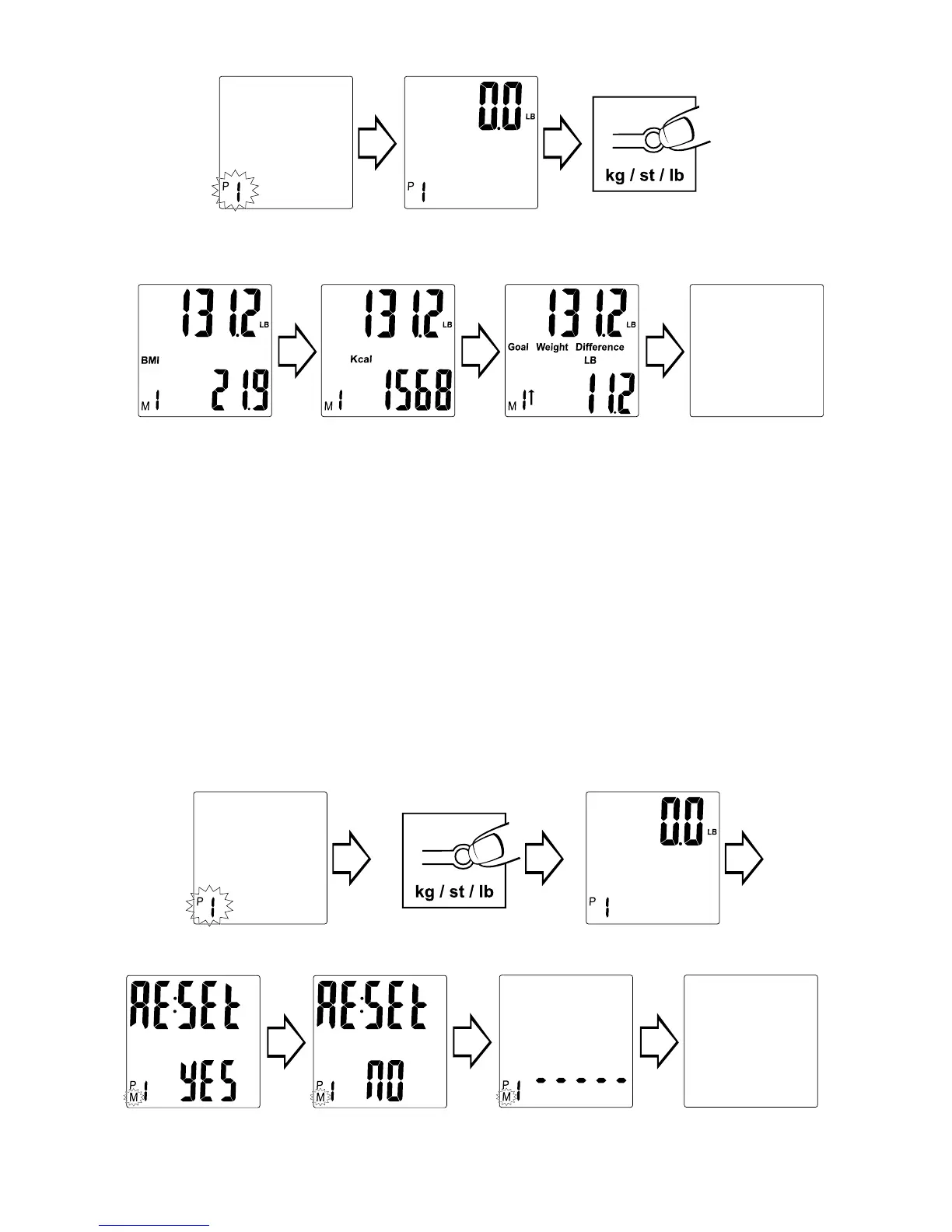
Press“¤”. Memory
number blinks. Press
“▲”/“▼” to change.
Scale shows zero.
Press & hold kg/st/lb
button under scale
Weight & BMI
display.
Weight & Calorie
display.
Weight & Difference
from Goal display.
Scale turns off.
To Clear Results
You may clear out weighing results and goal weight from memory.
1. Press “¤” (On) button to turn the scale on.
2. Press “▲” or “▼” until your memory number ashes (P1-P8).
3. When zeros appears, press and hold the “kg/st/lb” button on the bottom
of the scale for 3 seconds.
4. Press “▲” or “▼” at the same time and hold for 3 seconds. “RE:SET YES”
appears on screen.
5. Press “▲” or “▼” to toggle between “YES” and “NO”.
6. Press “¤” to select “YES” (clear memory) or “NO” (do not clear memory).
7. If “YES” is selected, the scale shows dashes and turns off automatically. If
“NO” is selected, the scale will turn off automatically without clearing the
memory.
Press“¤”. Memory number blinks.
Press “▲”/“▼” to change.
Press & hold kg/st/lb
button under scale
Scale turns off.
Press and hold “▲” & “▼” at the same time. Press
“▲” & “▼” to toggle between “YES” and “NO”.
Press “¤” to select “YES” or “NO”.
Dashes display when
memory is clear
Scale shows zero.


 To Next Page