12
Programming
Preparing the garage door for the garage door opener
First, open and close the garage door manually to check that the garage door
moves smoothly and is well balanced. If this is not the case, do not connect the
garage door opener to the garage door.
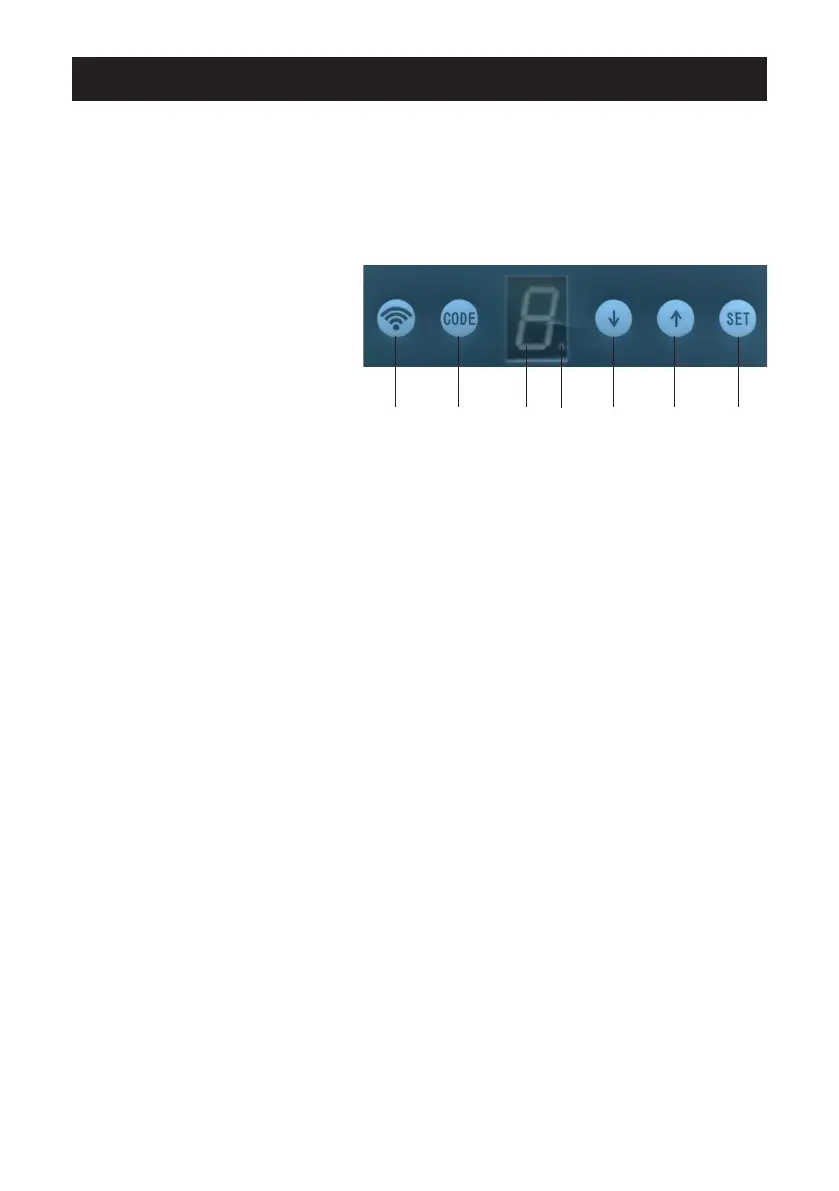
Control panel
1. Wi-Fi button
2. CODE button
3. Display
4. Wi-Fi indicator
5. ARROW DOWN button
6. ARROW UP button
7. SET button
1 2 3 4 5 6 7
Motor settings and operating instructions
1. When the garage door opener is connected to the mains, the display shows
“0” and the garage door opener is in standby mode.
2. Setting the open and closed position:
Press the SET button once. The display shows “1”. Press the ARROW UP
button until the door is in the fully open position. Release the ARROW UP
button and press the SET button.
The display shows “2”. Press the ARROW DOWN button until the door is in
the fully closed position. Release the ARROW DOWN button and press the
SET button. The door runs a test cycle and opens and closes fully once.


 To Next Page