Menu Introduction
• From the Home screen, press the M button to access the menu page.
Continue to press the M button to turn the page until the receiver returns
to the Home screen.
• From the menu page, press and hold the M button to access options→
press it to setting values or functions→press and hold it again to save the
settings. Press the power button to exit the settings or menu page.
• If no operation is performed within 20 seconds on the menu page, the
display will automatically return to the Home screen.
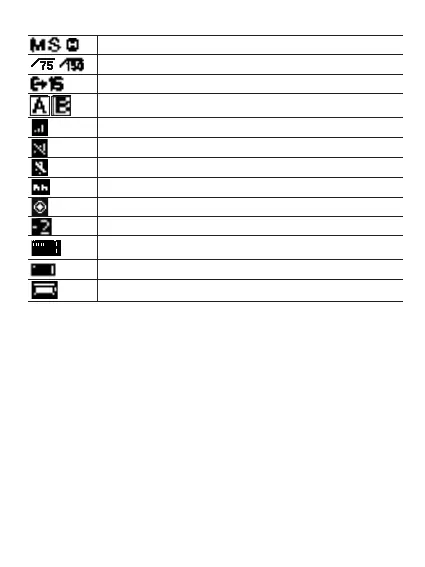
Indicates that the receiver is in Mono, Stereo, or Safety Track output mode.
Sounds that are 75Hz (150Hz) or lower will be filtered.
Indicates the receiver’s output volume from 00 to 15. Default to 06.
Indicates that channel A/ B is connected.
Indicates the wireless signal strength between transmitter and receiver.
Indicates that the current channel is disconnected.
Microphone is muted.
Indicates the noise cancellation of the transmitter has been enabled.
Indicates the onboard recording of the transmitter has been
enabled while the icon appears and flashes.
Indicates the corresponding transmitter's mic gain from -6 to +9. Default to 0.
Indicates current audio input level.
Upper right corner: Indicates the receiver’s battery level.
Both sides: Indicates the corresponding transmitter’s battery level.


 To Next Page