Car
Rear
(Side) View
Camera
(usER
MANUAL& INSTALLATION GUIDE)
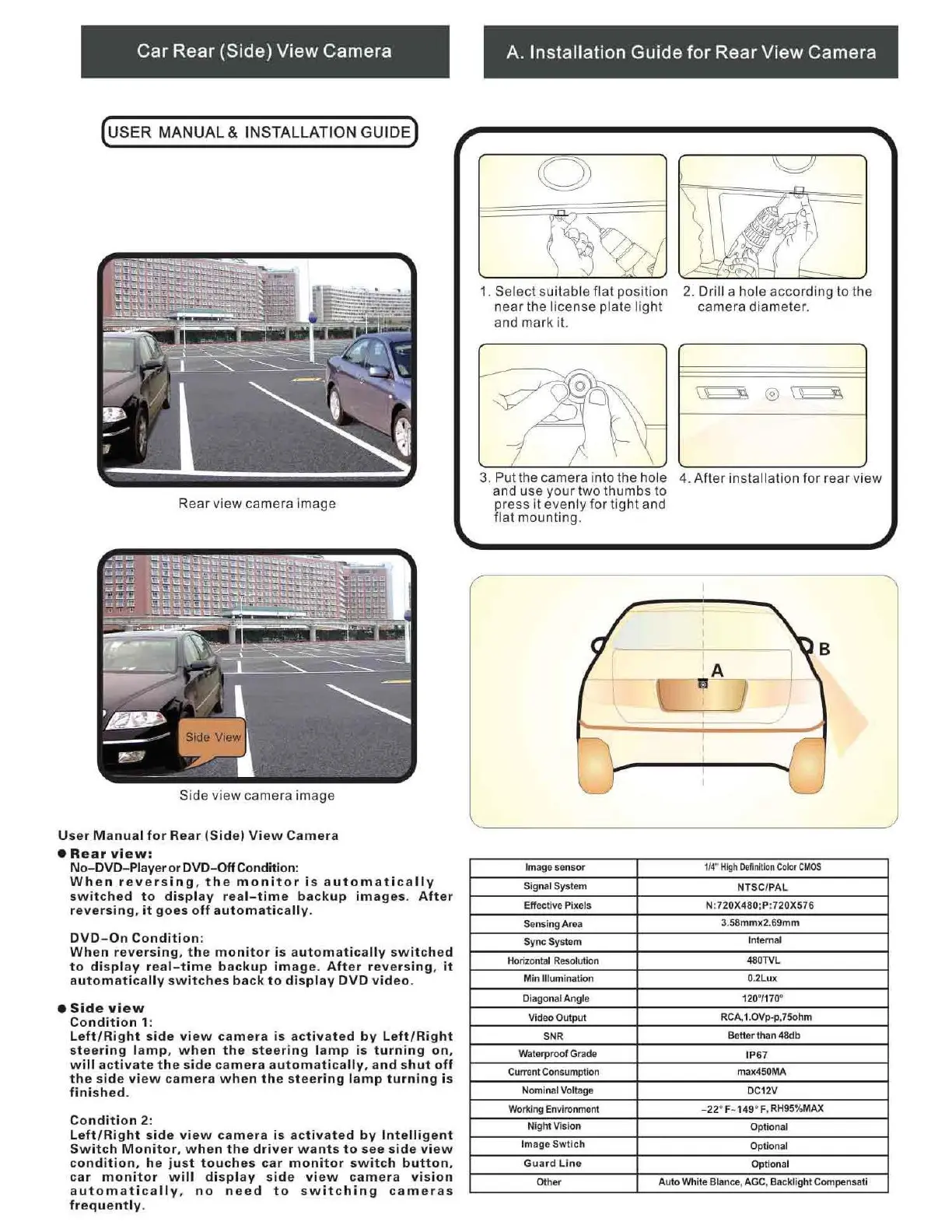
Rear view camera image
Side view camera image
User
Manual
for
Rear
(Side)
View
Camera
•
Rear
view:
No-DVD-Player
or
DVD-Off Condition:
When
re
versing
,
the
monitor
is
automatically
switched
to
display
real-time
backup
images
.
After
reversing
,
it
goes
off
automatically.
DVD-On
Condition:
When
reversing,
the
monitor
is
automatically
switched
to
display
real-time
backup
image
.
After
reversing,
it
automati
c
ally
switches
back
to
display
DVD
video
.
eSide
view
Condition
1:
Left
/
Right
side
view
camera
is
activated
by
Left/Right
steering
lamp
,
when
the
steering
l
amp
is
turning
on,
will
activate
the
side
camera
automatically,
and
shut
off
the
side
view
camera
when
the
steering
la
mp
turning
is
finished.
Condition
2:
Left
/
Right
side
view
camera
is
activated
by
Intelligent
Switch
Monitor
,
when
the
driver
wants
to
see
side
view
condition,
he
just
touches
car
monitor
switch
button
,
car
monitor
will
di
splay
side
view
camera
vision
automatically,
no
need
to
switching
cameras
frequently
.
A. Installation
Guide
for
Rear
View
Camera
1. Select suitable flat position
near the license plate light
and mark it.
2. Drill a hole according to the
camera diameter.
\
~
J.\ @
\
~
J.\
3.
Put the camera into the hole 4.
After
installation for rear view
and use your two thumbs
to
press It evenly for tight and
flat mounting.
I
Image
sensor
114
"
High
Definition
Color
CMOS
Signal System
NTSC/PAL
Effective Pixels N:
720X480
;P:
720X576
Sensing Area
3.58mmx2.69mm
Sync
System
Internal
Horizontal Resolution
480TVL
Min
Illumination 0.2Lux
Diagonal
Angle
120°/170"
Video
Output
RCA,1.OVp-p,
75ohm
SNR
Better
than
48db
Waterproof Grade
IP67
Current Consumption max450MA
Nomin
al Voltage
OC12V
Working Environment
-22
' F-
149
' f , RH95%MAX
Night
Visio
n
Optional
Image
Swtlch
O
pti
ona
l
Guard
Line
Optional
Other
Auto
White Blance, AGC,
Backlight
Compensati



 To Next Page
 Loading...