EasyManua.ls Logo

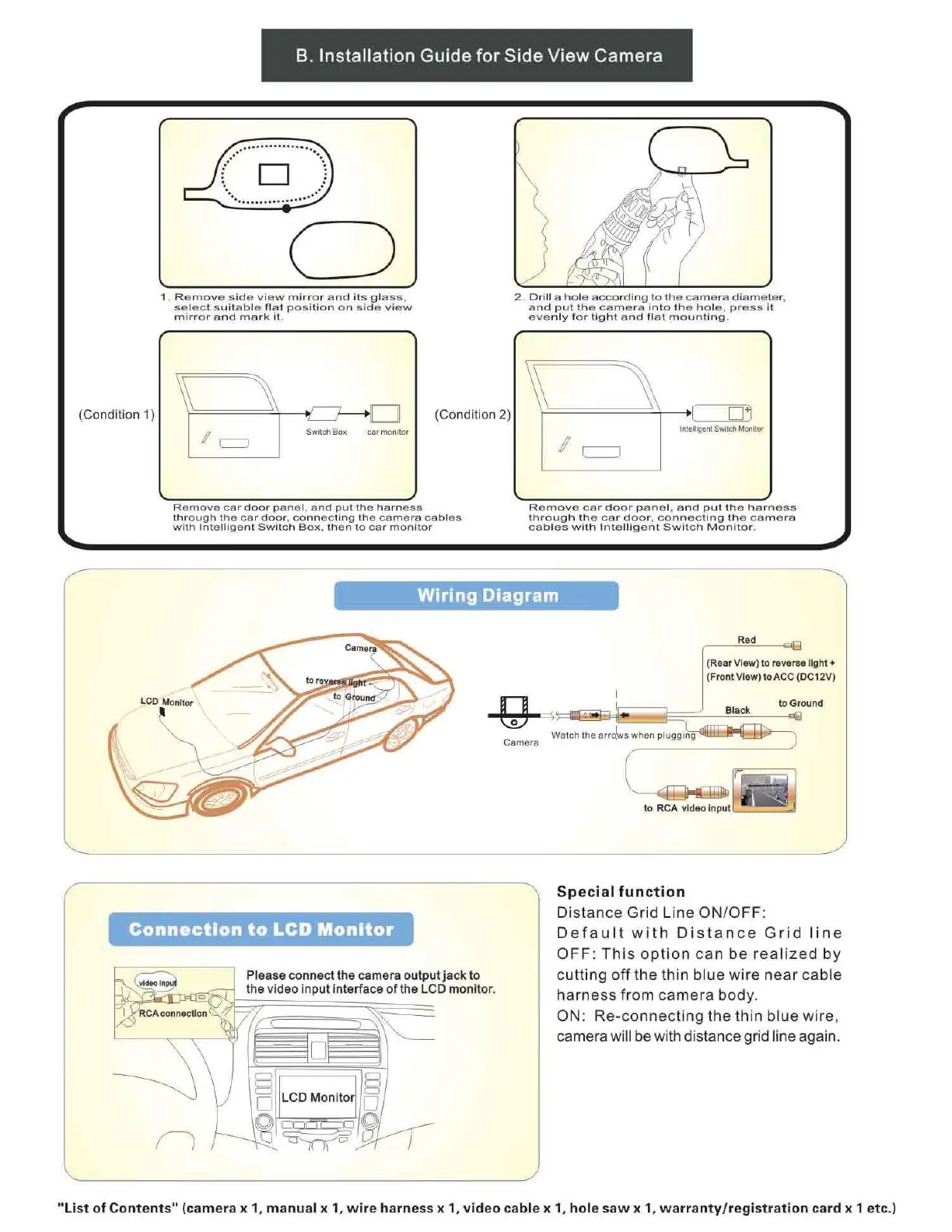
Boyo Vision VTB123HD - Installation Guide for Side View Camera; Wiring Diagram; Connecting to LCD Monitor; Special Functions

Default Icon
4 pages
Print Icon
To Next Page IconTo Next Page
To Previous Page IconTo Previous Page
Loading...
(Condition 1)
B.
Installation
Guide
for
Side
View
Camera
C)
1.
Remove
side
view
mirror
and
its
glass
,
select
suitable
flat
position
on
side
view
mirror
and
mark
iL
I
c::::::::J
Switch Box car mon
it
or
(Condition
2)
Remove
car
door
panel
,
and
put
the
harness
through
the
car
door
,
connecting
the
camera
cables
with
Intelligent
Switch
Box.
then
to
car
monitor
2.
Drill
a
hole
according
lo
the
camera
diameter
,
and
put
the
camera
Into
the
hole.
press
It
even
ly
for
tight
and
flat
mounting.
Intelligent
Sw
llCh
Monitor
Ren,ove
car
door
panel
,
and
put
the
harness
through
the
car
door,
connecting
the
camera
cables
with
Intelligent
Switch
Monitor
.
Wiring Diagram
Red
(Rear View)
to
reverse
light+
(Front View)
to
ACC (DC12V)
to
RCA video lnpu
J'
- J
Special
function
D
is
tan
ce
Grid
Line
ON/OFF:
Connection
to
LCD
'
Monitor
D
efa
ul
t
wit
h
Di
stance
Gr
id
lin
e
OFF:
This
option
can
be
realized
by
cutt
ing
off
the
thin
blue
wire
near
cab
le
harn
ess
from
came
ra body.
D
LCD Manito
ON:
Re-connecting
the
thin
bl
ue
wire,
camera will be with distance g
ri
d line again.
"List
of
Contents"
(camera
x 1,
manual
x 1, w i
re
harness
x 1,
video
cable
x 1,
hole
saw
x
1,
warranty/registration
card
x 1
etc.)