
 Need help?
Do you have a question about the boytone BT-6 and is the answer not in the manual?
Further safety guidelines and precautions for operating the product.
Details on AC/DC adapter voltage and frequency requirements.
Key technical specifications like model, input, and power consumption.
Identification and listing of all external controls and ports on the player.
Instructions for operating the player using batteries.
Instructions for connecting the player to mains power via adapter.
Steps to tune into and listen to FM radio stations.
Procedure for saving preferred FM radio stations.
How to connect and use headphones with the player.
Guidelines for proper handling, cleaning, and storage of discs.
Steps to insert a disc and initiate playback.
How to navigate between tracks and find specific points in playback.
Instructions for repeating single tracks or all tracks.
How to play the first ten seconds of each track sequentially.
How to play tracks in a random, non-sequential order.
How to create and play a custom sequence of tracks.
Information on playing discs containing MP3 files.
How to set the player to repeat all tracks within a selected album.
Instructions for using USB drives and SD/MMC cards.
Overview of different playback modes like skip, repeat, intro, and random.
How to connect and use external audio sources via the AUX input.
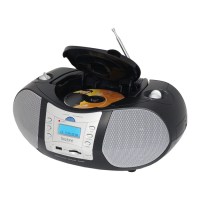
This document describes the BOYTONE® Portable CD/MP3 Player with FM Radio and USB & SD/MMC card reader, models BT6B and BT6R.
The device is a portable audio player capable of playing CDs and MP3 files. It includes an FM radio tuner and features a USB port and an SD/MMC card slot for playing media from external memory devices. It can be powered by batteries or an AC/DC adapter. The unit also has a headphone jack for private listening and an AUX-in jack to connect external audio sources, allowing it to function as a power amplifier for other devices.
 General
| Brand | boytone |
|---|---|
| Model | BT-6 |
| Category | MP3 Player |
| Language | English |

 To Next Page