FAMILIARIZE WITH THE DISPL
YED CONTENTS IN THE LCD
1 2
35 6
7 8 9 10
11
12
13
14 4
15 16
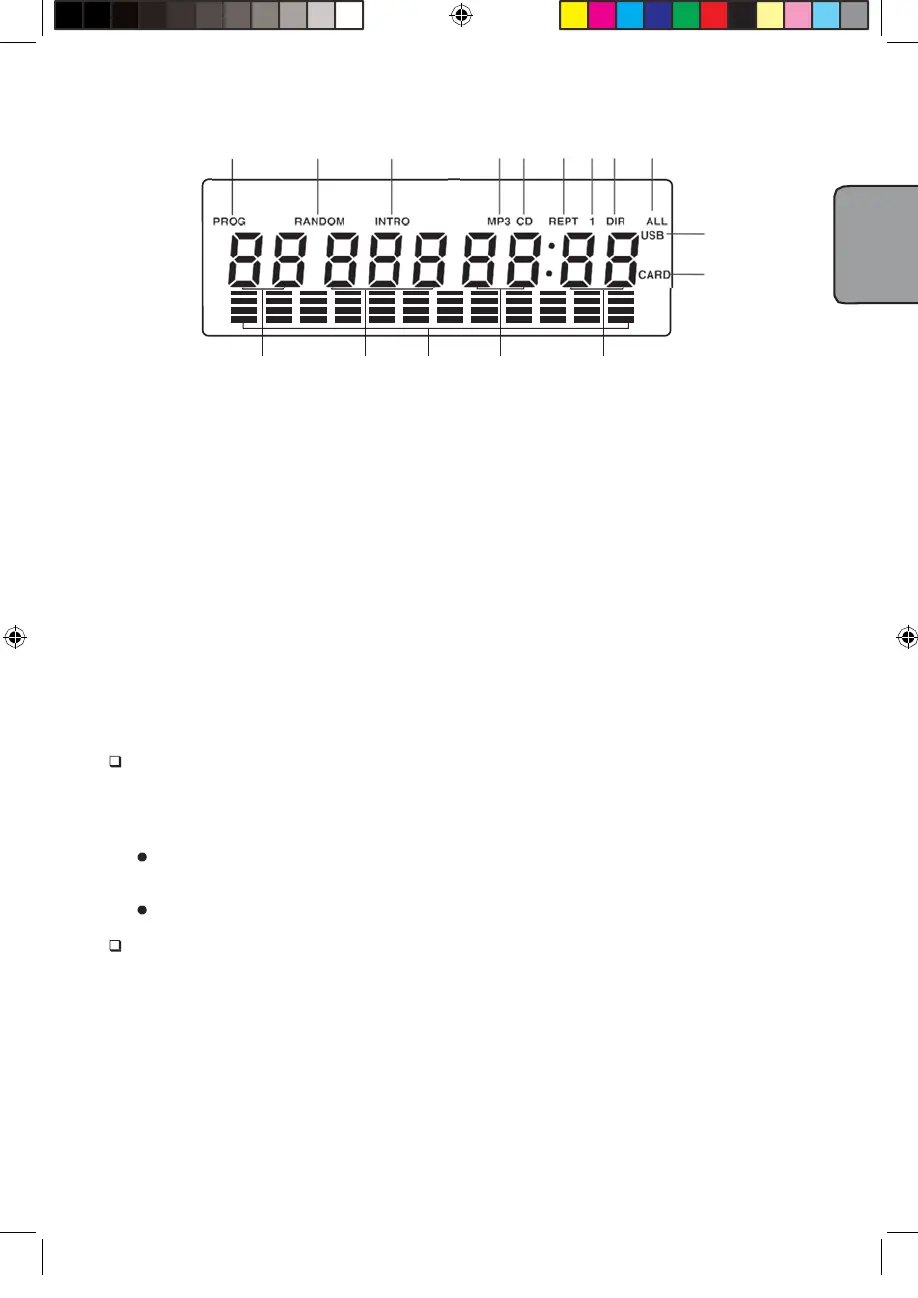
1.
"PROG" shows during Programming and in programmed play.
2.
"RANDOM" shows when in RANDOM playback.
3.
"INTRO" shows when in INTRO playback.
4.
English Text display. The information of the current track is displayed scrolling forward in MP3
playback.
5.
"MP3" shows when the disc played is an MP3-CD.
6.
"CD" shows when the disc played is a CD-DA.
7.
"REPT" shows when in various repeat modes.
8.
"1" shows together with "REPT" when in single track repeat mode.
9.
"DIR" shows together with "REPT" when in album repeat mode.
10.
"ALL" shows together with "REPT" when in all tracks repeat mode.
11.
This shows when the player reads data from USB data traveller.
12.
This shows when player reads data from SD/MMC card.
13.
This figure is the album number.
14.
This figure is track number of the current album on a MP3 disc or the current track number on
a CD disc.
15.
This figure is the elapsed minutes of the track played.
16.
This figure is the elapsed seconds of the track played.
POWER SUPP
BATTERY OPERATION
1. Remove the battery compartment cover gently.
2. Install 8 x 'C' size batteries (UM-2 or equivalent) while observing the correct polarities.
3. Replace the battery compartment cover.
NOTE:
Leaking batteries may damage the battery cabinet and the player as a whole, so they
should be removed from the cabinet when becoming flat or when the player is not to be
played on batteries for some time.
The AC/DC adapter must be detached from the DC IN jack of the player for battery operation.
DC INPUT OPERATION
Plug the supplied adapter to the DC IN jack on the unit and to the main power.
TO PL
THE RADIO
1. The standby indicator will light up once the unit is connected to the main power.Press the
STANDBY button to turn the unit on (the standby indicator will be off)
2. Press the SOURCE button repeatedly to switch the unit on the TUNER(FM radio) mode.
3. To launch the auto-searching, Rotate and hold the TUN+/- several seconds and for
shortly to tune the radio stations manually
4
English


 To Next Page
 Loading...