EasyManua.ls Logo

bp pulse home - Pulse Home Unit Overview; Socketed Pulse Home Components; Tethered Pulse Home Components

bp pulse home
13 pages
Print Icon
To Next Page IconTo Next Page
To Previous Page IconTo Previous Page
Loading...
Become acquainted with
your new pulse home
What’s in the box …before we begin let’s take a look at what you have got.
For the latest version of the pulse home user manual please refer to
www.bppulse.co.uk/pulse-home-user-manual
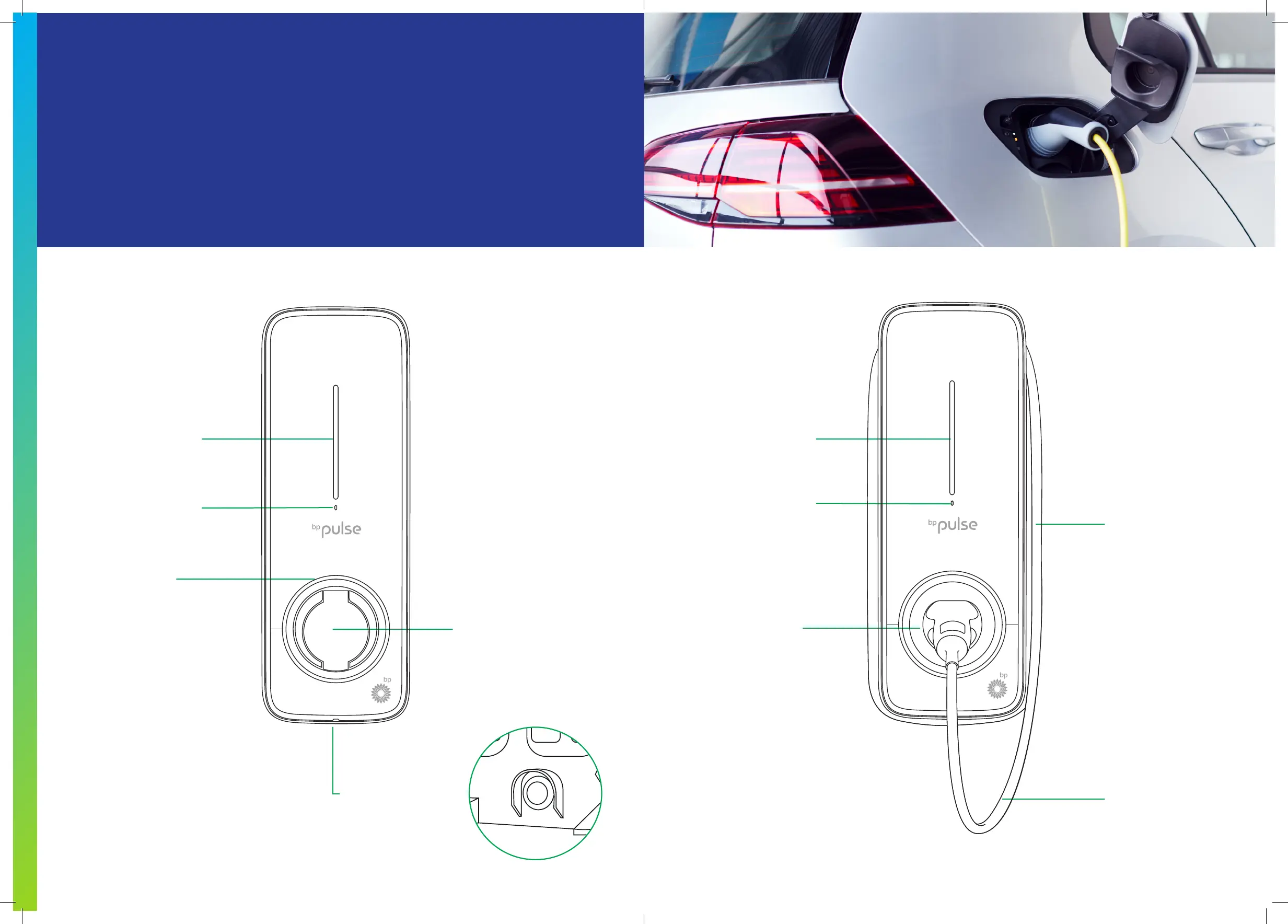
Socketed Tethered
Status indicator
Task light
The Type 2 socket is
located under the ap.
Lift the ap to access
the socket and plug
the connector from
the electric vehicle
into the socket
Function button on
rear surface – to
congure WiFi and
reset pulse home
Status indicator
Ambient light sensor
Docking socket for
charging cable plug
When not in use
keep cable wrapped
around the unit
Charging cable
with connector
pulse home User Guide
9