Display Reference
27
Taking a Temperature Measurement
1. Ensure that the patient is comfortable and relaxed.
2. Use the Mode button to cycle through the
temperature measurement modes until the desired
mode is selected and indicated on the front panel as:
• single-oral ( )
• single-axillary ( )
• continuous-oral ( )
• continuous-axillary ( )
3. Press the Temperature Start button to begin the
temperature measurement. The progress indicators
in the Temperature display will begin to flash.
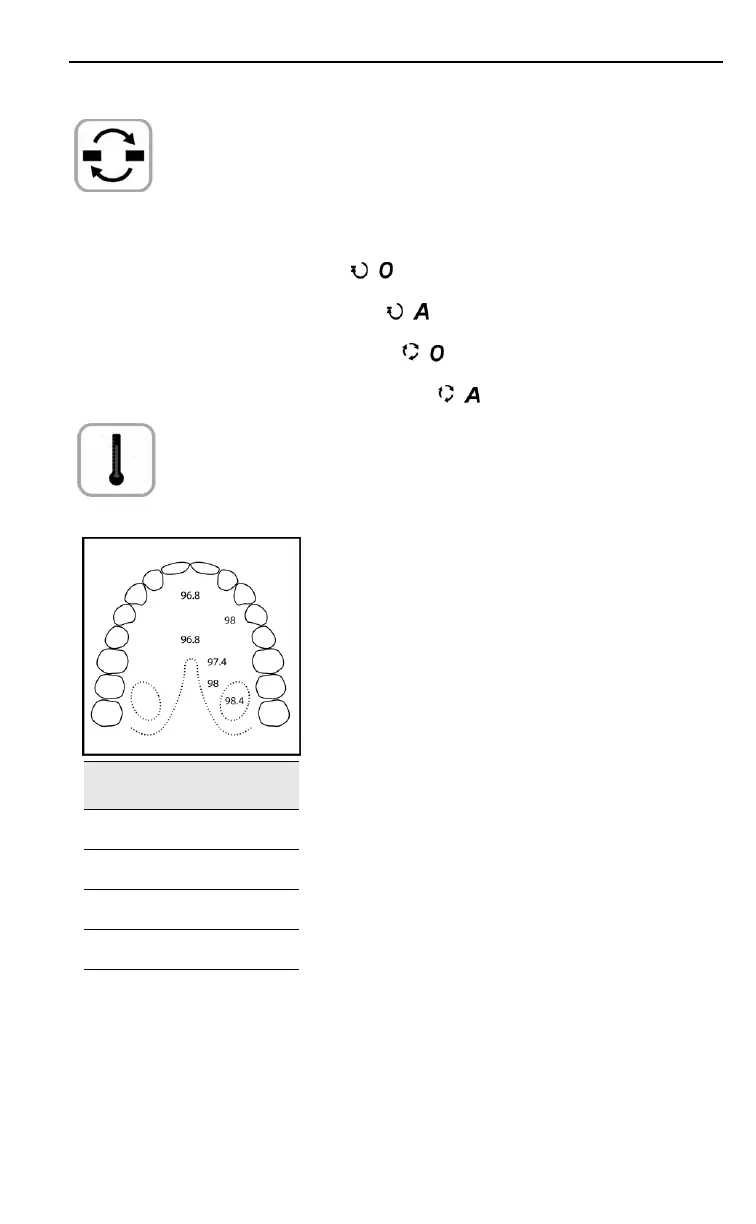
Fahrenheit Celsius
96.8 36.0
97.4 36.3
98.0 36.7
98.4 36.9
4. For oral measurements, insert the
probe tip into the patient’s mouth and
carefully slide the probe under the
tongue into either sublingual pocket.
It is important to press the
Temperature Start button before
inserting the probe, and to ensure that
the probe does not contact any other
surface before it is placed in the
patient’s mouth.
To obtain an accurate measurement:
Ensure that the temperature
probe is correctly positioned
in the sublingual pockets of
the patient’s mouth. The
temperature within the
mouth can vary by 2 °F
(1 °C).
Ensure that the patient’s
mouth is closed to minimize
air currents across the probe.


 To Next Page