Display Reference
45
Temperature Probe Mounts (BPM300)
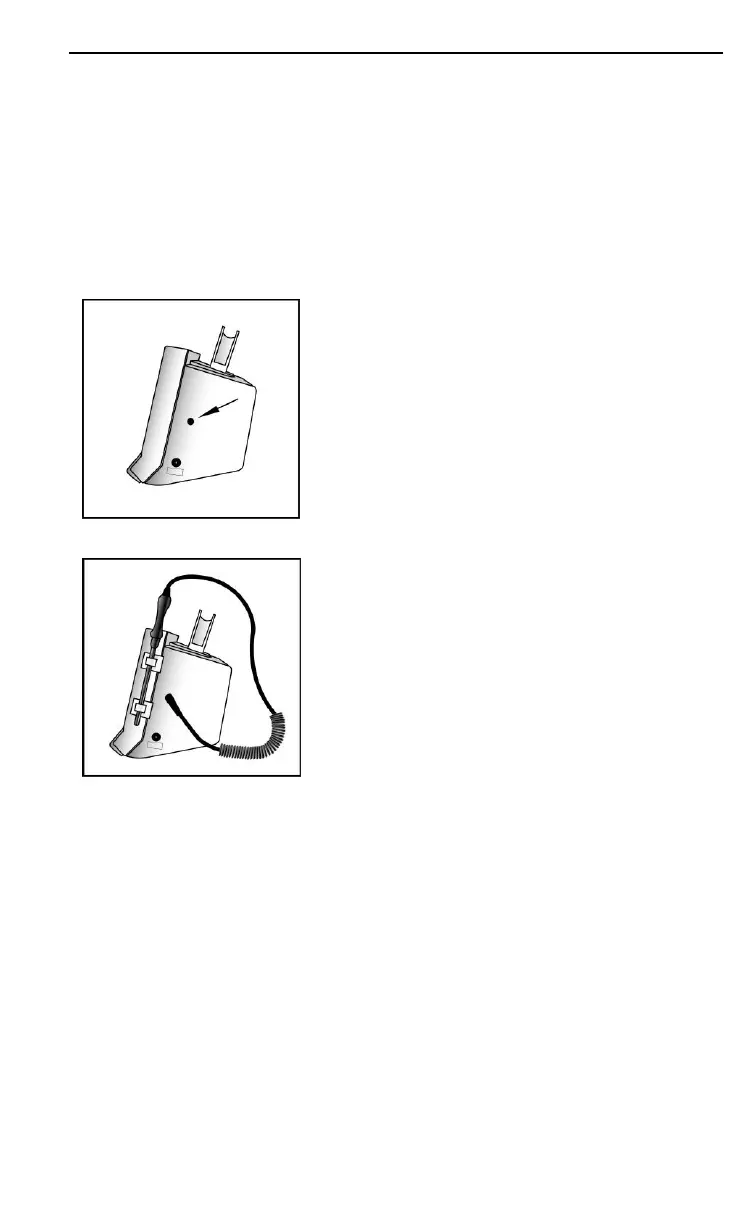
On the BPM300, clips are provided to mount the
temperature probe on the right hand side of the BpTRU
near the temperature control buttons (on the same side
of the monitor as the temperature and power jacks). To
install these clips, follow the instructions below:
There are two temperature probes — a
blue probe for oral and axillary
measurements and a red probe for rectal
measurements. Either probe can be used
for this procedure.
1. Insert the temperature probe plug
into the jack on the side of the
BpTRU.
2. Place two temperature probe clips
onto the shaft of the temperature
probe.
3. Remove the protective tape to expose
the adhesive backing on the
temperature probe clips.
4. Attach the temperature probe and
clips to the side of the BpTRU, using
the adhesive backing.
Powering the BpTRU
The BPM100 must be connected to a standard wall
outlet. The BPM200 and BPM300 can be powered either
from a wall outlet or by the internal battery.
Powering the BPM100
The BPM100 includes a wall-mounted power supply
with a plug style specific to each geographical region.
Connect the BPM100 as follows:


 To Next Page