1
Spectrolink Comfort Control
WED
MAN
ON
HEAT
HOME
WED
SET
WED
SET
WED
HEAT
OFF
SCC OFF
Set time
Set day
QUICK START - MANUAL
OPERATION
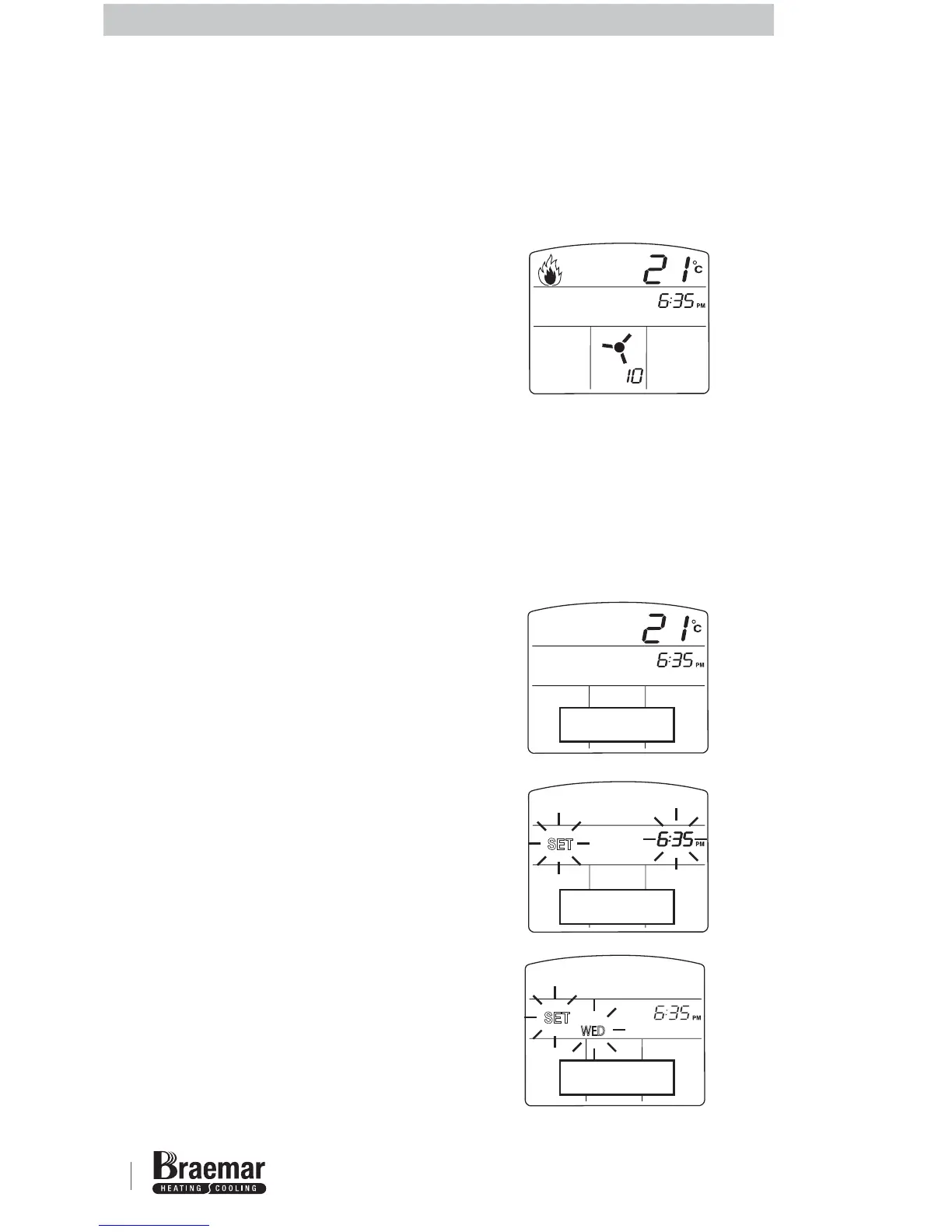
1 Set the time and day on the SCC (see
below).
2 Press the ON/OFF button to turn the
SCC on.
3 Select HEAT mode - press AC
MODE button if required to switch
between HEAT and COOL mode.
4 If AUTO is displayed open the SCC
door and press the SET button (and
hold) and press the MAN/AUTO
button to set to MANUAL mode -
MAN will now be displayed.
5 Increase temperature setting by
pressing the UP arrow button until
the set temperature is as required.
SETTING THE TIME AND DAY
1 Press the ON/OFF button to turn the
SCC OFF.
2 With the SCC turned off, press and
hold the SET button for 3 seconds -
SET and the time display will flash.
3 Press the UP or DOWN arrow button
to adjust to the current time - ensure
that AM/PM is correct. Hold button
for rapid adjustment.
4 Press the SET button when the time
is correct.
5 SET and the day display will flash.
6 Press the UP or DOWN arrow button
to adjust to the current day.
7 Press the SET button when the day
is correct to return to normal
operation.
Normal display with heater running in
MANUAL mode.
HEATING



 To Next Page