Need help?
Do you have a question about the Braun 3756 and is the answer not in the manual?
Essential safety instructions for product operation and user protection.
Details on product voltage and identification of its various parts.
Step-by-step guide for connecting the charger and charging the toothbrush handle.
Guidance on proper brushing methods and motions for effective cleaning.
Explanation of different cleaning modes and how to switch between them.
Information on the built-in timer for optimal brushing duration and coverage.
Details on the pressure sensor feature to protect teeth and gums.
Overview of various Oral-B brush head types and their specific features.
Guidance on monitoring brush head wear and warranty implications.
How to properly clean the toothbrush handle, brush heads, and accessories.
Guidance on environmentally responsible disposal of rechargeable batteries.
Details on the 1-year warranty, coverage, and service procedures.
The Oral-B TriZone electric toothbrush is designed to provide a unique, safe, and effective brushing experience for you and your family. It is engineered to offer thorough cleaning and protect your teeth and gums from hard brushing.
The Oral-B TriZone toothbrush utilizes a triple zone cleaning action to effectively remove plaque, even in between teeth. It is equipped with a pressure sensor that helps protect your teeth and gums. If too much pressure is applied during brushing, a red pressure sensor light (b) illuminates, and the brushing sound changes, reminding you to reduce pressure. This feature ensures that you maintain optimal brushing force without causing harm.
The toothbrush handle (d) is waterproof and electrically safe, making it suitable for use in the bathroom. It features an on/off button (c) that also serves as a mode selector, allowing you to switch between different brushing modes depending on your model. A charge indicator light (e) shows the charging status, while a low charge indicator light (f) alerts you when the battery is running low.
A professional timer is integrated into the toothbrush to guide your brushing. It provides a short stuttering sound every 30 seconds, signaling you to move to a different quadrant of your mouth. After the dentist-recommended 2 minutes of brushing, a long stuttering sound indicates that the session is complete. The timer memorizes the elapsed brushing time even if the handle is briefly switched off, but it resets if paused for longer than 30 seconds.
To begin using the toothbrush, first attach a TriZone brush head (a) to the handle. Before switching the appliance on, wet the brush head and apply toothpaste. You can use any type of toothpaste. To prevent splashing, guide the brush head to your teeth before pressing the on/off button (c) to start brushing.
The toothbrush is designed to work with all common brushing techniques, allowing you to brush as you would with a manual toothbrush. For optimal cleaning, place the toothbrush bristles against your teeth at a slight angle towards the gumline. Apply light pressure and move the brush in back and forth motions. Brush the outsides of your teeth first, then the insides, and finally the chewing surfaces, ensuring all four quadrants of your mouth are brushed equally for 2 minutes.
For models with multiple brushing modes, the toothbrush automatically starts in the «Daily Clean» mode when you press the on/off button. To switch to «Sensitive» or «Whitening» modes, press the on/off button successively. To turn off the toothbrush from «Whitening» mode, press the on/off button once more. If you are in «Daily Clean» or «Sensitive» mode and wish to turn off the toothbrush, press and hold the on/off button until the motor stops.
It is normal for your gums to bleed slightly during the first few days of using an electric toothbrush. This usually stops after a few days. If bleeding persists for more than two weeks, it is advisable to consult your dentist or dental hygienist. If you are undergoing treatment for any oral care condition, consult your dental professional prior to use.
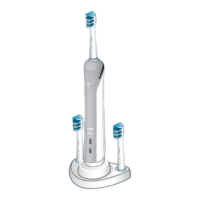
The Oral-B TriZone toothbrush is compatible with a variety of Oral-B brush heads, each designed for specific cleaning needs. These include:
Oral-B brush heads feature light blue INDICATOR® bristles that fade halfway down over approximately three months of thorough brushing (twice a day for two minutes), signaling that it's time for a replacement. If the bristles splay before the color recedes, it indicates that too much pressure is being applied during brushing.
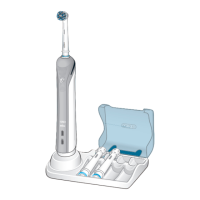
To charge the toothbrush, plug the basic charger (g) or the assembled charging unit (see picture B/C in the manual) into an electrical outlet and place the toothbrush handle (d) on the charging unit. The green charge indicator light (e) will flash while charging. Once fully charged, the green light will shine continuously for 5 seconds before turning off. A full charge provides enough power for up to 7 days of regular brushing (twice a day for 2 minutes).
If the rechargeable battery is low, the red low charge indicator light (f) will flash after you turn off the toothbrush. For daily use, the toothbrush handle can be stored on the plugged-in charging unit to maintain full power, as overcharging is not possible. However, for environmental reasons, it is recommended to unplug the charging unit until the next recharge is required. To maintain the maximum capacity of the rechargeable battery, fully discharge the handle with regular use at least every 6 months and then unplug the charging unit. If the charge indicator light does not flash immediately, continue charging; it should appear within 10–15 minutes.
After brushing, rinse your brush head or accessory carefully under running water with the handle switched on. Then, switch off the handle, remove the brush head or accessory, and clean both parts separately under running water. Wipe them dry before reassembling the toothbrush.
Before cleaning the charging unit, disassemble it. Never place the charger in a dishwasher or water; it should be cleaned with a damp cloth only. The brush head holder (h), brush head compartment (i), and protective cover are dishwasher-safe (picture 6 in the manual).
It is recommended to replace your brush head every 3 months or sooner if the brush head becomes loose due to damage or if the indicator bristles have faded. This product contains rechargeable batteries and should not be disposed of with household waste at the end of its useful life. Instead, it should be taken to an Oral-B Braun Service Centre or appropriate collection points for recycling.
The use of non-Oral-B replacement brush heads is not recommended, as Oral-B cannot control their quality, ensure cleaning performance, guarantee a good fit, or predict their long-term effect on handle wear. Oral-B replacement brush heads carry the Oral-B logo and meet high quality standards.
 General
| Brand | Braun |
|---|---|
| Model Number | 3756 |
| Type | Electric Toothbrush |
| Charging Time | 12 hours |
| Waterproof | Yes |
| Timer | 2 minutes |
| Brush Head | CrossAction |
| Warranty | 2 years |
| Battery | Rechargeable |

 To Next Page