EasyManua.ls Logo

Braun 9320s - User Manual

Braun 9320s
29 pages
Print Icon
To Next Page IconTo Next Page
Loading...
9320s
Series 9
Type 5792
www.braun.com/jp
91611498/IX-17
91611498_9320s_washable_JP.indd 191611498_9320s_washable_JP.indd 1 02.11.17 15:1702.11.17 15:17
Stapled booklet, 120 x 170 mm, 32 pages (incl. 4 pages cover), 2/2c = PMS485c + black
Business Use - P&G AUTHORIZED 91760830 Rev 001 Effective Date 2017-11-10 Printed 2018-07-25 Page 1 of 32

Questions and Answers

Summary

Introduction to the User Manual

Manual Purpose and Usage

Explains the importance of reading the manual for proper use and storage.

Safety Information and Warnings

Understanding Safety Symbols

Explains the meaning of warning and prohibition symbols used in the manual.

Critical Safety Warnings

Electrical Safety Precautions

Details warnings related to power cords, plugs, and usage in wet areas.

Product Modification and Repair Hazards

Advises against unauthorized modification or repair to prevent hazards.

General Safety Cautions

Usage and Handling Cautions

Covers precautions for children, non-intended use, and handling of blades.

Electrical Connection Cautions

Advises on unplugging the power cord safely and avoiding direct connection.

Braun Series 9 Product Overview

Identifying Shaver Components

Identifies and describes the main parts of the Braun Series 9 shaver.

Shaver Display Icon Guide

Explains the various icons and indicators on the shaver's display.

Technical Specifications and Package Contents

Power Supply and Charging Stand

Shows available power cord types and charging stand.

Shaver Model Specifications

Lists key technical specifications like power method, battery type, and consumption.

Charging the Braun Shaver

Important Charging Warnings

Provides critical warnings regarding charging in wet areas and handling the power plug.

Charging Procedure and Tips

Details the steps for charging the shaver for the first time and general charging information.

Understanding the Shaver Display

Battery Level and Status Indicators

Explains how battery charge is shown on the display, including gauge and digital readouts.

Special Shaver Function Icons

Describes icons for travel lock and replacement reminders.

How to Use Your Braun Shaver

Basic Shaver Operation

Explains how to turn on the shaver and important safety checks before use.

Optimizing Your Dry Shave

Provides guidance on optimal technique for a perfect dry shave.

Shaver Head Adjustment and Trimmer Features

Multi-Head Lock Mechanism

Details how to use the slide switch to adjust and lock the shaver head angle.

Using the Precision Trimmer

Explains how to extend and use the integrated trimmer for shaping.

Shaver Head Replacement Guide

When to Replace Shaver Head

Explains the indicator for replacement and the process to reset the counter.

Shaver Cleaning and Care

Water Washing Instructions

Step-by-step guide for cleaning the shaver under running water, including drying and lubrication.

Brush Cleaning and Consumable Parts

Cleaning with the Provided Brush

Details how to use the brush to clean the shaver head and precautions for handling the foil and cutter.

Recommended Consumables

Lists available consumable parts like foil & cutter cassettes and cleaning spray.

Braun Shaver Troubleshooting FAQ

Shaver Wont Start or Charge

Addresses issues with the shaver not turning on or charging, often related to travel lock.

Addressing Charging and Performance Issues

Covers slow charging, blinking indicators, odor, and reduced shaving performance.

Environmental Information and Disposal

Rechargeable Battery Disposal

Explains how to safely dispose of and recycle the rechargeable battery.

Lithium-ion Battery Removal for Recycling

Step-by-Step Battery Removal

Provides a step-by-step visual guide and text instructions for removing the battery.

Safe Battery Handling Practices

Emphasizes safety during battery removal and handling of the removed battery.

Warranty and Customer Support

Understanding Your Warranty

Outlines the warranty period, what's covered, and how to claim service.

Contacting Braun Customer Service

Provides contact details for customer support and repair centers.

Long-Term Product Health Check

Identifying Signs of Wear and Tear

Lists common symptoms indicating the need for professional inspection or replacement.

English Section: Product Safety and Usage

Important Safety Instructions

Key safety points including power supply, water cleaning, and age suitability for use.

General Usage Warnings

Specific warnings for keeping the power supply dry and general product safety.

Braun Shaver Parts and Basic Operation

Shaver Component Identification List

A numbered list identifying each part of the shaver.

Charging and Battery Information

Covers charging time, battery life, and temperature recommendations.

Shaver Display and Usage Guide

Understanding Battery Indicators

Details how battery level and remaining time are displayed.

Shaver Operation and Travel Lock

Explains how to operate the shaver, tips for a perfect shave, and the travel lock function.

Advanced Shaver Functions and Maintenance

Trimmer, Foil Replacement, and Cleaning

Instructions for using the trimmer and when/how to replace the foil and cutter cassette.

Cleaning Methods and Accessories

Describes cleaning with running water, brush cleaning, and recommended accessories.

Troubleshooting Common Shaver Issues

Shaver Start-up and Charging Problems

Lists problems like shaver not starting or charging issues with their potential causes and remedies.

Performance Degradation and Odor Solutions

Addresses battery performance degradation and unpleasant smells, providing solutions.

Free Repair Service Terms

Conditions for Complimentary Repairs

Specifies the conditions under which free repairs are provided according to the manual.

Situations Requiring Paid Repairs

Lists situations where repairs will be charged, including misuse or damage.

Summary

Introduction to the User Manual

Manual Purpose and Usage

Explains the importance of reading the manual for proper use and storage.

Safety Information and Warnings

Understanding Safety Symbols

Explains the meaning of warning and prohibition symbols used in the manual.

Critical Safety Warnings

Electrical Safety Precautions

Details warnings related to power cords, plugs, and usage in wet areas.

Product Modification and Repair Hazards

Advises against unauthorized modification or repair to prevent hazards.

General Safety Cautions

Usage and Handling Cautions

Covers precautions for children, non-intended use, and handling of blades.

Electrical Connection Cautions

Advises on unplugging the power cord safely and avoiding direct connection.

Braun Series 9 Product Overview

Identifying Shaver Components

Identifies and describes the main parts of the Braun Series 9 shaver.

Shaver Display Icon Guide

Explains the various icons and indicators on the shaver's display.

Technical Specifications and Package Contents

Power Supply and Charging Stand

Shows available power cord types and charging stand.

Shaver Model Specifications

Lists key technical specifications like power method, battery type, and consumption.

Charging the Braun Shaver

Important Charging Warnings

Provides critical warnings regarding charging in wet areas and handling the power plug.

Charging Procedure and Tips

Details the steps for charging the shaver for the first time and general charging information.

Understanding the Shaver Display

Battery Level and Status Indicators

Explains how battery charge is shown on the display, including gauge and digital readouts.

Special Shaver Function Icons

Describes icons for travel lock and replacement reminders.

How to Use Your Braun Shaver

Basic Shaver Operation

Explains how to turn on the shaver and important safety checks before use.

Optimizing Your Dry Shave

Provides guidance on optimal technique for a perfect dry shave.

Shaver Head Adjustment and Trimmer Features

Multi-Head Lock Mechanism

Details how to use the slide switch to adjust and lock the shaver head angle.

Using the Precision Trimmer

Explains how to extend and use the integrated trimmer for shaping.

Shaver Head Replacement Guide

When to Replace Shaver Head

Explains the indicator for replacement and the process to reset the counter.

Shaver Cleaning and Care

Water Washing Instructions

Step-by-step guide for cleaning the shaver under running water, including drying and lubrication.

Brush Cleaning and Consumable Parts

Cleaning with the Provided Brush

Details how to use the brush to clean the shaver head and precautions for handling the foil and cutter.

Recommended Consumables

Lists available consumable parts like foil & cutter cassettes and cleaning spray.

Braun Shaver Troubleshooting FAQ

Shaver Wont Start or Charge

Addresses issues with the shaver not turning on or charging, often related to travel lock.

Addressing Charging and Performance Issues

Covers slow charging, blinking indicators, odor, and reduced shaving performance.

Environmental Information and Disposal

Rechargeable Battery Disposal

Explains how to safely dispose of and recycle the rechargeable battery.

Lithium-ion Battery Removal for Recycling

Step-by-Step Battery Removal

Provides a step-by-step visual guide and text instructions for removing the battery.

Safe Battery Handling Practices

Emphasizes safety during battery removal and handling of the removed battery.

Warranty and Customer Support

Understanding Your Warranty

Outlines the warranty period, what's covered, and how to claim service.

Contacting Braun Customer Service

Provides contact details for customer support and repair centers.

Long-Term Product Health Check

Identifying Signs of Wear and Tear

Lists common symptoms indicating the need for professional inspection or replacement.

English Section: Product Safety and Usage

Important Safety Instructions

Key safety points including power supply, water cleaning, and age suitability for use.

General Usage Warnings

Specific warnings for keeping the power supply dry and general product safety.

Braun Shaver Parts and Basic Operation

Shaver Component Identification List

A numbered list identifying each part of the shaver.

Charging and Battery Information

Covers charging time, battery life, and temperature recommendations.

Shaver Display and Usage Guide

Understanding Battery Indicators

Details how battery level and remaining time are displayed.

Shaver Operation and Travel Lock

Explains how to operate the shaver, tips for a perfect shave, and the travel lock function.

Advanced Shaver Functions and Maintenance

Trimmer, Foil Replacement, and Cleaning

Instructions for using the trimmer and when/how to replace the foil and cutter cassette.

Cleaning Methods and Accessories

Describes cleaning with running water, brush cleaning, and recommended accessories.

Troubleshooting Common Shaver Issues

Shaver Start-up and Charging Problems

Lists problems like shaver not starting or charging issues with their potential causes and remedies.

Performance Degradation and Odor Solutions

Addresses battery performance degradation and unpleasant smells, providing solutions.

Free Repair Service Terms

Conditions for Complimentary Repairs

Specifies the conditions under which free repairs are provided according to the manual.

Situations Requiring Paid Repairs

Lists situations where repairs will be charged, including misuse or damage.

Overview

The Braun Series 9 shaver, model 9320s (Type 5792), is a high-quality electric shaver designed for a close and comfortable shave. This manual provides comprehensive instructions for its safe and effective use, maintenance, and troubleshooting.

Function Description

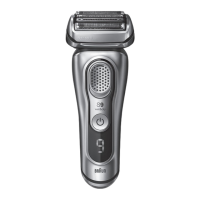
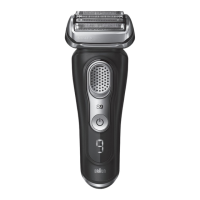
The Braun Series 9 shaver is primarily designed for dry shaving, offering a cordless operation for up to 60 minutes on a full charge. It features a sophisticated shaving system with a Foil & Cutter cassette (1) that adapts to facial contours for efficient hair removal. The shaver is equipped with a Multi Head Lock switch (3) which allows the shaver head to be locked in five different positions, making it easier to shave hard-to-reach areas like under the nose. For precise grooming, a precision trimmer (6) is integrated, ideal for shaping sideburns, moustaches, or beards.

The shaver's operation is managed via an On/off button (4) and a Shaver display (5) that provides essential information. The display includes a battery status indicator (5c) with segments and, on some models, a digital number (5d) showing remaining shaving time in minutes. A plug reminder (5f) flashes when the battery is low, indicating approximately 5 minutes of shaving time left. The shaver can also be used while connected to the power supply (10). For travel, a travel lock feature (5a) prevents unintended activation, indicated by a lock icon on the display. A replacement indicator for the Foil & Cutter cassette (5b) reminds users when it's time to replace the shaving head for optimal performance. Some models also feature a cleaning indicator (5e) that lights up after each shave, prompting cleaning with a Clean & Charge Station (if applicable).

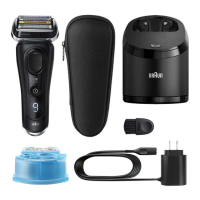
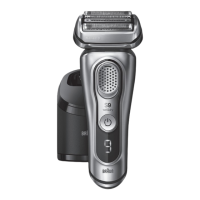
The shaver is powered by a lithium-ion battery and can be charged by connecting the power supply (10) directly to the shaver's power socket (9) or by placing it in the charging stand (10a). The power supply is an integrated transformer (Safety Extra Low Voltage) and should not be tampered with. The appliance is suitable for cleaning under running tap water, but it must be detached from the power supply before water cleaning.

Usage Features

To operate the shaver, simply press the On/off button (4). For optimal dry shaving, it is recommended to use the shaver on dry skin before washing. Users should position the shaver at a right angle (90°) to their skin, gently stretch the skin with one hand, and shave against the direction of beard growth.

The Multi Head Lock switch (3) is a key feature for precision. By sliding it down, the shaver head can be locked in one of five positions. To change the angle, users can manually move the shaver head with their thumb and forefinger.

The precision trimmer (6) is activated by pressing the release button (8) and sliding the trimmer upwards. This allows for detailed styling and trimming.

The travel lock feature is engaged by pressing and holding the On/off button (4) for 5 seconds. A beep sound confirms activation, and the travel lock icon (5a) appears on the display. To unlock, the process is repeated.

The Foil & Cutter cassette (1) should be replaced when the replacement indicator (5b) lights up to maintain 100% shaving performance. To remove the cassette, press the cassette release buttons (2). After replacement, the counter can be reset by pressing the On/off button (4) for 10 seconds. On some models, the indicator resets automatically after 7 shaves.

Maintenance Features

Regular cleaning is crucial for maintaining the shaver's performance and hygiene. The shaver is designed for easy cleaning under running tap water. To clean, switch on the shaver (cordless) and rinse the shaver head under hot running water until all residues are removed. Liquid soap without abrasive substances can be used. After rinsing, let the shaver run for a few more seconds to shake off excess water. Then, switch off the shaver, press the cassette release buttons (2) to remove the Foil & Cutter cassette (1), and allow it to dry. If cleaning with water regularly, applying a drop of light machine oil on top of the Foil & Cutter cassette once a week is recommended to ensure smooth operation.

For cleaning with a brush, first switch off the shaver. Remove the Foil & Cutter cassette (1) and tap it out on a flat surface to dislodge hair clippings. Use the provided brush to clean the inner area of the pivoting head. It is important not to clean the Foil & Cutter cassette with the brush, as this can damage it.

The manual also provides troubleshooting tips for common issues such as the shaver not starting, charging problems, unpleasant smells, or reduced battery/shaving performance. These often involve checking the travel lock, ambient temperature, power supply connection, or replacing/lubricating the Foil & Cutter cassette.

For disposal, the product contains a rechargeable lithium-ion battery. Users are instructed not to dispose of it with household waste but to take it to designated electric waste collection points. Before disposal, the battery should be fully discharged and removed according to the detailed instructions provided in the manual, which includes using specific tools and taking precautions against liquid leakage. The removed battery should be insulated with tape and taken to a small secondary battery recycling facility.

Braun 9320s Specifications

General IconGeneral
TypeElectric Shaver
Model9320s
SeriesSeries 9
Shaver TypeFoil Shaver
Battery Life60 minutes
Charging Time1 hour
Quick Charge5 minutes for 1 shave
Wet & Dry UseYes
Travel LockYes
Battery TypeLithium-ion
Number of Shaving Elements5
Sonic TechnologyYes
10D Contour AdaptationYes
Precision TrimmerYes
ColorSilver
WaterproofYes
Operating Time60 minutes
DisplayLED
BladesTitanium coated
Cordless Runtime60 minutes

Related product manuals