13
REMOTE CONTROL
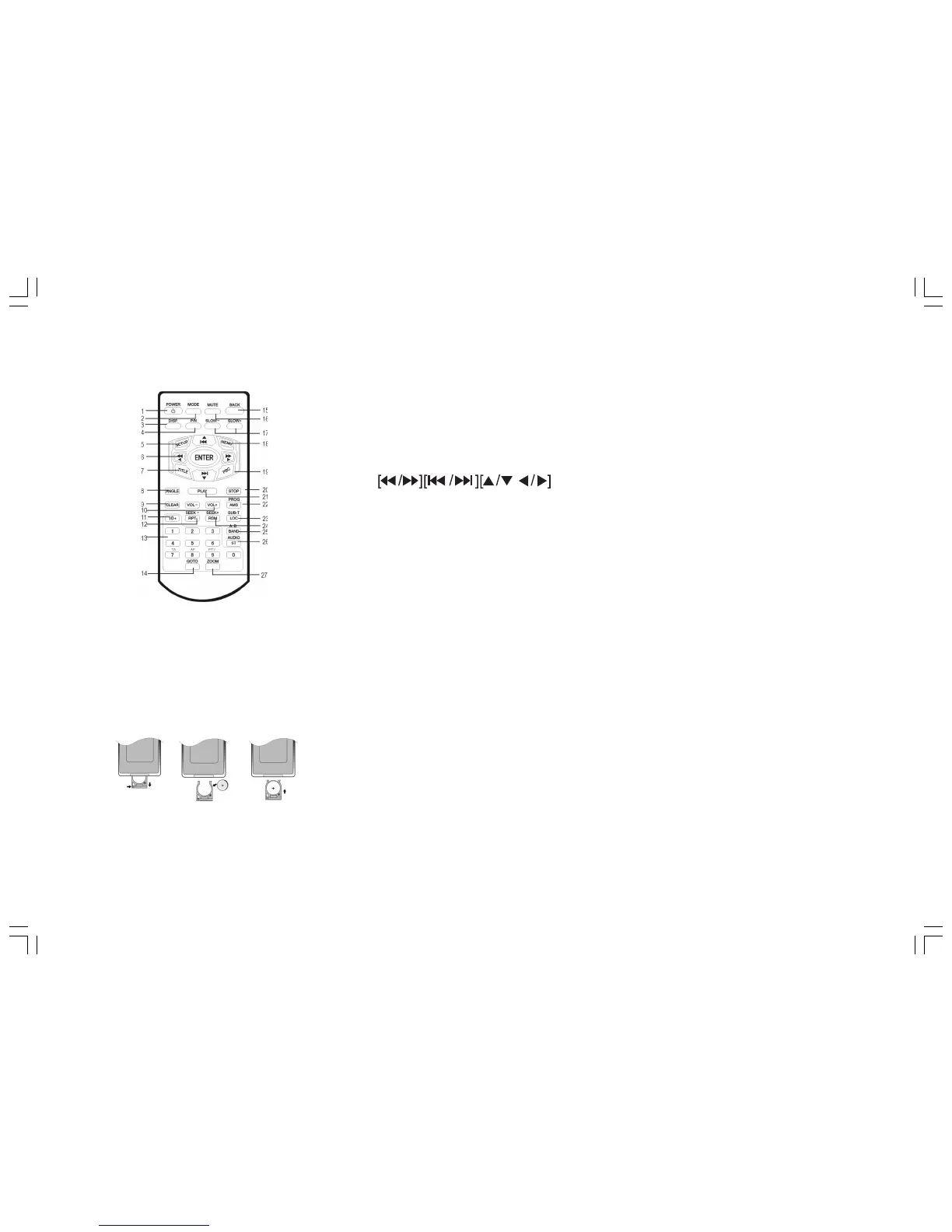
Installing the battery
Slide the tray out on the back of the remote
control and insert the battery with polarity
(+) on top as shown.
1. POWER
2. MODE
3. DISP
4. P/N (PAL/NTSC)
5. SETUP
6.
/ENTER
7. TITLE
8. ANGLE
9. CLEAR
10. VOL-/VOL+
11. 10+ BUTTONS
12. RPT/SEEK
13. (0-9) NUMBER BUTTON
14. GOTO
15. BACK
16. MUTE
17. SLOW-/SLOW+
18. MENU
19. PBC
20. STOP
21. PLAY
22. AMS/PROG
23. LOC/SUB-T(local stations/subtitles)
24. RDM/SEEK+
25. BAND/A-B (band/repeat A-B)
26. ST/AUDIO (stereo/audio language)
27. ZOOM
Use and care of the remote control
Point the remote control to the IR window on the front panel for operation.
Notes:
Using the battery incorrectly can cause malfunctions. Take note of the following
points for the remote control:
• Keep the battery out of the reach of children. Should the battery be swallowed,
immediately consult a doctor.
• Use one CR2025 (3V) Lithium battery.
• Remove the battery if the remote control is not to be used for a month or longer.


 To Next Page