-3-
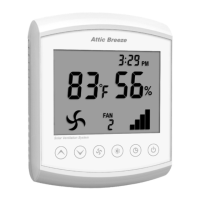
Temperature Display
May be configured for display in either °F or °C. Reports attic
air temperature over a range of 16°F - 176°F (-9°C - 80°C).
1
Fan Icon
Displays when fan is operating.
2
Increase Button
Used for adjustments to controller settings. Holding down the
increase button for 10 seconds will access the controller
Configuration Menu.
3
Decrease Button
Used for adjustments to controller settings. Holding down the
decrease button for 10 seconds will access the controller
Depressurization Test Menu.
4
Fan Button
Used to switch between network channels when more than
one FC-10A Fan Controller is installed on the network.
5
Temperature/Humidity Control Button
Used to access Temperature/Humidity Control Menu. Also
used to acknowledge changes to controller settings.
6
Clock Button
Used for adjustments to clock settings. Holding down the
clock button for 10 seconds will access Clock Menu.
7
On/Off Button
Used to manually control operation of fan (on/off).
8
Battery Access Panel
Push in panel to access battery compartment. Requires two
(2) AAA batteries.
9
Fan Controller Channel Display
Displays selected network communication channel.
10
Power Indicator Bars
Displays amount of power available to operate fan.
11


 To Next Page