Need help?
Do you have a question about the Bresser OMNI-5GC and is the answer not in the manual?
Please read the safety instructions in this manual carefully to avoid damage to the unit and the risk of injury.
Keep packaging materials away from children and dispose of them as legally required. Recycle when possible.
Guidelines for using batteries, including polarity, mixing, and safety precautions against leaks or damage.
Device compliance with FCC Rules and notes on potential radio frequency interference.
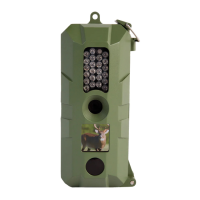
Overview of the Bresser OMNI-5GC game camera's versatility for surveillance and capturing wildlife.
Visual summary of main features: 5.0 MP photos, Time & Date, 4GB Micro Card, 22 IR Lights, 33FT flash range.
Labels for external parts like IR lights, lens, preview screen, motion sensor, side door, and hangers.
Identifies buttons, micro card slot, mini USB port, ON/OFF switch, and battery tray.
Details the 8 AA battery tray layout, including positive and negative terminals.
Steps to unlock the side latch, open the door, and remove the battery tray.
Guide for inserting 8 AA batteries into the battery tray, noting polarity.
Instructions for correctly inserting the tray and closing/locking the side door.
Guide to inserting the micro card and turning the trail camera on.
How to configure DATE/TIME, DEFAULT (factory settings), and FORMAT (TF card).
How to adjust the PIR sensor sensitivity to LOW, MIDDLE, or HIGH.
How to configure STAMP (show/hide) and PHOTO SIZE (5MP, 3MP, 2MP).
How to set the pause period between pictures (seconds or minutes).
Instructions on how to view recorded pictures directly on the camera's preview screen.
Steps to connect the camera to a computer via USB for image transfer and viewing.
Describes methods for mounting the camera using the provided strap or screw/nail.
Lists key technical specifications of the OMNI-5GC camera, including picture size, lens angle, memory, and weight.
The Bresser OMNI-5GC is a versatile game camera designed for surveillance, whether for observing wildlife or monitoring for trespassers. Its robust design and user-friendly features make it suitable for various outdoor applications.
At its core, the OMNI-5GC functions as a motion-activated camera, capable of capturing still images. It utilizes a passive-infrared (PIR) motion sensor to detect movement within its detection range, triggering the camera to take a photo. This allows users to document activity in a specific area without constant manual monitoring. The camera is designed for both day and night operation, ensuring continuous surveillance regardless of lighting conditions. For nighttime use, it incorporates infrared (IR) lights, which provide illumination without alerting subjects, making it ideal for discreet observation.
Setting up the OMNI-5GC is straightforward. Users begin by installing eight AA batteries into the designated battery tray. It's crucial to ensure correct polarity and to wait a few seconds after battery installation for the camera's internal chip to initialize properly before powering it on. Once the batteries are in place, a micro SD card (up to 32GB, Class 6 or above) needs to be inserted into the micro card slot. The camera does not require complex programming for basic operation; simply turning it on will initiate its function.
Upon powering on, the camera's preview screen, located on the programming dongle, will display what is in front of the lens. This allows users to test the camera's view and ensure it is aimed correctly. After a brief countdown, the camera enters its active state, ready to capture images based on detected motion.
The OMNI-5GC offers several customizable settings to tailor its performance to specific needs. These settings are accessible via the MENU button on the preview screen. Users can adjust the date and time, which is essential for accurate record-keeping. The camera also includes a "DEFAULT" option to reset all settings to their factory defaults, providing a convenient way to start fresh if needed.
For managing storage, the camera features a "FORMAT" option, allowing users to format the inserted micro SD card directly through the camera's interface. This helps ensure optimal card performance and clears existing data.
The sensitivity of the PIR motion sensor can be adjusted to "LOW," "MIDDLE," or "HIGH." This feature is particularly useful for preventing false triggers from minor movements like swaying branches or small animals, or conversely, for ensuring even subtle movements are captured.
Users can also choose whether to include a "STAMP" on their captured photos, which typically includes information like the date and time. The "PHOTO SIZE" setting allows for adjustment of the image resolution, with options such as 5MP, 3MP, and 2MP. This can impact image quality and the number of photos that can be stored on the micro SD card.
A "DELAY" setting is available to control the pause period between consecutive pictures when the camera is in active motion mode. This prevents the camera from taking an excessive number of pictures of the same event, which helps conserve battery life and storage space. The delay can be set in seconds or minutes, offering flexibility depending on the expected activity level.
Viewing captured images can be done in two ways. Directly on the camera, users can press one of the preview buttons to switch into "view mode." The preview buttons allow navigation through the recorded pictures. After viewing, the camera automatically resumes normal operation if no buttons are pressed for a few seconds. Alternatively, images can be viewed on a computer. By sliding the ON/OFF switch to the "OFF" position and connecting the camera to a computer via the provided Micro USB cable, a connection icon will appear on the camera screen, allowing users to access the images using their preferred JPEG viewer software.
Mounting the OMNI-5GC is designed for flexibility. It can be secured using the included nylon strap, which wraps around a tree or post, or by using a screw or nail through the dedicated hanger located on top of the camera. This ensures the camera can be positioned securely in various outdoor environments.
Maintenance of the OMNI-5GC primarily involves managing its power source and storage. Regular replacement of exhausted AA batteries is necessary, and it's important to remove batteries before extended storage to prevent leakage. The micro SD card should be formatted periodically to maintain performance and clear old data. The camera's sturdy plastic housing is designed to be easily camouflaged, blending into natural surroundings, and protecting the internal components from the elements.
The OMNI-5GC is a practical and reliable tool for anyone needing to monitor outdoor areas, offering a balance of ease of use, customizable features, and robust construction for long-term deployment.
 General
| Waterproof | Yes |
|---|---|
| Application | Wildlife monitoring, security surveillance |
| Image sensor | CMOS |
| Image resolution | 12 MP |
| Video resolution | 1080p |
| Memory | Supports SD card up to 32GB |
| Power supply | 8x AA batteries |
| Operating Temperature | -20°C to +60°C |

 To Next Page