Need help?
Do you have a question about the Breville Smart Tilt Control and is the answer not in the manual?
General safety guidelines for operating the ceramic heater safely.
Keep flammable materials clear and ensure proper spacing for safe operation.
Avoid use near water, in wet locations, or areas with flammable substances.
Exercise caution and supervision when children, invalids, or animals are near the heater.
Ensure cords are undamaged, properly used, and prevent objects entering air openings.
Avoid touching hot parts, use on stable surfaces, and never leave unattended.
Prevent electrical overload and moisture contact with the appliance.
Not intended for unsupervised use by persons with reduced physical, sensory, or mental capabilities.
Keep button batteries away from children; dispose of safely to prevent injury.
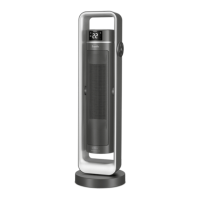
Identifies the main structural frame and carrying handle of the heater.
Locates the main control interface and the digital display screen.
Details the front grille, heater housing, and back fan grille.
Identifies the base, supporting feet, and the power cord.
Points to the hinge allowing manual tilt adjustment for heat direction.
Identifies the included remote control with magnetic backing.
Describes the functions of the Power/Wi-Fi, Mode, Timer, Minus, Plus, and Oscillation buttons.
Explains the icons shown on the LED display for Wi-Fi, Eco Mode, Heat Mode, Timer, and Child Lock.
Explains how ceramic plates and coils generate and distribute heat quickly.
Details the ThermoSecure™ Protection and Safety Tip-Over Cut-Out Switch.
Instructions for removing packaging and promotional labels before initial operation.
Guides on placing the heater, plugging it in, and switching on the main power.
Explains the room temperature display and the memory function for settings.
Details the four modes: Smart Eco, Low Heat, High Heat, and Fan Only.
Instructions on how to manually set the desired temperature between 5-35°C.
Explains the 12-hour auto-off timer and how to set or cancel it.
Describes how to activate and deactivate the child lock feature on the control panel.
Explains how to enable and disable the oscillation feature for wider heat distribution.
Details how to manually tilt the heater housing up to 30 degrees for directional control.
Introduces the remote control and its magnetic attachment feature.
Steps for opening the battery compartment and replacing the CR2032 battery.
Notes on pointing the remote at the control panel and operating range.
Step-by-step guide to connect the ceramic heater to your home Wi-Fi network.
Explains Bluetooth pairing for control within range, without Wi-Fi.
Lists recommended voice commands for controlling the heater with Amazon Alexa.
Lists recommended voice commands for controlling the heater with Google Assistant.
Provides tips for configuring and using voice assistants like Alexa and Google.
Guidance on cleaning the heater's housing, grilles, and interior.
Advice on storing the heater upright in a cool, clean, and dry location when not in use.
Recommendations for optimizing heating performance and reducing heat loss.
Addresses issues with the tip-over switch, main power switch, and plug connection.
Solutions for oscillation problems due to foreign objects or heavy items.
Covers non-heating issues related to room temperature or damaged sensors.
Troubleshooting steps for a non-flashing Wi-Fi indicator, often related to pairing.
Addresses sudden stops, weak fan/heating due to dust or timer completion.
Solutions for remote control issues, typically weak batteries or range.
Troubleshooting for when the heater is not appearing in the app or shows offline.
Solutions for Alexa/Google Assistant not responding to voice commands.
 General
| Tilt Safety Switch | Yes |
|---|---|
| Overheat Protection | Yes |
| Oscillation | Yes |
| Heating Power | 1500W |
| Thermostat Control | Adjustable Thermostat |

 To Next Page