
 Need help?
Do you have a question about the Breville the AirDynamic 3D Connect and is the answer not in the manual?
Essential safety instructions for operating and handling the Breville air circulator to prevent injury or damage.
Explains the function of air circulators and their benefits for room comfort and ventilation.
Guidance on positioning the air circulator for effective cooling and heating in different seasons.
Steps to take before initial operation, including unpacking and checking parts.
Instructions for connecting the pedestal tube to the anti-topple base.
Detailed steps for attaching the grilles, blade, and blade cap to the motor head.
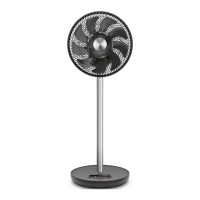
Visual guide and list of all components included with the Breville air circulator.
Explanation of the buttons and display on the air circulator's control panel.
Details on the four operating modes: NORMAL, TURBO, NATURAL, and SMART ECO, including their characteristics.
Instructions on setting and cancelling the 12-hour auto-off timer for automatic shutdown.
How to activate and utilize horizontal and vertical oscillation for 3D air circulation.
How to use the remote control, including battery replacement and operating range.
Guide to connecting the air circulator to Wi-Fi and controlling it via the Breville Home Connect app.
Instructions for safely cleaning the air circulator's exterior, grilles, and fan blades.
Recommendations for storing the air circulator when not in use to maintain its condition.
Australian and New Zealand customer service contact phone numbers and website.
 General
| Model | the AirDynamic 3D Connect |
|---|---|
| Timer | 12 hours |
| Remote Control | Yes |
| Wi-Fi Connectivity | Yes |
| Height Adjustment | No |
| Fan Type | Tower |
| Voice Control | Yes |
| Noise Level | 58 dB |
| Blade Size | No blades (bladeless design) |

 To Next Page
