Wheel Balancer User Manual
This document serves as a comprehensive user manual for a wheel balancer, providing instructions on its operation, maintenance, and safety regulations. The manual emphasizes the importance of reading and understanding all instructions before operating the machine to ensure its proper function and longevity.
Function Description
The wheel balancer is a high-performance machine designed to measure and correct unbalance in car and van tires weighing up to 65kg. It utilizes a central synthesis signal management system, characterized by high intelligence and long life. The machine features a CPU and digital display for precise measurements and user feedback. Its primary function is to identify the unbalance value and position of a wheel, allowing the operator to add corrective weights to achieve balance.
The balancer supports various balancing modes, including:
- Standard Dynamic Balance: Used for balancing both sides of the tire.
- ALU Modes (ALU1, ALU2, ALU3): Specifically designed for balancing aluminum alloy rims, accommodating different weight application methods (e.g., on shoulders, hidden weights).
- Static Balance: Used for balancing one side of the tire.
Key operational features include:
- Automatic Brake: Ensures the wheel stops safely after a spin.
- Sop Button: Allows for immediate stopping of the tire's spin.
- Self-calibration: The machine can be calibrated to maintain accuracy, especially after changes in components or prolonged use.
- Error Hint System: Provides diagnostic messages to help identify and troubleshoot operational issues.
The machine is equipped with a protective hood and an interlock switch, which automatically starts the motor when lowered and stops it when raised, enhancing operator safety.
Usage Features
Operating the wheel balancer requires adherence to specific procedures and safety guidelines.
Installation and Setup:
- The machine must be installed on a solid floor capable of supporting its maximum load.
- The installation site should be protected from moisture and have a minimum luminosity of 300lux.
- Proper electrical connection is crucial, requiring qualified personnel to ensure compliance with current regulations. This includes verifying power supply parameters (voltage, frequency), installing a suitable circuit breaker, and ensuring effective grounding.
- The distance between the machine and surrounding walls must meet specified clearances (e.g., >80cm at the rear, >50cm at the left, >200cm at the right) for proper ventilation and ease of operation.
- The thread shaft must be securely mounted on the main shaft before use, ensuring clean contact surfaces.
Mounting the Tire:
- Select the appropriate cone for the tire's center hole.
- Mount the tire on the wheel balancer, following the indicated figures for positive positioning, which is suitable for common steel and aluminum alloy rims with minor deformation.
- For wheels with outside deformation, a specific positioning method is used to ensure accurate alignment of the steel rim inner hole and main shaft, particularly for thick ALU rims.
- For tires exceeding 15kg, a lift should be used to avoid injury.
Inputting Tire Parameters:
- The machine allows for unit conversion between inch/mm for rim dimensions (Br, D) and gram/ounce for unbalance values.
- Parameters like rim diameter (Dia), rim width (Br), and distance (Dis) are manually input.
Balancing Operation:
- After inputting parameters, press the "START" key or lower the protective cover to begin the spin.
- The machine automatically stops after a few seconds.
- The display shows the inner and outer unbalance values and indicates the weight adding positions using positioning lamps.
- Rotate the wheel manually until the positioning lamps light up, indicating the highest unbalance position for both inner and outer sides.
- Add the corresponding weights at the indicated points and re-test until the tire is balanced.
- For larger tires, manually pulling the wheel to assist rotation can prolong motor life.
Balance Mode Selection:
- The "FUN" key is used to switch between dynamic, static, and ALU modes. The machine defaults to dynamic balance mode upon startup.
- ALU modes are specifically for aluminum alloy rims, allowing for different weight application strategies (e.g., weights on shoulders, hidden weights).
Safety Precautions:
- Operators must read and understand all safety warnings.
- Only professional, authorized, and trained operators should use the machine.
- Loose clothing, neckties, and watches should be avoided near movable parts.
- The machine should not be operated without the tire lock facility or with the safety hood removed.
- Compressed air or water spray should not be used to clean tires mounted on the machine.
- Unauthorized modifications or use for purposes not specified in the manual are prohibited.
- In case of strange noises, smoke, or other abnormal situations, power off, unplug the machine, and contact technicians.
- Do not detach or collide with rotating parts.
- Wait at least 5 seconds before restarting after power off.
- Avoid placing heavy objects on the balancer.
Maintenance Features
Regular maintenance is essential for the machine's performance, accuracy, and longevity.
General Maintenance:
- Keep the working area clean and free of dust.
- Never use compressed air or water spray to clean the machine, as this can introduce dust and residue.
- Clean the balance shaft, nut, cone, and flange using a brush rinsed in a neutral solution.
- Handle cones and flanges carefully to avoid damage, which can affect centering accuracy. Store them in a dust-proof environment and clean with ethanol if necessary.
Lubrication:
- The motor and balancing shaft bearings are the only rotating parts requiring lubrication.
- Bearings should be checked periodically: annually for frequent use (more than two hours per day) or every two years for less frequent use.
- If a noisy bearing or incorrect working is observed, the bearing should be replaced. If replacement is not possible, the grease (XHP103) should be changed under professional guidance.
- After replacing bearings or changing grease, the machine must be recalibrated.
Sensor Maintenance:
- Inaccurate balance or incorrect positioning can be caused by a faulty press sensor.
- The manual provides detailed instructions for replacing piezoelectricity sensors, including detaching components, installing new sensors, ensuring correct polarity, tightening screws to specific torque (40NM), and checking insulation resistance (IR > 50MΩ).
- After sensor replacement, the machine must be self-calibrated.
Calibration:
- The machine should be calibrated once every six months to maintain accuracy.
- The manual outlines a weight calibration program, which involves selecting a suitable tire, inputting parameters, performing an initial spin, adding a known weight (e.g., 100g) at a specific position, and re-spinning. The machine automatically saves and exits the calibration program upon completion. Car and truck modes must be calibrated separately.
Troubleshooting:
- The manual includes a troubleshooting section that lists common problems, their causes, and solutions, such as issues with power, display, start/input buttons, braking, unbalance display stability, and test data accuracy after clamping.
Scrapping:
- At the end of its life, the machine must be disposed of according to local regulations. Electrical, electronic, plastic, and ferrous components should be separated. The crossed-out bin symbol on the data plate indicates proper disposal procedures to prevent environmental harm and promote recycling.

 Need help?
 General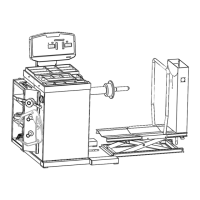

 To Next Page