ENGLISH OPERATION MANUAL
BRITEQ
®
3/78 BTX-BEAM 2R
The housing and the lenses must be replaced if they are visibly damaged.
Please use the original packing when the device is to be transported.
Due to safety reasons it is prohibited to make unauthorized modifications to the unit.
Important: Never look directly into the light source! Don’t use the effect in the presence of persons suffering
from epilepsy.
DESCRIPTION:
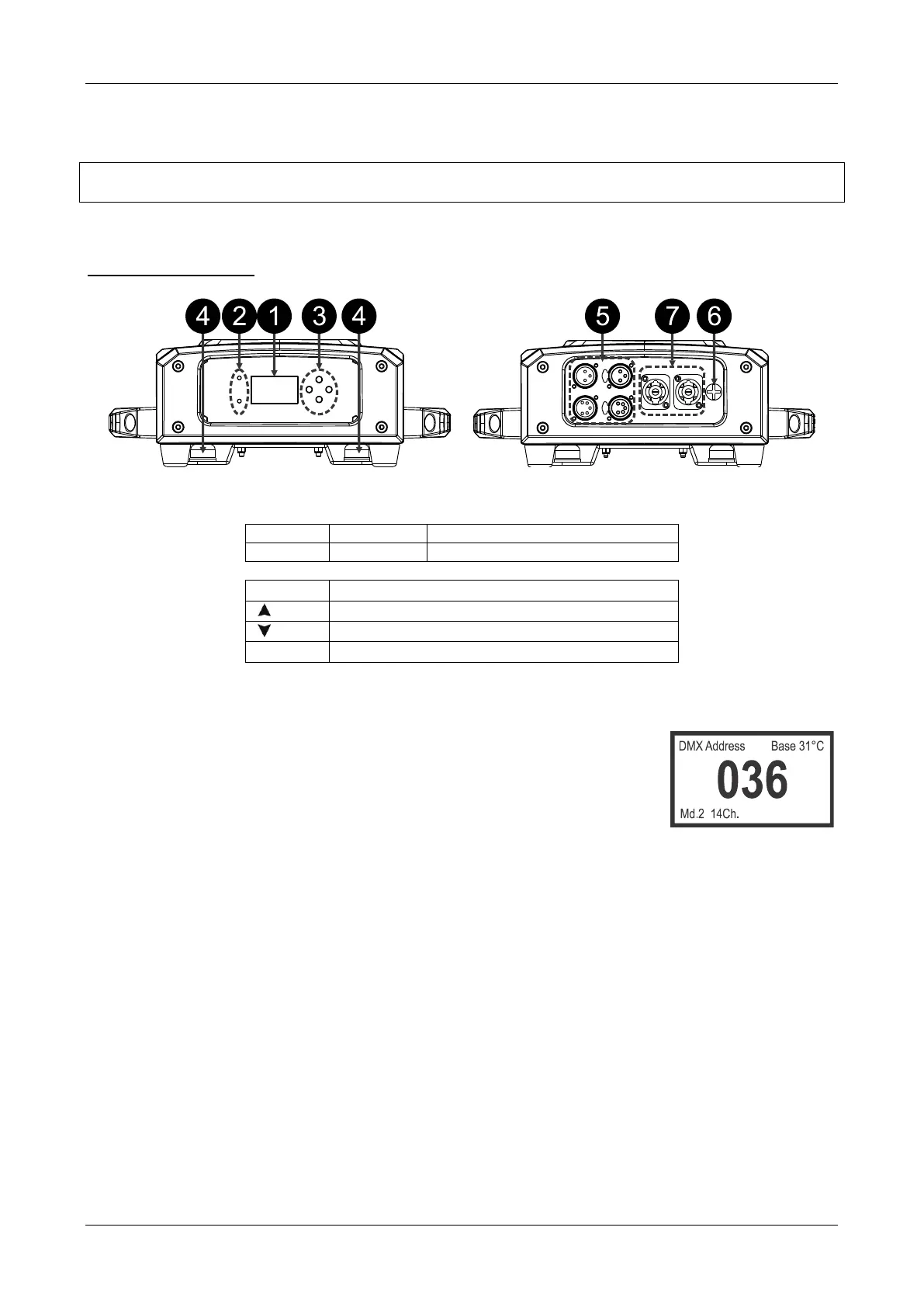
CONTROL PANEL:
1. DISPLAY shows the various menus and the selected functions.
2. LEDS
3. BUTTONS
To select the programming functions
To go backward in the selected functions
To go forward in the selected functions
To confirm the selected functions
Button Shortcuts:
There are 4 different shortcuts to access specific functions without the need for using the setup menu.
While the screen displays the standard window (see right), the user can press the following button
combinations:
Lamp on: Press MENU and UP together during 3s.
Lamp off: Press MENU and DOWN together during 3s.
Reset Unit: Press MENU and ENTER together during 3s.
Reverse display: Press UP and DOWN together.
4. OMEGA CLAMPS: used for rigging, see further.
5. DMX IN/OUTPUTS: used for DMX512 linking, you can use good quality balanced signal cables with 3pin
or 5pin XLR-connectors.
6. MAINS FUSE: this fuse only protects the electronics of the projector, mains input/output (7) is not fused.
7. MAINS INPUT / OUTPUT: with PowerCON
®
sockets, connect the supplied mains cable here, you can
daisy chain several units, up to max 16A. Input and output are connected to each other without any fuse.
Hint: Please check our website for special cable assemblies that contain both power (3x1.5mm² with Neutrik
PowerCON
®
) and balanced signal (XLR 3pin) in one cable. Different lengths are available: 1.3m, 3m, 5m and
10m, very convenient!



 To Next Page