EasyManua.ls Logo

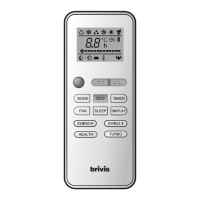
Brivis GYKQ-52e - User Manual

Brivis GYKQ-52e
8 pages
Print Icon
To Next Page IconTo Next Page
Loading...
Thank you very much for purchasing your Brivis Air Conditioner.
Please read this manual carefully before operation and retain for
future reference. To be read in conjunction with the User Manual
accompanying the Air Conditioner.
Due to our policy of continuous improvement, product specifications and
details are subject to change without notice. Please contact BRIVIS on
1300 BRIVIS (1300 274847 ) or visit brivis.com.au for further information.
Question and Answer IconNeed help?

Do you have a question about the Brivis GYKQ-52e and is the answer not in the manual?

Summary

Remote Control Manual

Remote Control Specifications

Details the technical specifications of the remote control unit, including model and rated voltage.

Function Buttons

Explains the purpose and function of each button on the remote control for user interaction.

Indicators On LCD

Describes the meaning of various symbols displayed on the remote control's LCD screen.

Replacement of Batteries

Provides instructions on how to replace batteries in the remote control unit safely and correctly.

Remote Controller Holder Use

Guidance on locating and using the remote controller holder for convenient access.

System Operation

Details how to turn the air conditioner system on and off using the remote control.

Auto Mode Operation

Explains how to use the Auto mode, including temperature selection and system behavior.

Cooling and Heating Operation

Instructions for operating the unit in Cooling and Heating modes, including temperature and fan speed.

Fan Only Operation

Guide to using the Fan Only mode, including fan speed selection and limitations.

Dry Operation (Dehumidifying)

Details the Dry mode for dehumidifying the room, its limitations, and automatic control.

Fan Speed Adjustment

How to manually adjust and select fan speed settings, including Auto mode.

Adjusting Air Flow Direction

Instructions for adjusting vertical and horizontal louvre movement for optimal air circulation.

Timer Operation

How to set Auto-on and Auto-off timer functions for scheduling appliance operation.

ECO Mode

Details the ECO mode for energy saving, explaining its effect on temperature settings.

TURBO Mode

Explains the TURBO mode for rapid cooling or heating and its operational parameters.

Sleep Mode

Instructions for activating Sleep Mode for comfortable temperature adjustment and energy saving.

Summary

Remote Control Manual

Remote Control Specifications

Details the technical specifications of the remote control unit, including model and rated voltage.

Function Buttons

Explains the purpose and function of each button on the remote control for user interaction.

Indicators On LCD

Describes the meaning of various symbols displayed on the remote control's LCD screen.

Replacement of Batteries

Provides instructions on how to replace batteries in the remote control unit safely and correctly.

Remote Controller Holder Use

Guidance on locating and using the remote controller holder for convenient access.

System Operation

Details how to turn the air conditioner system on and off using the remote control.

Auto Mode Operation

Explains how to use the Auto mode, including temperature selection and system behavior.

Cooling and Heating Operation

Instructions for operating the unit in Cooling and Heating modes, including temperature and fan speed.

Fan Only Operation

Guide to using the Fan Only mode, including fan speed selection and limitations.

Dry Operation (Dehumidifying)

Details the Dry mode for dehumidifying the room, its limitations, and automatic control.

Fan Speed Adjustment

How to manually adjust and select fan speed settings, including Auto mode.

Adjusting Air Flow Direction

Instructions for adjusting vertical and horizontal louvre movement for optimal air circulation.

Timer Operation

How to set Auto-on and Auto-off timer functions for scheduling appliance operation.

ECO Mode

Details the ECO mode for energy saving, explaining its effect on temperature settings.

TURBO Mode

Explains the TURBO mode for rapid cooling or heating and its operational parameters.

Sleep Mode

Instructions for activating Sleep Mode for comfortable temperature adjustment and energy saving.

Brivis GYKQ-52e Specifications

General IconGeneral
BrandBrivis
ModelGYKQ-52e
CategoryRemote Control
LanguageEnglish

Related product manuals