6
OPERATING INSTRUCTION
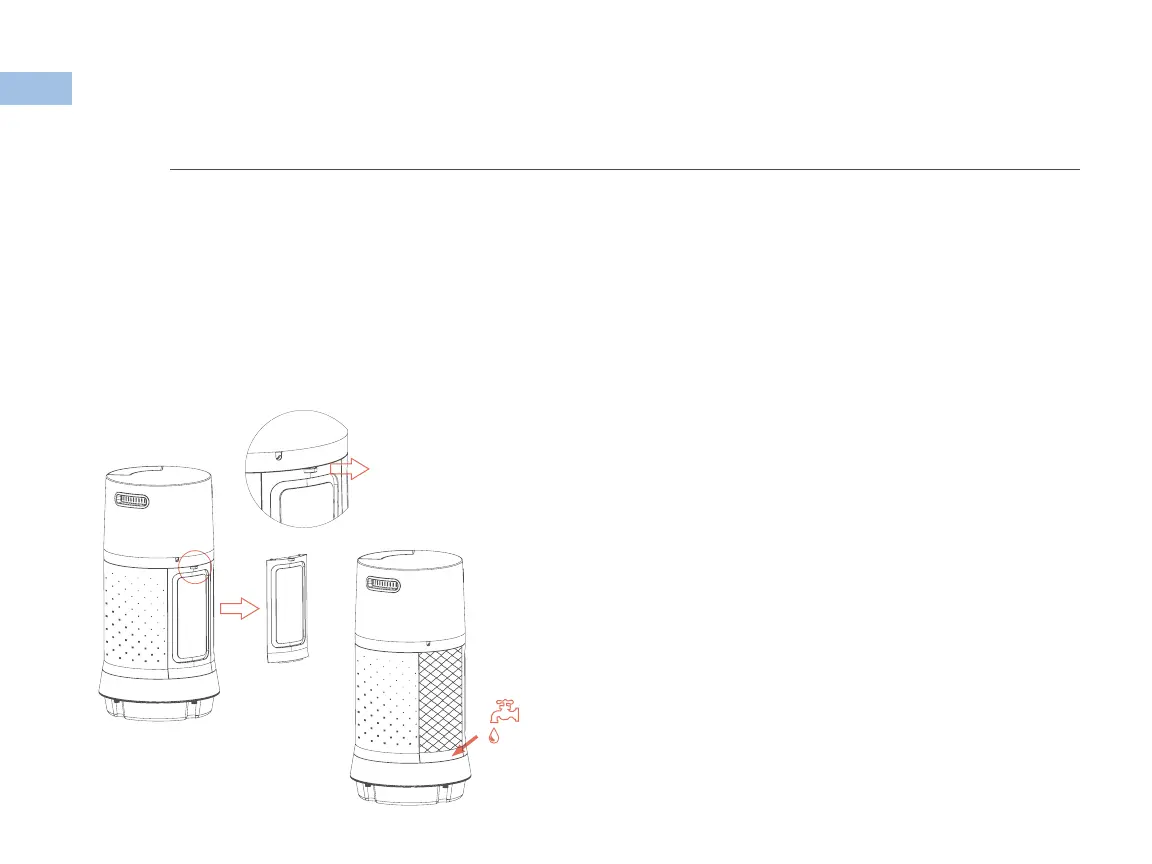
Open the tank
cover by pulling up
and out from here
Filling Water Tank
Open the tank cover on the back of the unit as
shown in the illustration below. Use a water jug
to fill. Do not exceed the “max” water level mark.
Power
Press “Power” on the control panel or remote to turn
the fan on. “Power” will illuminate, press again to
power off.
Speed
Press “Speed” on the control panel or remote to
control wind speed. Speeds: Low (1), medium (2),
High (3), selected speed will light up.
Swing
Press “Swing” on the control panel or remote to have
the front grill oscillate. “Swing” will illuminate. Press
again to stop “Swing” mode.
Cool
Press “Cool” on the control panel or remote to
operate cooling function. Light will illuminate.
Press again to switch off.
NOTE
When the “Cool” mode is activated, the pump inside the water tank will pump water to saturate the filters. Heat that flows
through the filters will exchange with the water and cool the air flowing through the filters. Therefore, a decrease in
temperature depends on relative humiditity and ambient temperature when the unit is in “Cool” mode.


 To Next Page