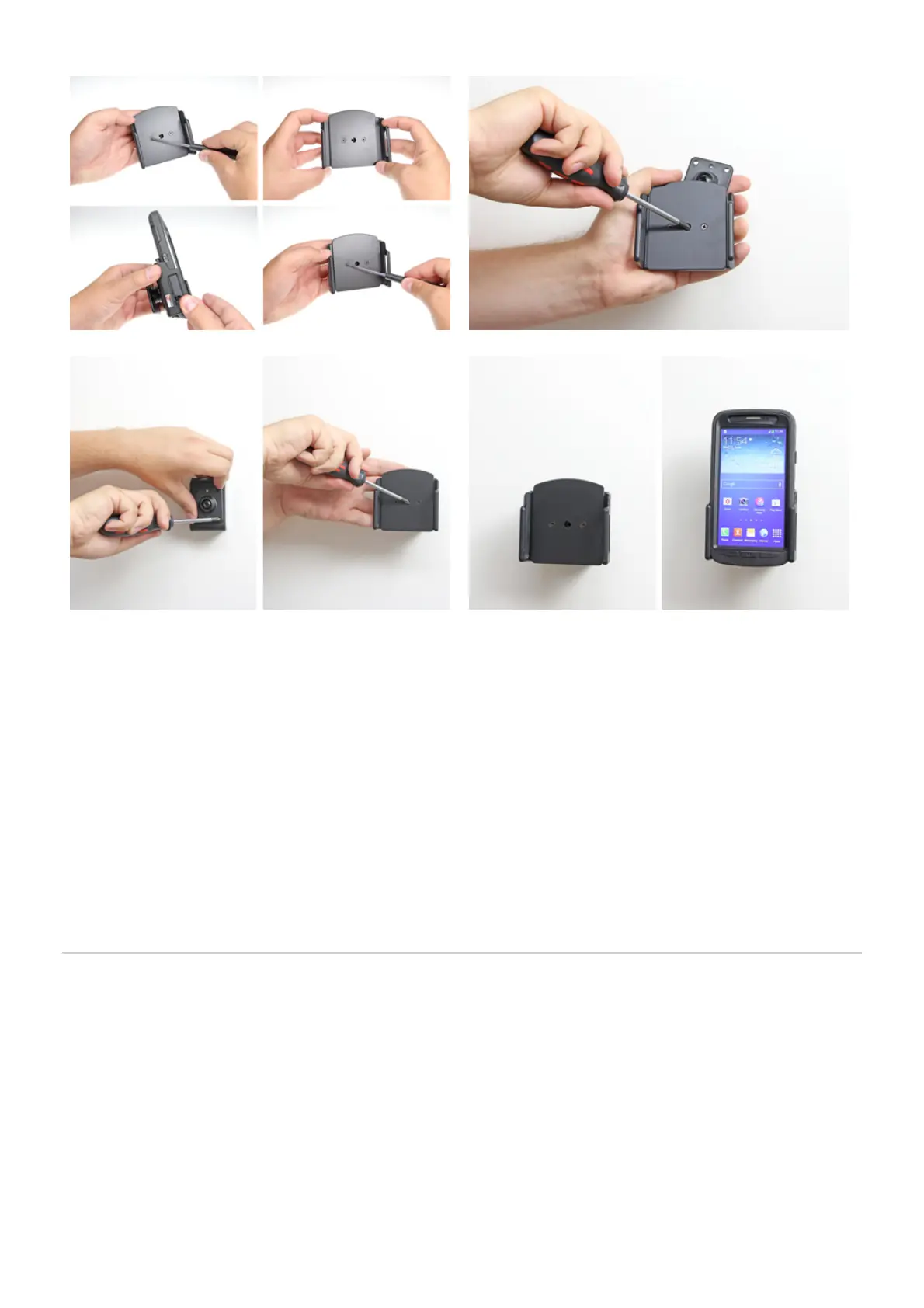
1. 2.
INSTALLATION INSTRUCTIONS
4.3.
Please read all of the instructions and look at the pictures before attaching the holder.
1. To adjust the holder for your device: Loosen the screws on the front side of the holder, so the sides of the
holders can be adjusted. Place the device in the holder and press the sides together so the device is firmly in
place. Tighten the screws on the front side of the holder.
2.To install the holder: Loosen the screw in the center of the holder so you can remove the tilt swivel attaching
plate on the back.
3. Place the attaching plate onto the desired position. Screw the attaching plate into place with the enclosed
screws. Place the holder over the attaching plate so the screw fits in the hole in the tilt swivel. Screw a few turns
on the screw, just so the thread starts to pull. Pull the holder toward you and hold it slightly tensed, in the same
time tighten the screw so the holder is pulled toward the tilt swivel. Tighten the screw firm at first, then loosen it a
bit so the holder is firmly in place, but still can be adjusted.
4. The holder is in place.



 To Previous Page