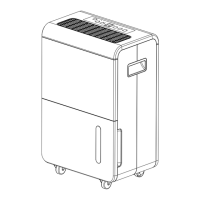
This document describes the BROLIN Desiccant Dehumidifier, model BR10D, providing instructions for its operation, maintenance, and troubleshooting.
Function Description
The BROLIN Desiccant Dehumidifier is designed to remove excess moisture from the air in indoor environments. It can be used in various locations such as basements, kitchens, and living rooms. The unit operates by drawing in moist air, removing the humidity, and then expelling drier air. It also features a "DRYER" mode suitable for drying clothes, utilizing high fan speed and heat. The dehumidifier includes an "AIR CLEAN" mode for air purification, especially when an optional HEPA filter is installed. It is equipped with an intelligent humidity display that changes color to indicate the current humidity level in the room.
Important Technical Specifications
- Model No.: BR10D
- Power Supply: 220~240V, 50Hz
- Humidity Removal Capacity:
- 9 L/day at RT 30°C, RH 80%
- 10 L/day at RT 35°C, RH 90%
- Power Consumption:
- TURBO (high): 730W
- Electric heating element: 650W
- Air Volume (max.): 185 m³/h
- Fan (Ventilation) Speed: 3 settings
- Water Tank Volume: 5L
- Working Temperature Range: 1~32°C
- Timer: 1~24 hours
- Continuous Drainage: Yes
- Safety Device: Tip-over switch
- Size (WxDxH): 340 x 232 x 511 mm
- N.W.: 7.5 Kg
- Current & Fuse: F2L250V or T2L250V
Usage Features
The dehumidifier offers several operating modes and settings:
- FAN SPEED:
- SLEEP (MUTE): Low fan speed with low heat for quiet operation. If ambient humidity is below the set level, it runs on low fan (ventilation) only with no heat. The humidity indicator on the front plate does not light in this mode.
- NORM (standard): Medium fan speed with high heat. If ambient humidity is below the set level, it runs on medium fan speed only with no heat.
- TURBO: High fan speed with high heat. If ambient humidity is below the set level, it runs on high fan speed only with no heat.
- AUTO BUTTON: Automatically adjusts operation based on humidity:
- Above 70% RH: TURBO mode.
- Between 55% and 70% RH: SLEEP mode.
- Less than 55% RH: Unit stops for 30 minutes before rechecking room humidity, restarting only if humidity rises above 55%.
- DRY (LAUNDRY) BUTTON: Sets desired humidity to 40% RH, unit works continuously for 8 hours, then rests for 30 minutes. If room humidity is still above 40%, it works for another 8 hours. If below 40%, it rests for 30 minutes. Fan speed is fixed at HIGH in this mode.
- HUMIDITY BUTTON: Allows setting continuous dehumidification or specific humidity levels (40%, 50%, 60%, or 70% RH). The set level is shown on the LED display. After 8 hours of continuous heater operation, the unit rests for 30 minutes before resuming. If not set, it defaults to 50% RH / low fan speed / low heat.
- Continuous Dehumidify Mode: For safety, the machine stops automatically after 8 hours, rests for 30 minutes, and then resumes. If ambient humidity is less than 35%, the heater works for 15 minutes, rests, and repeats unless humidity rises. If ambient temperature is higher than 36°C, the heater stops, and the fan runs to check humidity/temperature, then follows the 30-minute stop logic if humidity is reached.
- Working with Humidity Setting (40%, 50%, 60%, 70%): The machine stops automatically after 8 hours, regardless of whether the set humidity is reached, rests for 30 minutes, and then resumes.
- POWER BUTTON: Starts or turns off the machine. It may take a few minutes for the unit to turn off completely.
- TIMER BUTTON: Sets working hours (1-24 hours). The LED display shows the set hour, and the TIMER indicator lights up. The machine turns off automatically when the set time is reached. It can also be pre-set to turn on automatically after a specified number of hours and operate in the previous mode.
- AIR CLEAN BUTTON: Runs the fan without dehumidifying, suitable for air purification. The fan speed is adjustable in this mode. Using a HEPA filter while dehumidifying may reduce performance by 10%.
- DISPLAY WINDOW: Shows room temperature (0~50°C), room humidity (35~95%RH), set humidity (when HUMIDITY button is pressed), and set time (when TIMER is pressed).
- ON INDICATOR: Lights green when the heat element is working. Lights red and blinks if the unit is tipped over.
- WATER FULL INDICATOR: Turns red and blinks, and the unit buzzes, when the water tank is full or not properly positioned.
- HUMIDITY INDICATOR IN THE FRONT: An intelligent LED display that changes color to indicate ambient humidity:
- Blue light: room humidity > 70%
- Green light: room humidity 50~70%
- Red light: room humidity < 50%
- This indicator does not work in SLEEP mode.
- Positioning: Place on a level surface with a minimum of 20 cm (8") space on either side for efficient airflow. For dryer function, keep the air vent at least 40 cm from clothes to prevent water dripping into the machine.
- Safety Features: Anti-tip safety device that switches off the unit if tipped. Self-diagnosis function displays error codes (E1-E7) if issues occur. E5 indicates the unit is tipped over.
Maintenance Features
- General Maintenance: Always unplug the unit and wait at least one hour before any maintenance or cleaning.
- Cleaning the Body: Use a soft cloth to wipe the unit clean. Do not use volatile chemicals, gasoline, detergents, chemically treated clothes, or other cleansing solutions as they may damage the cabinet.
- Cleaning the Filter:
- Dust Filter (washable): Pull out the air filter from the rear. Use a vacuum cleaner or tap lightly for cleaning. For very dirty filters, use warm water with a small amount of mild detergent. Ensure the filter is completely dry before replacing. Do not expose to sunlight.
- Active Carbon Filter (non-washable): This filter is not washable. Its lifespan varies depending on ambient conditions. Check periodically (about every 6 months) and replace if necessary.
- Drainage:
- Emptying the Water Tank: When the tank is full, the unit stops and buzzes. Hold the unit firmly, pull out the tank, grasp the handle, remove the cover, and empty the water. Return the tank to its position, ensuring it's properly seated for the "water full" sign to clear.
- Continuous Drainage: For high humidity conditions, connect a water tube (inner diameter 11mm, not supplied) to the drain hole. Ensure the water drains freely and the tube remains in place. Take precautions in cold weather to prevent freezing. Remove the tube if continuous drainage is not needed, and water will collect in the tank again.
- Storage: For extended periods of non-use, turn off, unplug, and tidy the AC cord. Completely empty and clean the water tank. Cover the unit and store it away from direct sunlight.


 To Next Page
 General