37
9.2 FUNCTIONS OF THE DISPLAY’S BUTTONS
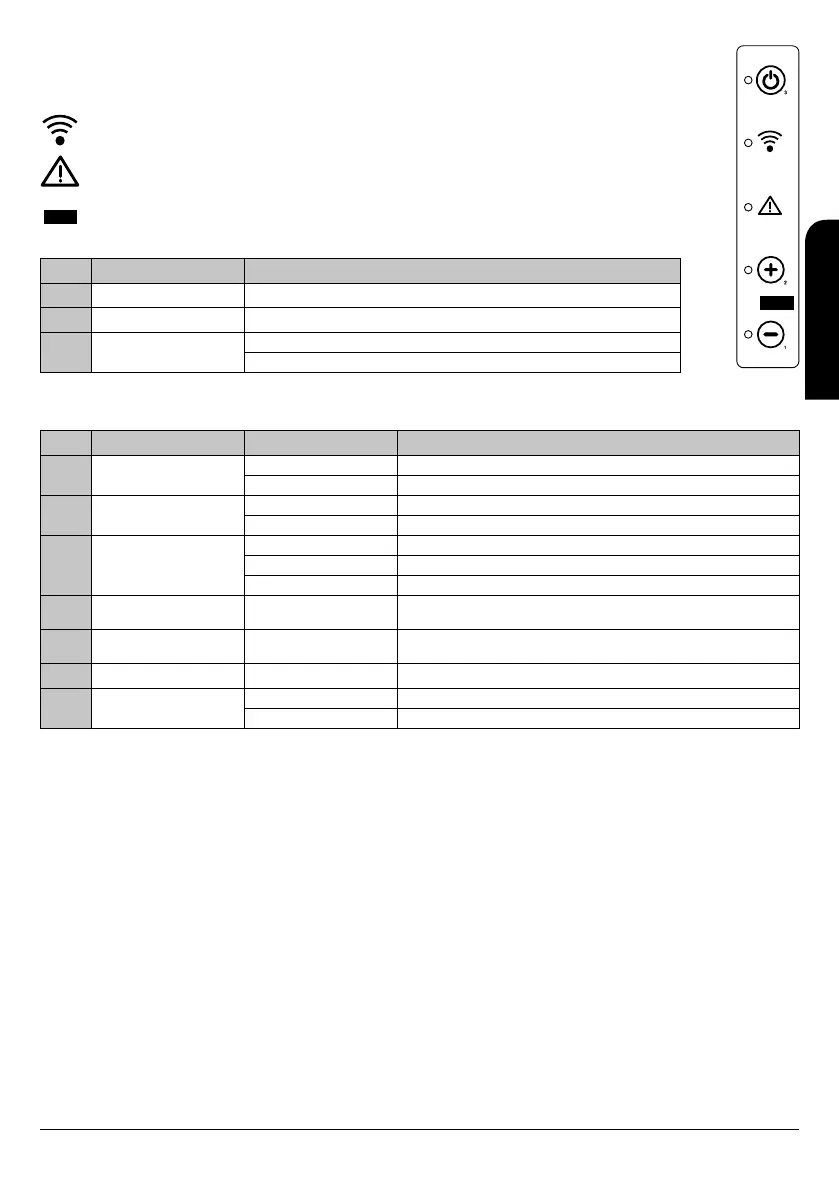
The use of the display placed on the stove or insert is only recommended only recomended in case that there is not possibility of
using of the remote control, because it has no battery, it is far away, etc.
The symbol placed under the power button shows us, by a flashing light, if the remote control is working.
The symbol placed over the button number 2 shows us, by a light system, if the stove has any kind of problem.
The opening between buttons 1 and 2 serves to connect, if necessary, the remote control directly to the stove.
Button Description Performance description
1 Decrease Only decrease the value of the power.
2 Increase Only increase the value of the power.
3
ON/OFF
Unblocking
It switches on or off the stove or insert pressing 2 seconds.
Unblocks the stove or insert and switches it off.
9.3 FUNCTIONS OF THE REMOTE CONTROL’S BUTTONS
Button Description Modality Performance description
1 Decrease
PROGRAMMING It shows several values of the stove in the moment.
WORKING Modifies/Increases the value of the selected menu.
2 Increase
PROGRAMMING It shows several values of the stove in the moment.
WORKING Modifies/Increases the value of the selected menu.
3
ON/OFF
Unblocking
WORKING It switches on or off the stove during 2 seconds, as appropriate.
BLOCKING Unblocks the boiler and switches it off.
MENU / PROGRAMMING Goes back to the previous level menu and saves the modified data.
4 Select temperature WORKING
Select the temperature option in order to be modified by buttons number
1 and 2.
5 Select power WORKING
Select the power option in order to be modified by buttons number 1
and 2.
6 - PROGRAMME Button deactivated in this model.
7 MENU
MENU Moves to the following menu option.
PROGRAMMING Moves to the following submenu option.
9.4 MENU OPTION
By pressing button nº 7 of display we can access to the MENU. It is divided into different sections and levels that allow to access to the stove
configuration and programming.
The access to the technical menu of the stove or insert is protected by a password. These parameters should be modified only by an
authorised technician. (The changes in these parameters could cause a wrong running in the stove and the subsequent lost of its warranty).
INSTALLATION, OPERATING AND SERVICING INSTRUCTIONS RADIOFREQUENCY SERIES
EN



 To Next Page