Assembly instruction
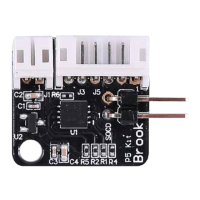
Step1
Check whether there is a wafer
connector in the position of J2
in UFB. If not, you need to weld
the Wafer connector at J2.
Step2
Connect signal line and power
cable to UFB-UP5 and UFB. There
is a detail you need to notice that
the red line connects VDD_5V
and a black line connects GND of
a signal line.
Step3
After connecting UFB-UP5 to
UFB, please update the firmware
of UFB. Firmware download:
Step4
Press PS button and SHARE/
SELECT button at the same time,
then connect the arcade stick to
the PC / laptop.
wafer
connector
4
PC/ laptop
PS
+
or
SHARE
SELECT
GND
4K
3K
2K
1K
GND
4P
3P
2P
1P
START
SELECT
PS/XBOX
GND
GND
RIGHT
LEFT
UP
DOWN
VDD_5V
J2
J3
J3 J1
GND
4K
3K
2K
1K
GND
4P
3P
2P
1P
START
SELECT
PS/XBOX
GND
GND
RIGHT
LEFT
UP
DOWN
VDD_5V
J2
J3
J3 J1
https://www.brookaccessory.com/download/PS4/
The following instructions are based on the UFB.


 To Next Page