START
SELECT
B
A
Y
X
START
SELECT
B
A
Y
X
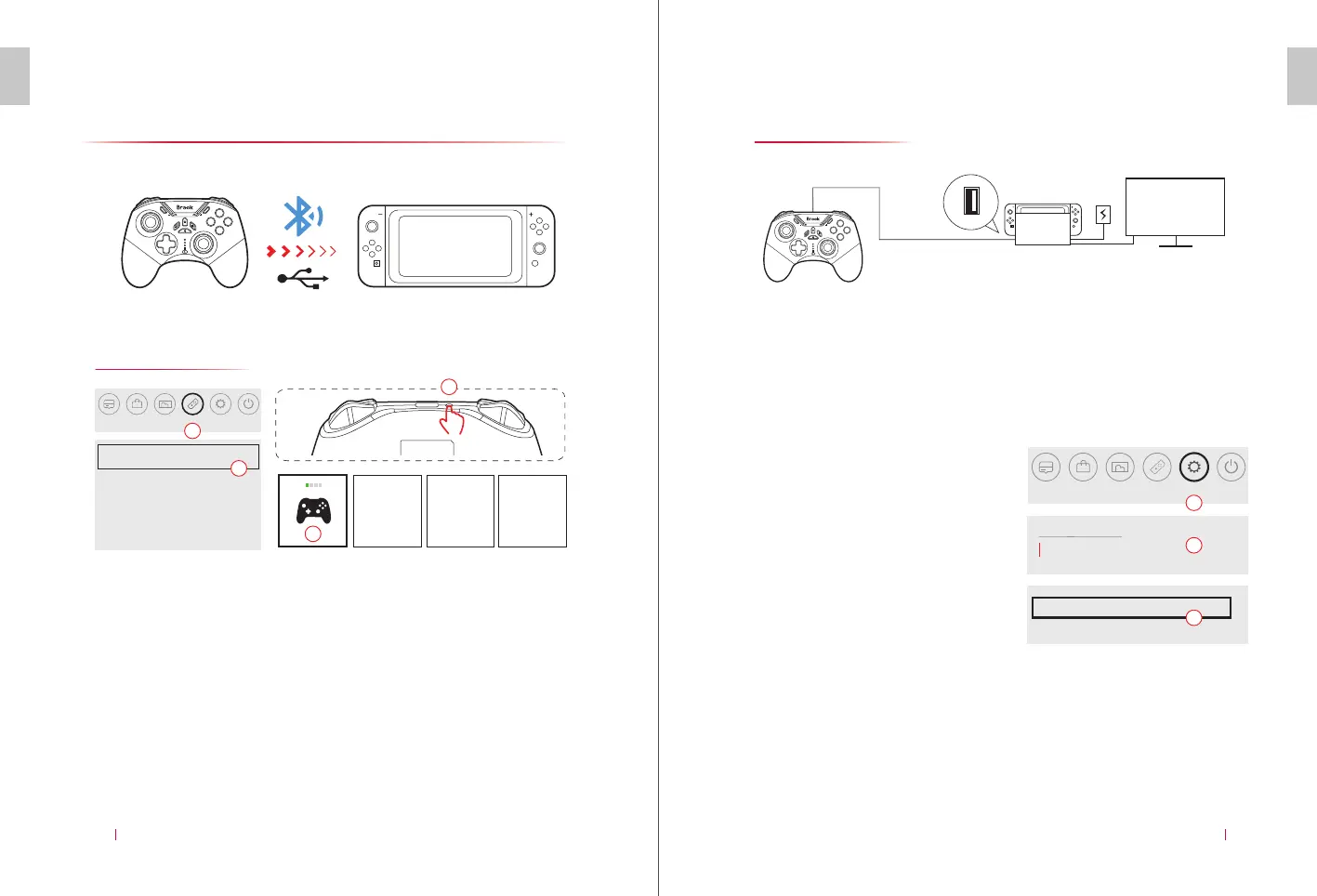
Connect Switch/Switch Lite
Connect Bluetooth
E N
Connect with Cable
CONNECT SWITCH/SWITCH LITE
05
Controller
Change Grip/Order
Find Controllers
Pairing New Controller
Close
2 3 4
1.
2.
3.
4.
*The channel light is steady on once sucessful connected,
RGB current light is red color by default.
1
2
3
4
E N
CONNECT SWITCH/SWITCH LITE
06
TV
USB
Switch
Attention
Way to turn on:
Auto Reconnect and Wake up
Once the controller is connected to Switch, just press the “HOME button”
on the controller. And then the controller will reconnect to Switch
automatically and wake it up at the same time.
* If the controller has been paired with other devices, you need to reconect to the N-Switch
according to method one or two.
Sleep Mode
Controller and Sensors
System
Pro Controller Wired Communication
On
2
Setting
1
3
Before connecting to Switch console with
the wired mode, the connection function
with cable is required to be turned on.
Setting->Controller and Sensors-> Wired
connection on Pro controller: Choose “On”
to turn on the wired mode or connect to
Switch console.
Enter the first page of Switch Console, and click the controller icon
below to enter the controller mode (Pic 1).
Then click “Change Grip/Order” to enter the pairing interface (Pic 2).
Press and hold “Pairing button” on the top of the controller for 2
seconds to turn on, with the quick flashing of RGB and LED on the
controller to enter the pairing status (Pic 3).
Once connected, press “HOME button” to return the main page for
further operations (Pic 4).
1.
2.
3.
When the controller is off, it can be connected to Switch with the cable
in the accessories.
Switch games can be operated in the wired mode.
After the wired connection is done, you can unplug the cable. The
controller will enter the automatic connection status to pair the
console.


 To Next Page
 Loading...