E N
ADVANCED FEATURES
11
E N
ADVANCED FEATURES
12
B
A
Y
X
B
A
Y
X
+
L/R/zL/zR
A/B/X/Y
L/R/zL/zR
A/B/X/Y
+ =
Press the right joystick
Before function interchange After function interchange
* LED 4 flashes with Turbo frequency.
+ +
When the vibration intensity is adjusted to “0”, the vibration function is turned off. It can be
activated again by increasing vibration intensity.
+
Press the left joystick
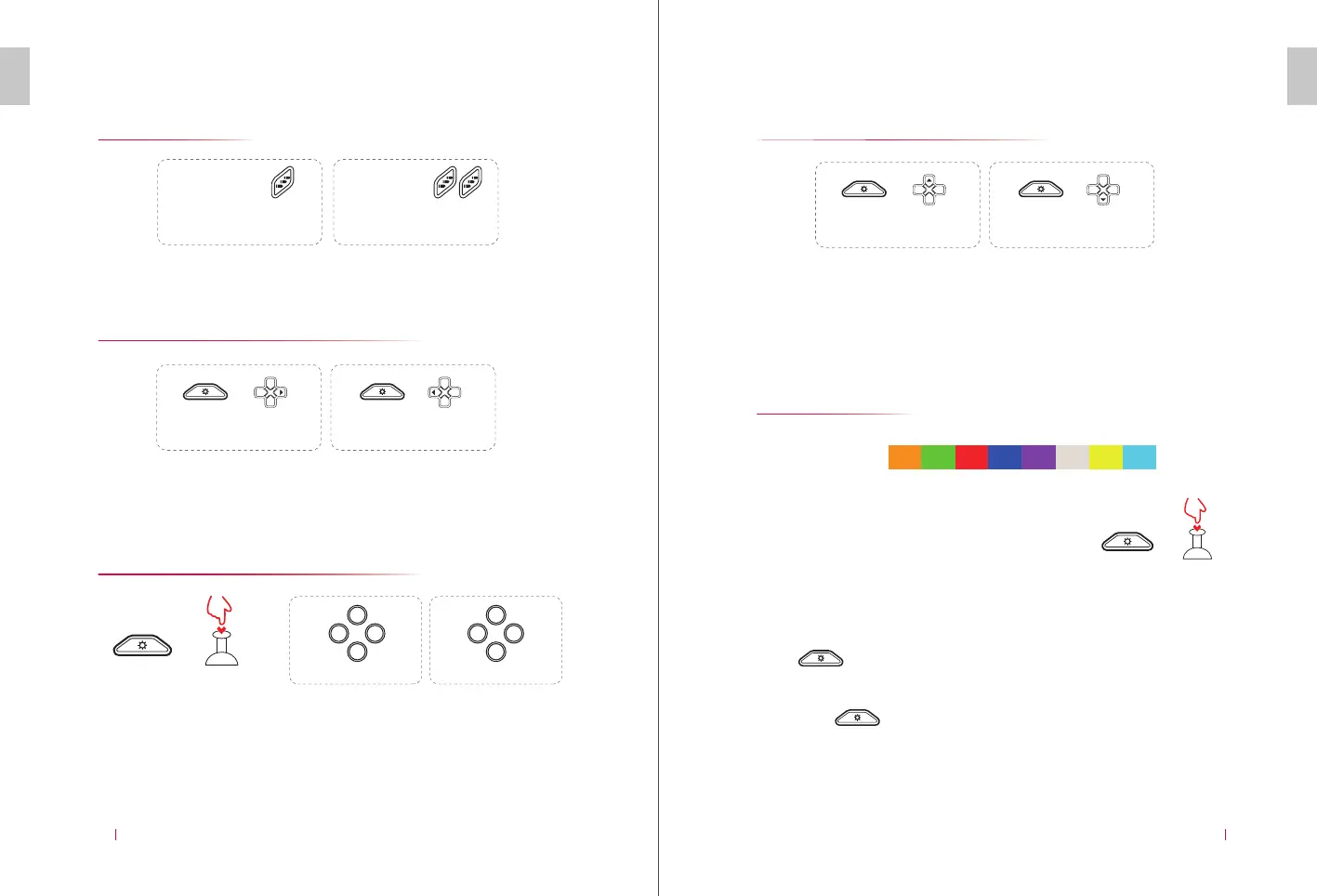
Turbo Function
Turbo Frequency Adjustment
Close: Repeat the operations to close “Turbo” function.
The Turbo frequency is divided into 3 levels: high, medium and low (15
times/s, 10 times/s and 5 times/s).
The default setting is medium level (10 times/s).
A, B, X and Y Function Switching
Press and hold Setting button, and then press “SR” button to switch the
functions of A & B, and X & Y. Repeat this operation to switch back to the
original function setting.
+
+ +
Vibration and Strength Adjustment
Vibrations in four levels (0/50%/70%/100%)
The default vibration level is 70%.
RGB Light
(The function does not support Android or iOS.)
Color:
Switch Mode: RGB in Red
Windows Mode: RGB in Blue
Bluetooth: RGB in Purple
Android Mode: RGB in Green
Apple Mode: RGB in Purple
(RGB Lights off/on)
Light Adjustment:
Press and “+” or “-“ button to switch between light colors.
Automatic Light Change Mode:
Long press for 3 seconds, and RGB light of the controller
will automatically flash and change colors.
Press and hold the function
button and then press “Turbo”
button to set the burst button.
Press and hold the function button
and then press “Turbo” button twice
to set the automatic burst button.
Press Setting button and “down
button” of D-PAD will reduce the
vibration frequency of the motor.
Press Setting button and “up
button” of D-PAD will strengthen the
vibration frequency of the motor.
Press Setting button and the
“right button” of D-PAD will
increase the turbo frequency.
Press Setting button and the “left
button” of D-PAD will decrease the
turbo frequency


 To Next Page
 Loading...