6
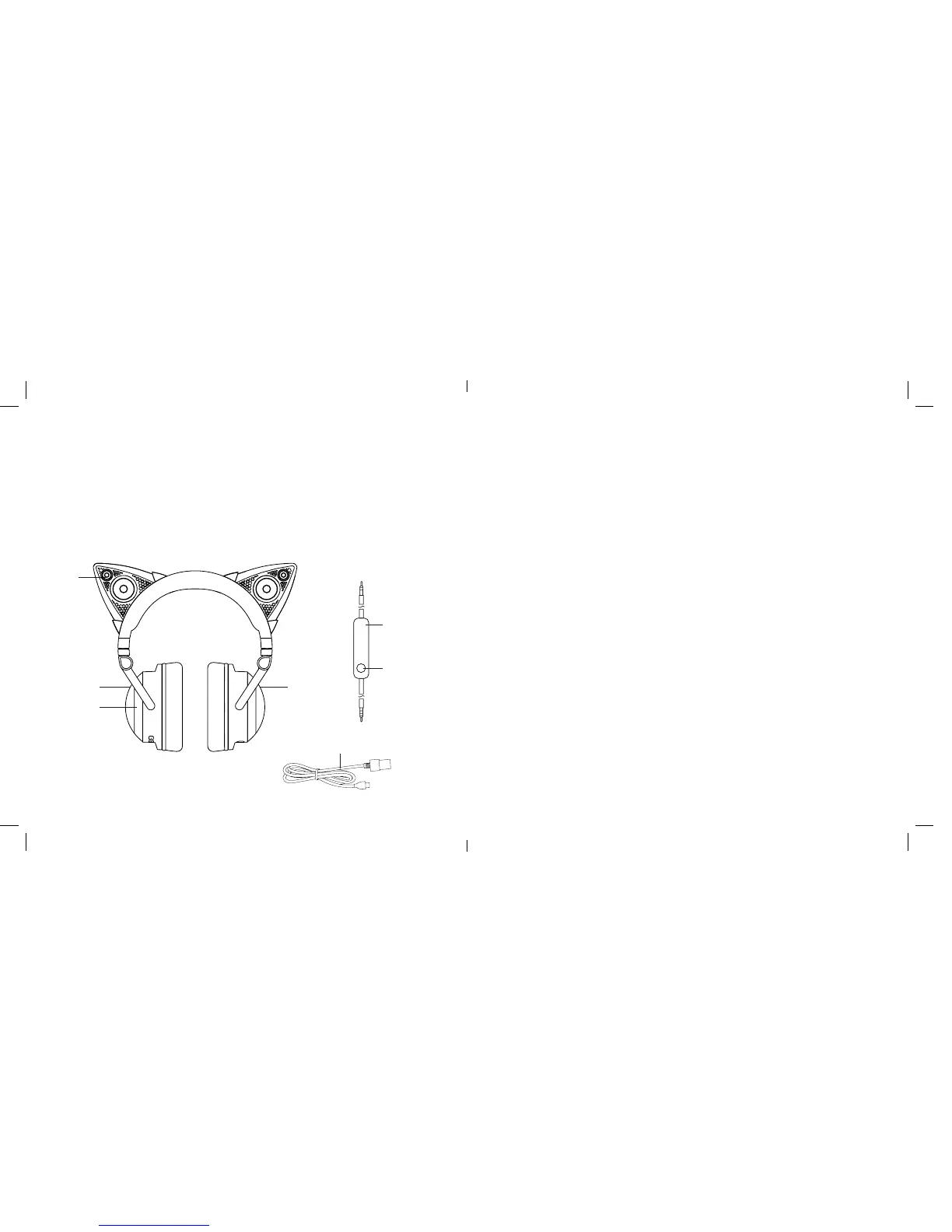
LOCATION OF PARTS AND CONTROLS
1
3
4
2
1. Speaker with Light (2)
2. Right Ear cup
3. Ear cup Light (2)
4. Left Ear cup
5. 3.5mm to 3.5mm Headphone Cord
with in line microphone
6. Play/Pause/Track Forward/Track
Back Button
7. Micro USB Charging Cable
5
6
7
15
9. To end an active call on your device, press the PLAY/PAUSE/TRACK
FORWARD/TRACK BACK BUTTON on the HEADPHONE CORD once.
Notes:
• The HEADPHONE CORD INPUT takes precedence over the Bluetooth
®
connection.
• If there is no audio streaming for 20 minutes, the Cat Ear Speakers are
turned off automatically.
COMPATIBILITY
Bluetooth 2.1 or above device with A2DP and AVRCP.
CARE AND MAINTENANCE
Unplug and spot clean with a soft, dry cloth.










 To Next Page