CD Care
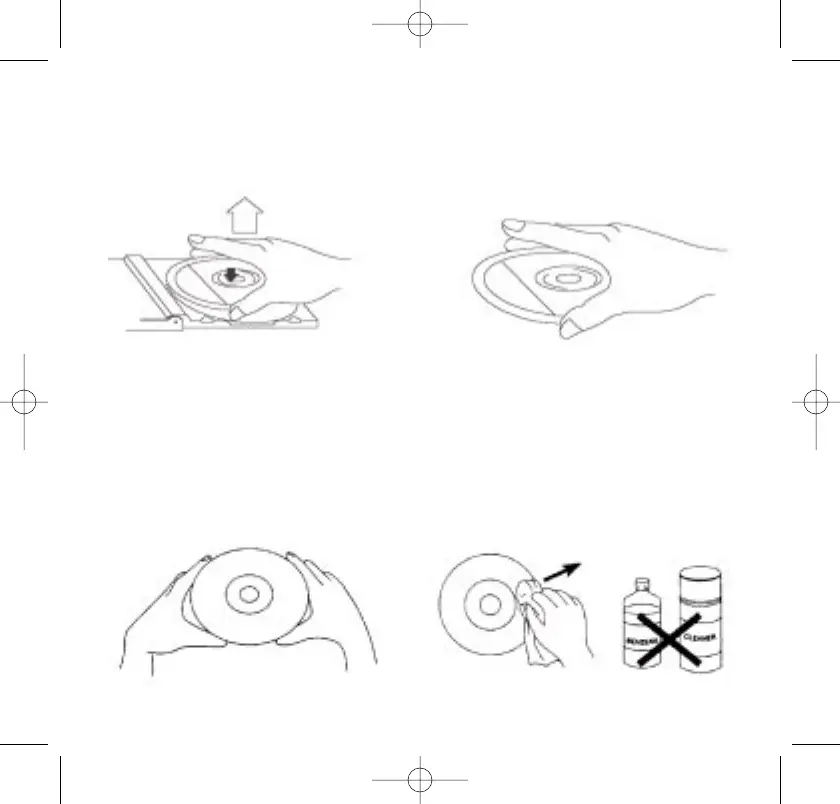
• To remove a disc from its storage case, press down on the center
of the case and lift the disc out, holding it carefully by the edges.
• Fingerprints and dust should be carefully wiped off the disc’s
recorded surface with a soft cloth. Unlike conventional records,
compact discs have no grooves to collect dust and microscopic
debris, so gently wiping with a soft cloth should remove most
particles. Wipe in a straight line from the inside to the outside of
the disc. Small dust particles and light stains will have absolutely
no effect on reproduction quality.
54



 To Next Page