5
SET UP
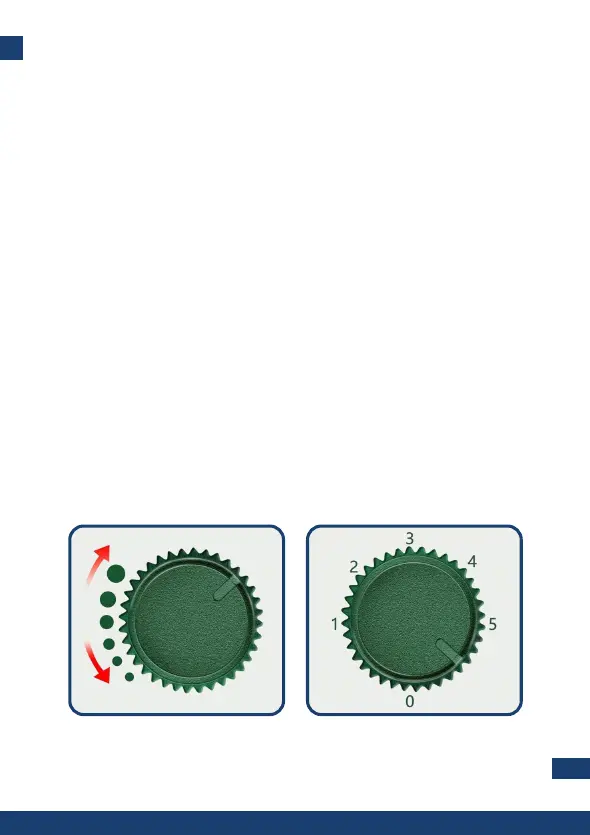
There are two knobs on the device:
• Sensitivity knob (left knob)
• Frequency knob (right knob)
“Sensitivity” knob helps you to adjust the impact distance of the
ultrasonic waves. By turning the knob clockwise, the range of
protection of the device will increase.
“Frequency” knob is used for frequency selection. By turning the
knob clockwise, the frequency will increase.
Frequency ranges per mode, comes as follow:
• 0: OFF
• 1: 13.5KHZ-19.5KHZ for repelling animals like mice, rats,
dogs, foxes, martens etc.
• 2: 19.5KHZ-24.5KHZ for repelling animals like cats,
raccoons, badgers, skunks etc.
• 3: 24.5KHZ-45.5KHZ for repelling animals like bats, birds,
rodents etc.
• 4: Alarm and strong red LED flashing lights to scare wild
animals.
• 5: All functions together (mode 1, mode 2, mode 3) along
with strong flashing light.
Frequency knobSensitivity Knob


 To Next Page