4 - 2
OPERATION section 4
Drawing 4
Drawing 5
Drawing 6
Operating Machine
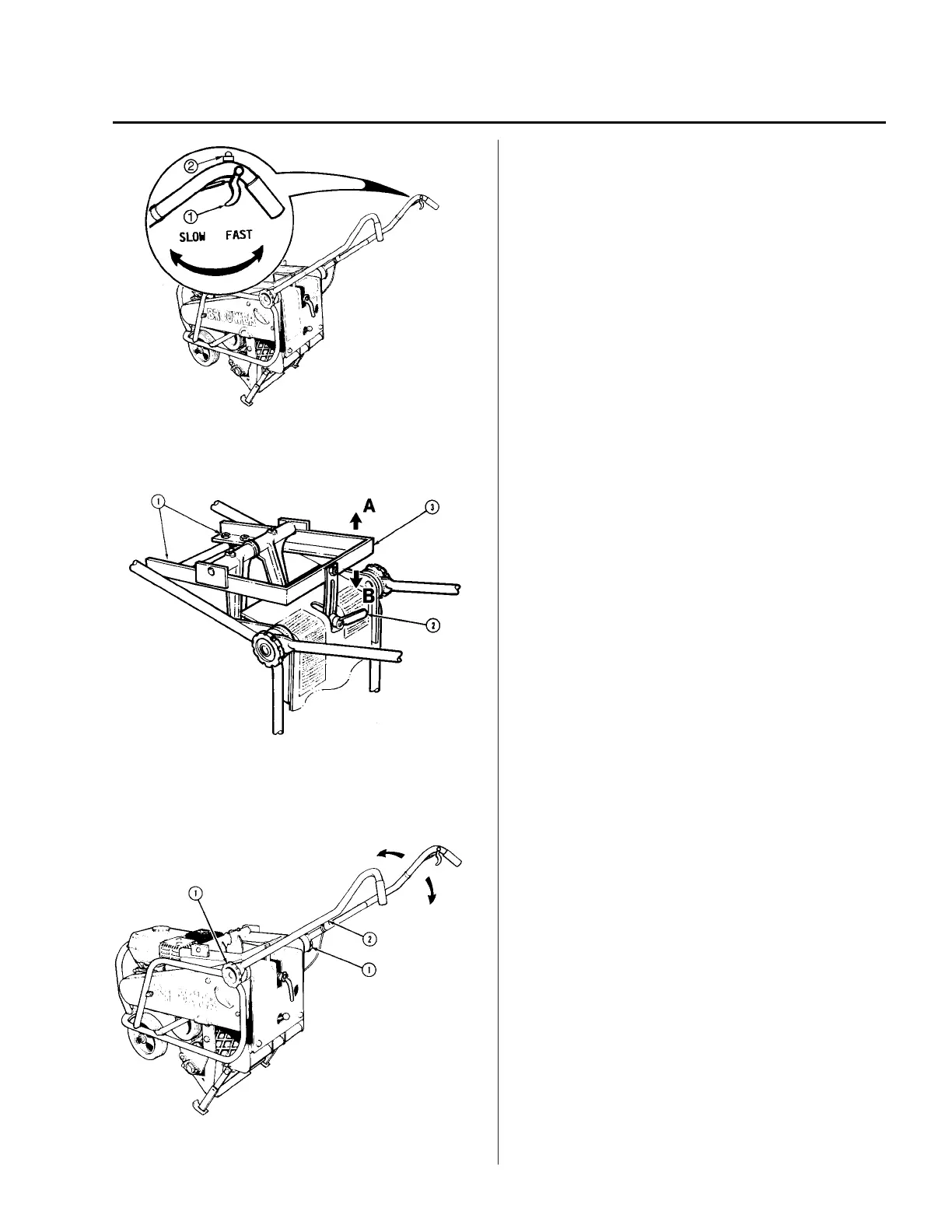
See Drawing 4. With the engine at “idle” speed, ease
the unit forward off the kickstand. To increase the
engine speed and engage the centrifugal clutch, the
throttle lever (1), positioned on the RH control
handle, is pulled toward the operator. At
approximately 1200 RPM, the clutch will engage,
putting the machine in motion and operating the
oscillating cutting blades.
An emergency kill switch (2) is located on the RH
control handle to stop the engine.
Adjusting Depth of Cut
Serial Number (1000 -- 4049) See Drawing 5. To
adjust the depth of cut: Position unit on kickstand,
loosen the two “U” bolts slightly (1) and the
adjustment handle (2). To decrease the depth of cut,
raise the frame (3) in the direction of arrow “A”. To
increase the depth of cut, lower the frame in the
direction of arrow “B”. Re--tighten the adjustment
handle (2) and “U” bolts (1).
Serial Number (4050 -- )See Drawing 5. To
adjust the depth of cut: Position unit on kickstand,
loosen the adjustment handle (2). To decrease the
depth of cut, raise the frame (3) in the direction of
arrow “A”. To increase the depth of cut, lower the
frame in the direction of arrow “B”. Re--tighten the
adjustment handle (2).
Adjusting Control Handles
See Drawing 6. To adjust the height of the control
handles to suit the operator, loosen the hand knobs
(1) on each side of the machine sufficiently enough
to allow the handle (2) to be raised or lowered as
required. Re--tighten hand knobs.



 To Next Page