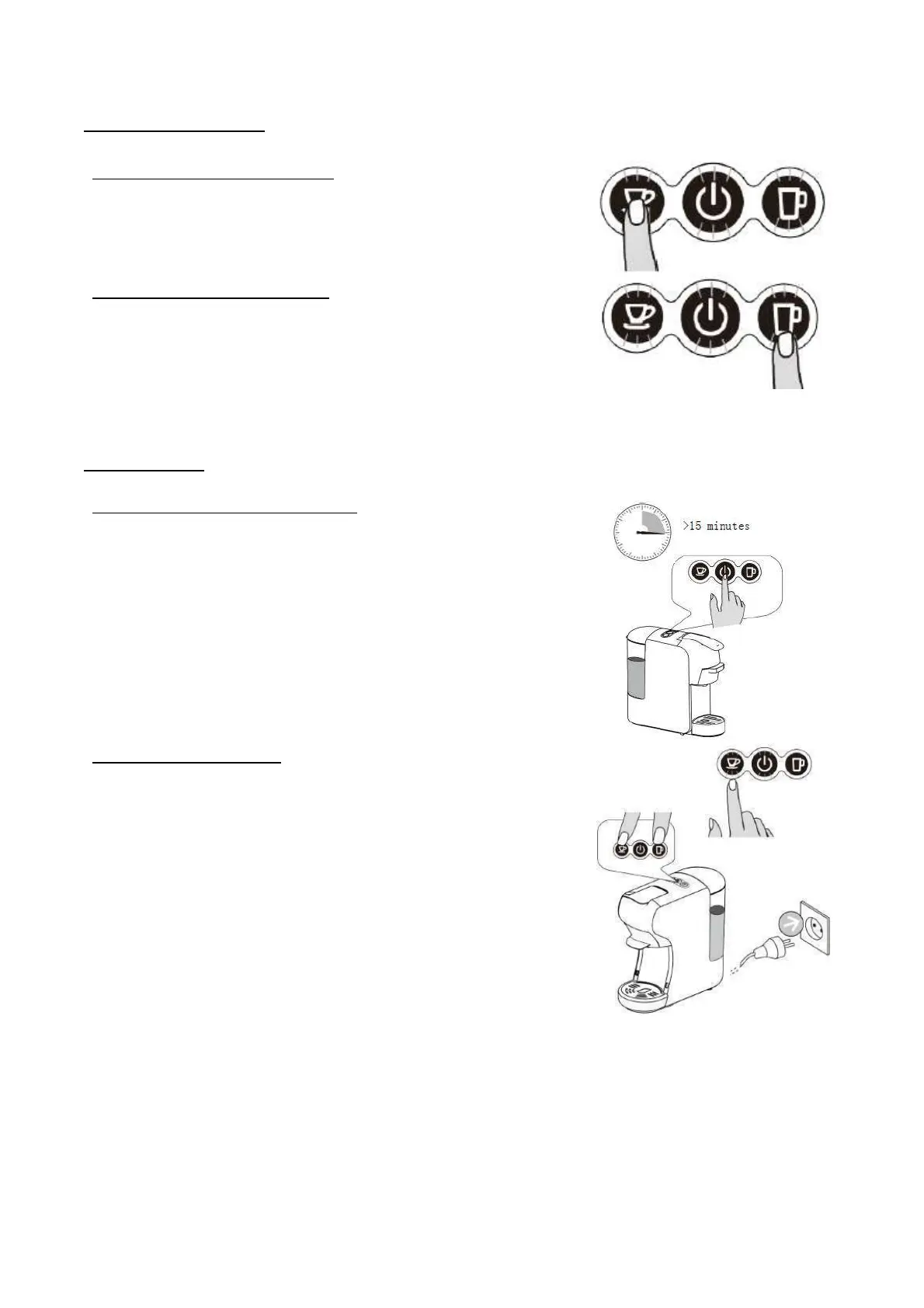
Short espresso volume setting
1. Place a cup on the drip grid (6) under the dispenser.
2. Keep pressing the Short espresso coffee and release
when you get the desired volume of coffee to stop the
brewing. (Minimum time 10sec, Maximum time 90sec).
Lungo coffee volume setting
1. Place a cup on the drip grid (6) under the dispenser.
2. Keep pressing the Lungo coffee and release when you
get the desired volume of coffee to stop the brewing.
(Minimum time 10sec, Maximum time 90sec).
Factory default Stand-by setting
• The default Stand-By setting is 15 minutes. The
appliance and the light indicators will turn off after 15
minutes.
Stand-by mode setting
1. While simultaneously pressind Short espresso button and
Lungo coffee button, connect the apliance to the
power supply.
2. On/Off button and Short espresso button light indicators
will turn on.
3. Press the Short espresso button. Light indicator will turn
off indicating the Stand-by mode is deactivated.
4. To activate Stand-by mode press again the Short
espresso button. Light indicator will turn on indicating
the Stand-by mode is activated.
5. When you complete Stand-by mode setting, press
on/off button to turn off the appliance.


 To Next Page
 Loading...