5
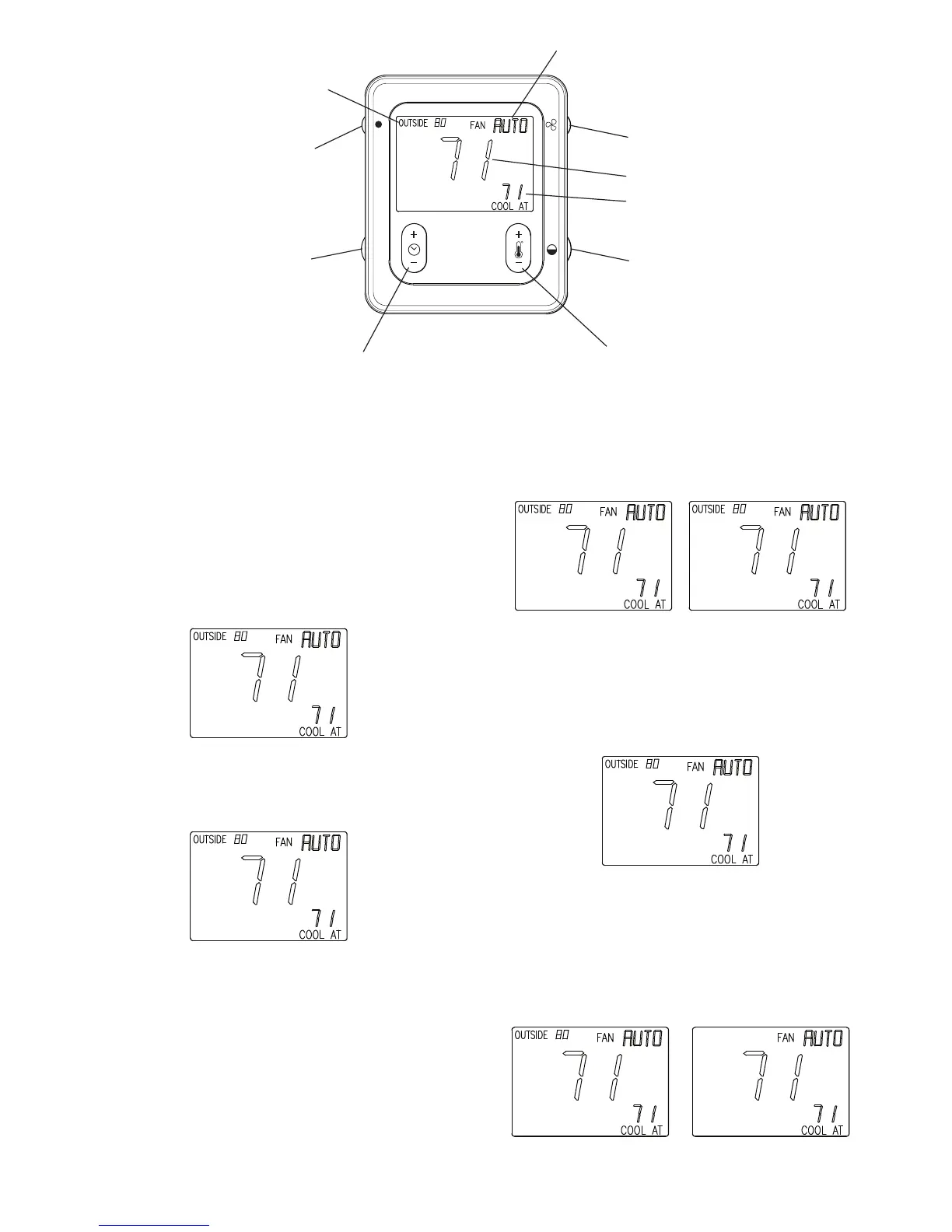
Outside Temp /
Indoor Humidity
Hold/Unoccupied
Time (+/-)
Temp (+/-)
COOL / HEAT
Set point
Room Temperature
Fan Control
Fan Status
Humidity/OAT
HOLD
A04136
Fig. 4 -- Smart Sensor Operation
SMART SENSOR OPERATION
The Infinity Smart Sensor allows control and changing of zone
temperature setpoints. Continuous FAN selection is available;
AUTO, LOW, MED, HIGH. Other features include viewing
Outdoor Temperature and Indoor Relative Humidity. Evolution
Smart Sensor Functions also include; HOLD and UNOCCUPIED
settings.
A. Changing Desired Temperature
S The current zone temperature will be displayed in the LCD.
S Press COOL/HEAT button to change between “COOL AT” and
“HEAT AT” setpoints.
A04141
S Press Temp (+/--) button to raise or lower setpoints.
S The default time for temporarily overriding the temperature
schedule is 2:00 HRS as indicated by the text in the lower left
screen.
OVERRIDE
2:00 HRS
A04142
S Temporary override time can be changed in 15--minute
increments by pressing the TIME (+/--) button to increase or
decrease the override timer.
NOTE: Override will not appear if programming has been turned
off.
B. HOLD/UNOCCUPIED
S Pressing HOLD / UNOCCUPIED button will display HOLD
allowing setpoints to remain permanent and override any existing
program schedules. Pressing HOLD/UNOCCUPIED button
again will release HOLD and return to previous program
schedules.
S Pressing HOLD/UNOCCUPIED button for approximately 3
seconds will display UNOCCUPIED status on lower left screen.
Pressing button again for approximately 3 seconds will release
UNOCCUPIED status and return to previous mode.
UNOCCUPIEDHOLD
A04143
C. Continuous Fan Adjustment
S Pressing the FAN button will scroll through the following:
AUTO, LOW, MED, HIGH.
S When AUTO is selected, zone airflow is available only when a
heating or cooling demand exists within the zone.
S When LOW, MED, or HIGH is selected, zone airflow will be
continuous without a heating or cooling demand.
A04141
D. Outdoor Temperature and Indoor Relative Humidity
S The current outside temperature is displayed in upper left corner
of the LCD.
S Press and release the HUMIDITY/OAT button to view % Indoor
Relative Humidity, value is measured at Zone Control (User
Interface).
S Outdoor temperature will return after five seconds or after the
button is pressed again.
%RH INSIDE 50
A04144


 To Next Page