EasyManua.ls Logo

BSP D8 - Wireless Controller Manual Overview; Schematic Diagram of Function Buttons; Android ShootingPlus V3 Mode; iOS ShootingPlus V3 Mode

BSP D8
5 pages
Print Icon
To Next Page IconTo Next Page
To Previous Page IconTo Previous Page
Loading...
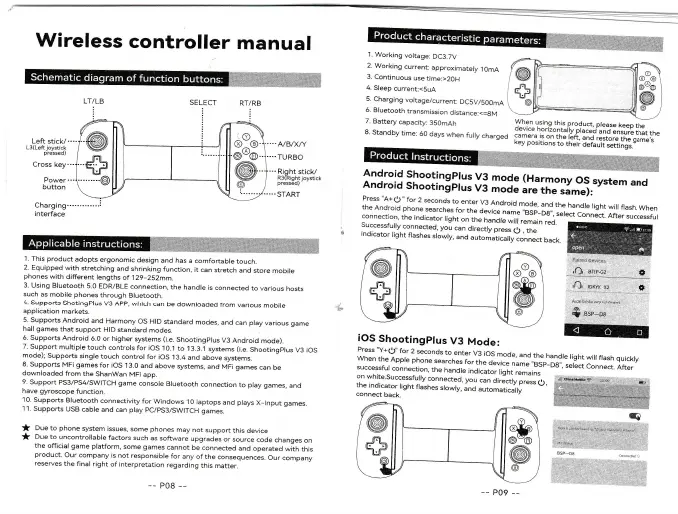
Wireless
controller
manual
'1.
Working
voltage:
DC3.7V
2.
Working
current:
approxinnately
l
OmA
3.
Continuous
use
time:>2OH
4.
Sleep
current:<5uA
5.
Charging
voltage/,current:
DC5V/50OmA
6.
Bluetooth
transmission
distance:<=8M
7.
Battery
capacity:
350mAh
Y^h91_;,.,n9
rl';s product,
ptease
keep
the
o^e\
rce hori/ontally
placed'and
ensure
that
the
c^ame.a
i.s
on
the
left.
and
restore
tt.-g".Lt,"
(ey
pos;tions
to
their
default
settings
LTlLB
:
Left
stick/
L3(Left
oystlcl
pressed
)
Cross
key
.--.4/B/X/Y
'...TURBO
8.
Standby
time:
60
days
when
fuily
charged
ilj#
:*::i::IH.y:
mo{e
(Harmony
os
system
and
Power
button
".Rrght
stick/
R3{Right
loyst
cl"
pressed)
..START
And
ro
i
d
Sh
ooti
n
t
pt
us
v3
;;;
;;;ti,J:i#.i.svsrem
and
press
"A+
O
,,
for
2 seconds
tc
the
Android
phone
searches
I
enter
v3
Android
mode'
and
the
handle
light
will
flash.
When
connectjon.
the
indjcator
,.^:::i::::,:.e,name
"BSp_D8,,,
setect
ConnJct
oia.."r.."".rrr
:::f
".:.1
tne
rndicator
tisht
on
the
n"^jr..iir."#,.Llo.
J-uLrcss.uly
co-nnected.
you
can
directly
press
q)
,
the
rndrcator
right
flashes
srowry.
and
automaticaryro*J.t
uu.t.
Press "Y+O"
for
2 seconds
to
enter
V3
iOS
mode,
and
the
handle
light
will
flash
quickly.
When
the
Apple
phone
searches
for
the
device
na,n"
,"aO_O,
,
select
Connect.
After
successful
connection,
the
handle
indicator
f ,gl_,,
;.ri;'
on
white.Successfully
connected,
you
can
a,.i.,fv
p.""..L,
"y'tu.hub€
.,..1U
r
:::[lff:I]r^t
frashes
srowry,
and,,to,"ti."'rri
'""
",
i;#*;*#:i
1.
This
product
adopts
ergonomic
design
and has
a comfortable
touch.
2.
Equipped
with
stretching
and
shrinking
function,
it can
stretch
and
store
mobire
phones
with
different
lengths
of
129-252mm.
3. Using
Bluetooth
5.0
EDR/BLE
connection,
the
handle
is
connected
to various
hosts
such
as
mobile
phones
through
Bluetooth.
4
supports
shotingPlus
V3
App,
which
can
be
downroaded
from
various
mobire
application
markets.
5.
Supports
Android
and
Harmony
OS
HID
standard
modes,
and
can play
various
game
hall games
that
support
HID
standard
modes.
6.
Supports
Android
6.0
or higher
systems
(i.e.
Shootingplus
V3
Android
mode).
7. support
multiple
touch
contrors
for ios
10.r
to
13.3.'1
systems
(i.e.
shootingprus
V3
ios
mode);
Supports
single
touch
control
for
iOS 1
3.4
and
above
systems.
8. Supports
MFi
games
for iOS
13.0
and
above
systems.
and
MFi games
can
be
downloaded
from
the
ShanWan
MFi
app.
9.
Support
PS3/PS4/SWITCH
game
console
Bluetooth
connection
to
play
qames,
and
have
gyroscope
functjon.
l0.SupportsBluetoothconnectivityforWindowsl0laptopsandpiaysX
lnputgames.
1'1.
Suppcrts
USB
cable
and
can
play
pCIpS3/SWITCH
games.
f
Due
to
phone
system
issues,
some phones
may
not
support
this device
f
Due
to uncontrollable
factors
such
as
software
upgr.des
or source
code
changes
on
the
official game
pratform,
some
games
cannot
be connected
and operated
*itr,
tni.
product.
Our company
is not
responsible
for
any
of
the
consequences.
Our company
reserves
the final
right
of
jnterpretation
regarding
this
matter.
@[
*sil
@
-\.
@
i/
"""-)^
r@lJ'
#il
\w
__J
-{
\
rnv
@^@
@x
@
@
iOS
Shootingplus
V3
Mode:
f@[
+ll
\w
-4il,S
{@,
--
P09
__
@
t
:,,Ql.1p6yi
12,,.,1
r,
l..,:l{:'
-
. ,#-"'''
S
esc-oe
!r