EasyManua.ls Logo

BSP D8 - Key Mapping and Connection Modes; Android Standard Mode; iOS MFi Mode; PC X-input Bluetooth Mode

BSP D8
5 pages
Print Icon
To Next Page IconTo Next Page
To Previous Page IconTo Previous Page
Loading...
2.
In Android/Harmony
OS standard
mode, you
can
download
various game
halls
and
enter
the
platform
to
download
the required
games.
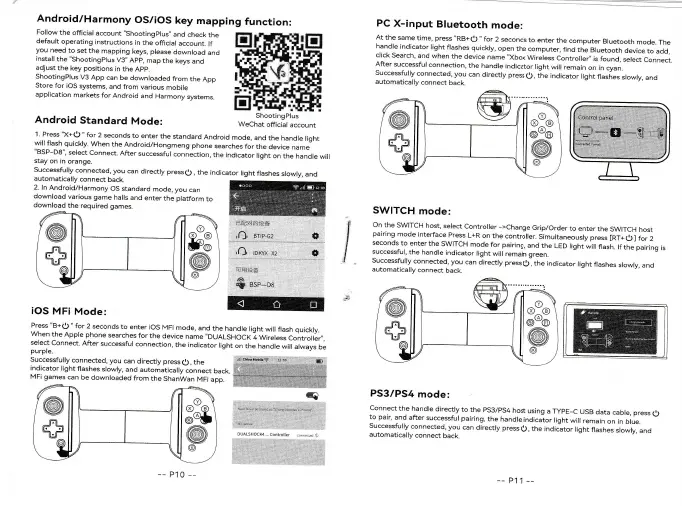
Android/Harmony
OS/iOS
key
mapping
function:
Follow
the official
account
"shootingplus,,
and
check
the
default
operating
instructions
in
the
official
account.
*
m
you
need
to
set
the
mapping
keys, please
download
and
install
the
"Shootingplus
V3'
App,
map
the
keys
and
adjust
the
key
positions
in the
App.
ShootingPlus
V3
App
can be
downloaded
from
the
App
Store
for iOS
systems,
and from
various
mobile
application
markets
for
Android
and
Harmony
systems.
Android
Standard
Mode:
l Press
"X+o
"
for
2
seconds
to enter
the
standard
Android
mode,
ancr
the
handre
right
will
flash quickly.
When
the Android/Hongmeng
phone
searches
for
the
device
name
"BSP-D8",
select
connect.
After
successfur
connection,
the
indicator
right
on the
handre
wiil
stay
on in
orange.
Successfully
connected,
you
can
directly
pressq),
the
indicator
light
flashes
slowly,
and
automatically
connect
back.
PC
X-input
Bluetooth
mode:
At
the
same
time, press'RB+O
"
for
2 seconds
to enter
the
computer
Bluetooth
mode.
The
handle
indicator
light
frashes
quickry,
open
the
computer,
find
the
Bruetooth
device
to add,
click
search,
and
when
the
device
name
"Xbox
Wireless
controiler"
is
found,
serect
connect.
After
successful
connection,
the handle
indicator
light
will
remain
on in
cyan.
Successfully
connected,
you
can
directly
press
1).
the indicator
light
flashes
slowly,
and
automatically
connect
back.
,-4
-=1v...-......,,.._
ffiflffi:
\y
li ll
^o-
SWITCH
mode:
on
the
SWITCH
host,
serect
controrer
->change
Grip/order
to enter
the
SWrrcH
host
pairing
mode
interface
press
L+R
on the
controller.
Simultaneously
press
[RT+g
]
for
2
seconds
to
enter
the
SWITCH
mode
for pairing,
and
the
LED
light
will
flash.
lf
the
pairing
is
successful,
the
handle
indicator
Iight
will remain
green.
Successfully
connected,
you
can
directly presse,
the indicator
light
flashes
slowly,
and
automatically
connect
back.
PS3/PS4
mode:
connect
the handre
directry
to
the
pS3/pS4
host
using
a
TypE-c
usB
data
cabre, press
Q
to pair,
and
after
successful
pairing,
the
handle
indicaior
light
will
remain
on
in
blue.
Successfully
connected,
you
can
directly
press
e,
the indii"ator
light
flashes
slowly,
and
automatically
connect
back.
,I
iOS
MFi
Mode:
ShootingPlus
f@lJ'
+ll
\w
wr
II
;\
O^@
r
@@o
@
@-/
rl
@J
1
.,i)\
rm-rd\
\
P@
@
@
@ti
+il
\gb
wtrl
-]
\
OY
o_@
\
@-@
@
@
@[
+ll
\w
__J
-l
.)
3*
@
@
,(-j,.ar+e-eZ
l' *
-I-l*=;--
--
;-
Press
"B+o
"
for
2 seconds
to
enter
ios
MFi
mode,
and
the
handre
right
wiil
flash quickry.
When
the
Apple phone
searches
for
the
device
name
"DUALSHocK
4 Wireress
controiler,,.
select
connect.
After
successfur
connection,
the indicator
right
on
the handre
wiil
arways
be
purple.
--
P10
--