EasyManua.ls Logo

BSP D8 - Advanced Features and Modes; PC 2.4 G Computer Receiver Mode; Wired Mode; Axis Calibration Function

BSP D8
5 pages
Print Icon
To Next Page IconTo Next Page
To Previous Page IconTo Previous Page
Loading...
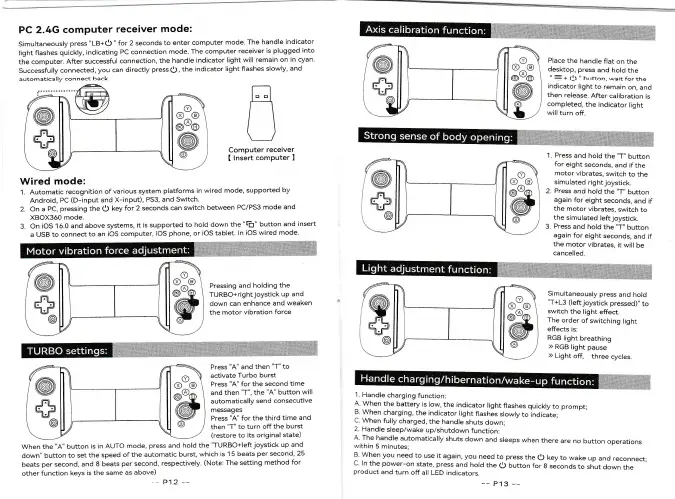
PC 2.4G
computer
receiver
mode:
simultaneously
press
"LB+o
"
for 2 seconds
to enter
computer
mode.
The
handle
indicator
light
flashes
quickly,
indicating
PC connection
mode.
The computer
receiver
is
plugged
into
the
computer.
After
successful
connection,
the handle
indicator
light will
remain
on
in cyan.
successfully
connected,
you
can
directly
press
1)
,
the
indicator
light flashes
slowly,
and
automatically
connect
back.
,,G.
ffi@
t";
tr1
/\
\_l
il#i;:il;""i$i
Piace
the
handle
flat
on
the
desktop,
press
and
hold
the
"
=*
O
"
button.
wait
forthe
indicator
light
to
remain
on. and
then
release.
After
calibration
is
completed.
the indicator
light
wiil
turn
off.
Wired mode:
1.
Automatic
recognition
of
various system
p{atforms tn wired mode,
supported
by
Android,
PC
(D-input
and
X-input),
PS3, and Switch.
2.
On a
PC,
pressing the
O
key
for 2 seconds
can
switch between
PC/PS3 mode
and
XBOX360
mode.
3.
On
iOS 16.0 and
above
systems,
it
is supported to
hold
down the
"ri'
button
and
insert
a
USB to connect
to an
iOS computer,
iOS
phone, or iOS tablet
ln
ioS wired
mode'
Pressing
and
holding the
TURBO+right
joystick
up and
down can
enhance
and
weaken
the
motor
vibration
force
Press
"A"
and then
"T"
to
activate
Turbo burst
Press
"A"
for the
second
time
and
then
"T",
the
"A"
button
will
automatically
seni consecutive
messages
Press
"A"
for the
third time
and
then
'T"
to
turn off
the burst
(restore
to
its original
state)
When the
"A"
button
is
in AUTO
mode,
press
and
hold the
"TURBO+left
joystick
up
and
down" button
to set
the
speed
ofthe automatic
burst,
which
is 1 5
beats
per
second,
25
beats
per
second,
and
I beats
per
second,
respectively.
(Note:
The setting
method
for
other
function
keys
is the same
as
above)
--
P12
*-
i
Handle
charging
function:
A. \,Vhen
the
battery
is low,
the indicator
light
flashes
quickly
to prompt;
3
When
charging,
the ind
jcator
light
flashes
slowly
to indicate;
L When
fully
charged,
the
handle
shuts
downi
2.
Handle
sleep/wake
uplshutdown
function;
A The
handle
automaticaily
shuts
down
and sreeps
when
there
are no
button
operations
{ithin
5 minutes,
I
When
you
need
to use
it
again, you
need
to press
the
O
key
to wake
up
and
reconnect,
C. ln
the power-on
state, press
and
hoid
the
O
button
for
g
seconds
to
shut
down
the
product
and
turn off
all
LED indicators.
-_ Pl3
-_
1.
Press
and
hold
the
"T"
button
for
eight
seconds.
and
if the
motor
vibrates,
switch
to the
simulated
right
joystick.
2.
Press
and
hold
the
"T"
button
again
for
eight
seconds,
and
if
the
motor
vibrates,
switch
to
the
simulated
left
joystick.
3.
Press
and
hold
the
"T"
button
again
for
eight
seconds,
and
if
the
motor
vibrates,
it will
be
cancelled.
Simuitaneously
press
and
hold
"T+L3
(leftjo)rstick
pressed)"
to
switch
the
light
effect.
The
order
of switching
light
effects is:
RGB
light
breathing
>>
RGB
light
pause
>
Light
off,
three
cycles.
@i]'
.%it
h
---!t
iI
-
-\
m\)
(a-6
\
@@@
@
2,,
@[l'
,"d
{
.n\
o-@ \
o@o
@
@
laa
'@
-.#
@
__Jl
-i'l
V
\
.Dv
@_@ \
@
6)
@.I
{
ta
V
{\\
1Lr
@
{
\
\!
{Y) Y
(x) (B)
{9, (gu
@
@
(@
,-q
aa,r
@
r'l
-\,1
\\
(?)Y
ri-ril \
(9)
ut)
@
@
;
;
@@]i$iffi
ffi
ffi
wlf srlili4+ii,ffi
f
f
irgtii5frffi
'
"