Need help?
Do you have a question about the BST PWA-220 and is the answer not in the manual?
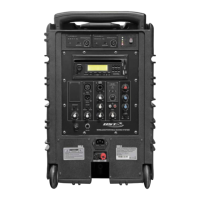
Receives signals from the remote control; ensure it is unobstructed for proper operation.
Knob to switch the CD-USB-SD module on/off and adjust its volume level.
Initiates playback or pauses the current track on the CD or USB/SD module.
Stops the playback of the current track or file from the CD, USB, or SD source.
Turns the CD-USB-SD player module on or off remotely.
Buttons to select USB, SD card, or CD as the audio source.
Buttons for playing, pausing, and stopping audio playback.
Protects the speaker against surges; check if the enclosure is not lit.
Button to turn the PWA broadcast module on/off and adjust its volume.
Selects operating mode: Transmitter (TX) to send signal or Receiver (RX) to receive.
Adjusts the level of the signal input when the speaker is in slave mode.
Choose between master or slave mode for wired connection between PWA220 units.
Connects to the LINK INPUT of another PWA220 speaker.
Connects to the LINK OUTPUT of another PWA220 speaker.
Adjusts the echo level for microphone signals (wired or wireless).
Enables or disables voice priority, lowering music volume when a mic is used.
Read manual, connect perfectly, avoid opening cover, connect power cord safely.
Technical details including frequency band, stability, power, charging, and operating times.
2-year warranty on parts/labour, excluding built-in batteries and mic battery.

 To Next Page
 General