BSWA 308/309 BSWA Technology Co., Ltd
37
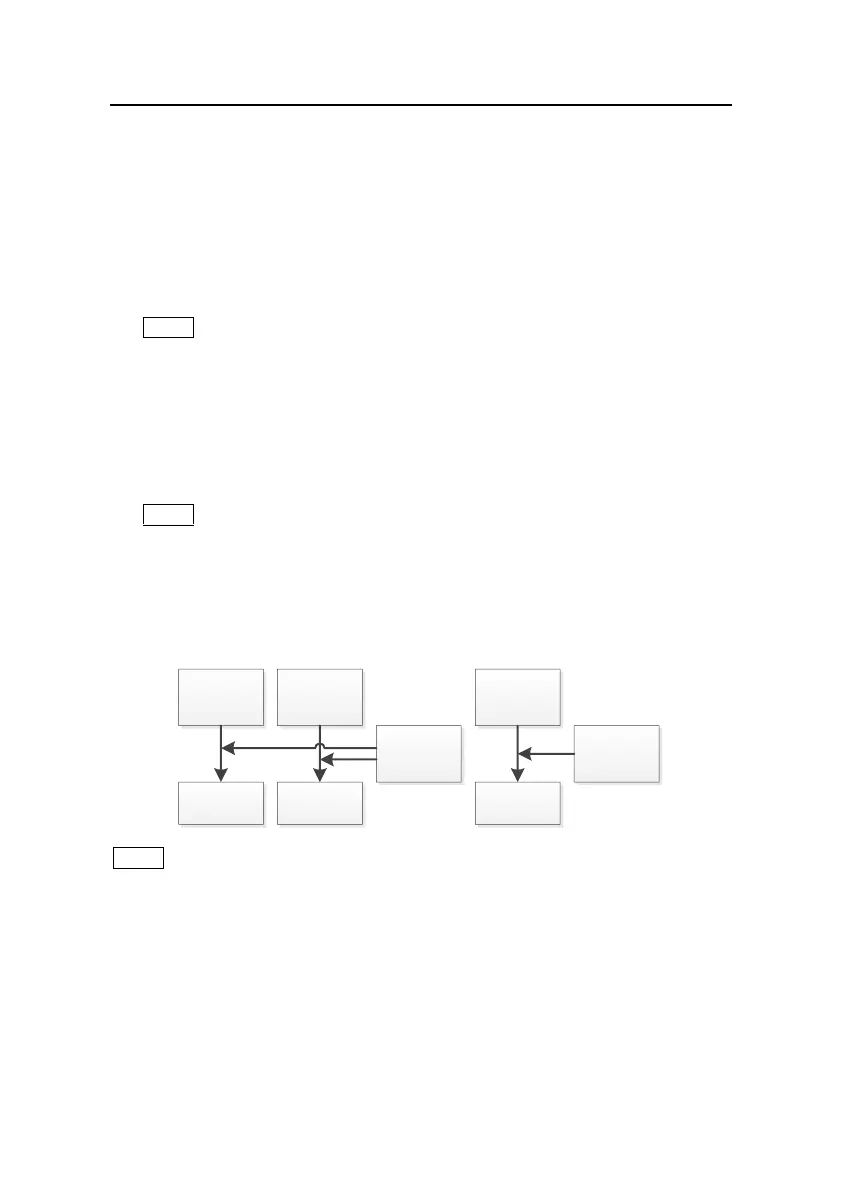
SWN/OCT saves the time history data into file. The data source in Level Meter mode is
Profile 1~3 (select in SWN Save of Profile 1~3 menu) and store as SWN file; in 1/1
Octave mode save all bands of octave and LAeq, LBeq, LCeq, LZeq, store as OCT file.
SWN Log.Step:
SWN Log.Step is the logger step (interval time) to save data as SWN/OCT file. Press
<◄>, <►> can select the option: 0.1s, 0.2s, 0.5s, 1s~59s, 1m~59m, 1h~24h.
★Note: The SWN Log.Step of 1/3 Octave starts from 0.5s (0.1s and 0.2s are disable).
CSD Logger:
Press <◄>,<►> to switch. If selected, sound level meter will save the CSD files.
CSD save the instantaneous data into file. The data source in Level Meter mode is 14
group results of Custom Measure and store as CSD file; in 1/1 Octave mode save all
bands of octave and LAeq, LBeq, LCeq, LZeq, store as CSD file.
★Note: If selected, press <Enter> at the main screen can save the data into CSD file
manually when measurement is stop.
CSD Log.Step:
CSD Log.Step is the logger step (interval time) to save data as CSD file. Press <◄>,
<►> can select the option: 1s~59s, 1m~59m, 1h~24h.
Profile1
Profile2
Profile3
SWN File
14 sets of
Custom
Measure
CSD File
CSD
Log.Step:
1s~24h
Octave
Data
OCT File
SWN/OCT
Log.Step:
0.1s~24h
★Note: SWN/OCT file only store integral data. The logger step can be considered as the
integral period. All the data within logger step (integral period) will be store as one line into
SWN/OCT file. CSD file only store instantaneous data without integration. Once the CSD
logger step is reached, 14 group data of custom measure will be store as one line into CSD
file, just as a screenshot.



 To Next Page