BSWA 308/309 BSWA Technology Co., Ltd
52
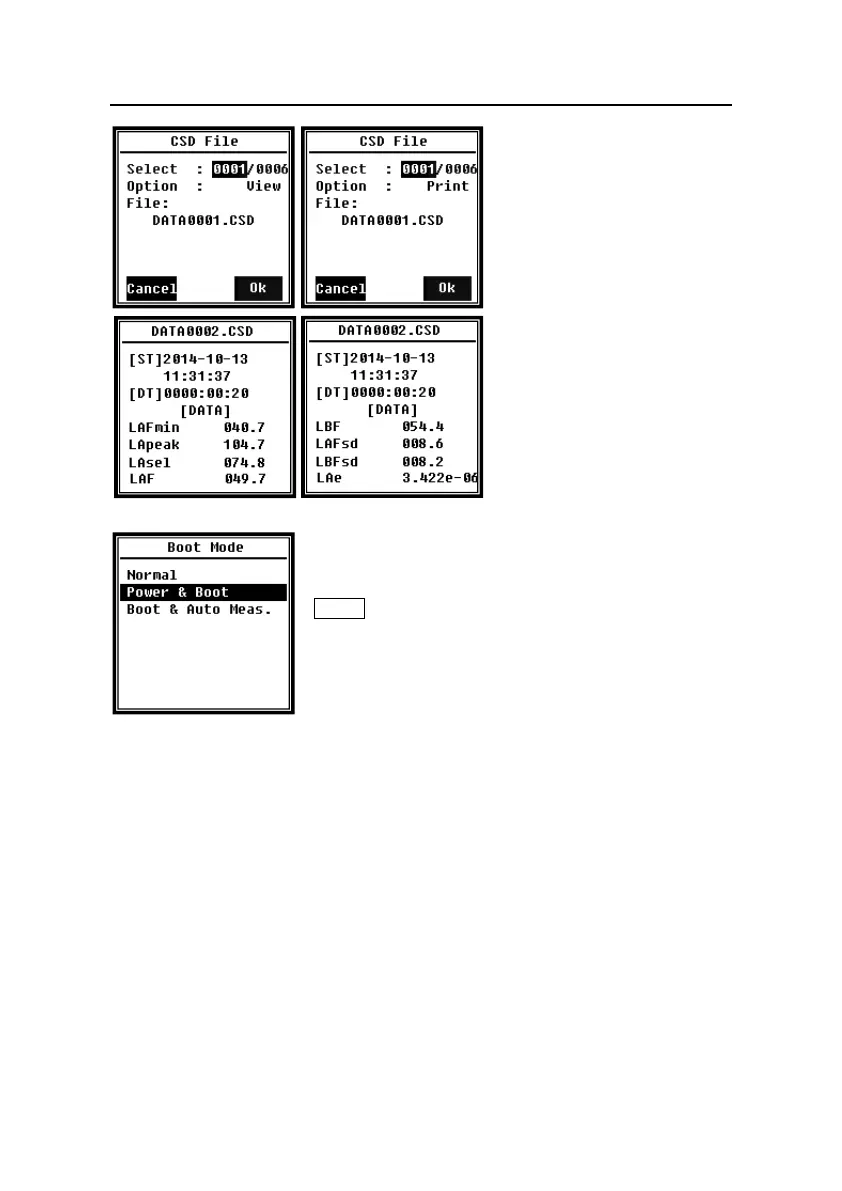
Select Option in menu of CSD
File, and then press <◄>、<►>
can View or Print the CSD file.
After select file number and action,
press <Enter> to view or print the
content of file.
Press <▲>, <▼>, <◄>, <►> can
brown file contents at View mode.
The Print mode is almost same to
View mode. Press <Enter> can
print the current displayed content
of CSD file.
4.4.10 Boot Mode
In menu of Boot Mode, press<▲>, <▼> can select Normal,
Power & Boot, Boot & Auto Meas. mode.
★Note: The hardware mode switch located in the battery
compartment need to be set to fit to different boot mode.
Normal:
Need to change hardware mode switch to Normal. This is the normal working mode of
sound level meter.
Power & Boot:
Need to change hardware mode switch to Boot. After select this mode, sound level
meter will power on when proper power supply available. It’s suitable for integrate into
other system, especially in those cases where power failure, sound level meter can
power on automatically from power shutdown.
Boot & Auto Meas.:
Need to change hardware mode switch to Boot. After select this mode, sound level
meter will not only power on when proper power supply available, but also start



 To Next Page