I
0800 145 6789* or go to www.bt.com/producthelp
Help 71
d
-
¦
-
¥
Have you connected the telephone line correctly?
• Do Not Disturb may be switched on, see page 23.
• Is the base ringer set to off?
• You may have a faulty line or socket. Try using another socket or line.
If you are a BT customer then please call 0800 800 151 or your network provider
if you still have problems.
d
-
É
É
]
;
+
+
Á
-
]
;
¥
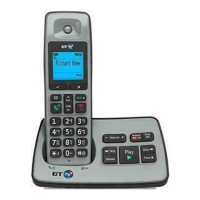
Sometimes other electrical equipment can interfere with your BT2500 if it’s placed
too close. We recommend that you place your BT2500 at least one metre away
from electrical appliances or metal obstructions to avoid any risk of interference.
C
-
tomer Helpline
a
:
;
-
^
]
¦
+
-
0800 145 6789* or go to
www.bt.com/producthelp
[
Á
-
¥
BT Residential lines – call 150. BT Business lines – call 152.
• For non BT line customers, call 0800 800 150 (residential) or 0800 800 152
(business).
• Additional handsets are available to purchase from the Helpdesk on 0800 145 6789*.
d
Á
-
f
-
]
;
-
d
T
*


 To Next Page