EasyManua.ls Logo

BT Digital Voice Adapter - User Manual

BT Digital Voice Adapter
9 pages
Print Icon
To Next Page IconTo Next Page
Loading...
1
Digital Voice
Adapter
User guide
Question and Answer IconNeed help?

Do you have a question about the BT Digital Voice Adapter and is the answer not in the manual?

Summary

Setting Up Your Digital Voice Adapter

Initial Setup Steps

General advice on setting up the adapter and ensuring the hub is ready.

Linking Adapter to Hub

Steps to link the Digital Voice Adapter with your BT Hub using the pairing buttons.

Connecting and Using the Adapter

Connecting a Home Phone

Instructions for plugging your home phone into the adapter.

Emergency Call Warning

Warning about emergency call limitations during power or broadband outages.

Understanding Adapter Lights

Explains the meaning of different light patterns on the adapter.

Managing Your Adapter

Accessing BT Smart Hub Manager

Instructions on accessing the BT Smart Hub Manager via a web browser.

Deregistering the Adapter

Steps to remove the adapter from your hub via the Manager or Handset menu.

Getting Help and Support

Troubleshooting Phone Compatibility

Advice for older phones potentially incompatible with the adapter.

Support Channels

Information on online chat, web help, and phone support channels.

Safety, Care, and Information

Important Safety and Care Instructions

Key safety, installation, care, and warning instructions for the adapter.

Technical and Disposal Information

Information on radio directives, GPL, and responsible equipment disposal.

Product Guarantee

Guarantee Terms and Conditions

Details and conditions of the 1-year guarantee for the Digital Voice Adapter.

Summary

Setting Up Your Digital Voice Adapter

Initial Setup Steps

General advice on setting up the adapter and ensuring the hub is ready.

Linking Adapter to Hub

Steps to link the Digital Voice Adapter with your BT Hub using the pairing buttons.

Connecting and Using the Adapter

Connecting a Home Phone

Instructions for plugging your home phone into the adapter.

Emergency Call Warning

Warning about emergency call limitations during power or broadband outages.

Understanding Adapter Lights

Explains the meaning of different light patterns on the adapter.

Managing Your Adapter

Accessing BT Smart Hub Manager

Instructions on accessing the BT Smart Hub Manager via a web browser.

Deregistering the Adapter

Steps to remove the adapter from your hub via the Manager or Handset menu.

Getting Help and Support

Troubleshooting Phone Compatibility

Advice for older phones potentially incompatible with the adapter.

Support Channels

Information on online chat, web help, and phone support channels.

Safety, Care, and Information

Important Safety and Care Instructions

Key safety, installation, care, and warning instructions for the adapter.

Technical and Disposal Information

Information on radio directives, GPL, and responsible equipment disposal.

Product Guarantee

Guarantee Terms and Conditions

Details and conditions of the 1-year guarantee for the Digital Voice Adapter.

Overview

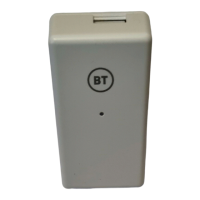
The BT Digital Voice Adapter is designed to allow users to continue using their existing home phones when their service transitions to Digital Voice. It works in conjunction with the latest BT Hub, ensuring seamless integration and continued use of familiar home phone equipment.

Function Description

The primary function of the Digital Voice Adapter is to bridge the gap between traditional home phones and BT's Digital Voice service. When your home phone service moves to Digital Voice, this adapter allows you to plug your existing telephone line cord into it, and your phone will then have the same dial tone as it did when plugged directly into your old wall socket. This means you don't need to replace your current home phones, offering a cost-effective and convenient solution for the transition.

The adapter links wirelessly with your BT Hub. Once linked, it remembers this connection, allowing you to unplug it and move it to any power socket or even an extension cable elsewhere in your home, providing flexibility in phone placement. The adapter supports a maximum of 5 Digital Voice devices, which can include a combination of Digital Voice Handsets and Digital Voice Adapters, registered to your new Hub at one time.

Usage Features

Setting Up the Adapter:

  1. Initial Hub Setup: Before setting up the adapter, ensure your new BT Hub is fully set up and powered on. The adapter can only be set up when the front of your hub shows a steady blue light. If you encounter issues, wait 5 minutes and try again, as the hub might be updating.
  2. Linking with the Hub: For easy linking, plug the Digital Voice Adapter into a power socket close to your BT Hub.
    • On your Hub: Press the "Pair Device" button (located halfway up on the left-hand side).
    • On your Adapter: Within 1 minute of pressing the Hub button, press and hold the "PAIR" button (on the right-hand side of the adapter) for 6 seconds.
  3. Registration Indicator: During registration, the light on the front of the adapter will flash quickly. Once registration is complete, the light will show a solid green.
  4. PIN Change Note: If you have changed your base PIN on your Hub from the default 0000, you will need to temporarily revert it to 0000 before linking your Digital Voice Adapter. Instructions for accessing the BT Smart Hub Manager are provided in the manual.
  5. Connecting a Home Phone: Plug your home phone's existing telephone line cord into the socket on the top of the Digital Voice Adapter. Your phone will then operate as usual.

Digital Voice Adapter Light Meanings:

The light on the adapter provides visual cues about its status:

  • Initial Plug-in: Flashes 0.5 seconds on, 2 seconds off.
  • During Registration: Flashes quickly (0.5 seconds on, 0.5 seconds off).
  • Once Registered: Stays solid green.
  • During a Call: Flashes slowly (1 second on, 1 second off).
  • Connection Problem (once registered): Flashes 0.5 seconds on, 2 seconds off, indicating an issue with your broadband connection.

Emergency Calls:

It's crucial to note that phones connected to the Digital Voice Adapter will not be able to call 999 (or any other numbers) during a power cut or if there's a problem with your broadband. Users are advised to have an alternative method for making emergency calls.

Deregistering the Adapter:

There are two methods to deregister the adapter from your hub:

  1. Via BT Smart Hub Manager (if no Digital Voice Handsets are registered):

    • Open a web browser on a device connected to your hub and type bthomehub.home/ in the address bar.
    • Click "Phone" on the left-hand side.
    • Scroll down to the adapter you wish to deregister and click "Deregister."
  2. Via Digital Voice Handset menu (if a Digital Voice Handset is registered):

    • From the handset menu, go to "Settings" and press "Select."
    • Scroll down to "Registration" and press "Select."
    • Scroll down to "Deregister" and press "Select."
    • Scroll to the "Adapter" you want to deregister and press "Select."

Compatibility Note:

If your home phone is more than 10 years old, there's a possibility it might be incompatible with the Digital Voice Adapter. BT provides a helpline for such inquiries.

Maintenance Features

General Care and Safety:

  • Indoor Use Only: The adapter is designed for indoor use within the UK.
  • Placement: Position all parts away from heat sources (radiators, window sills, other hot electrical equipment) and direct sunlight. Ensure the area is well-ventilated; avoid placing it in cupboards or behind sofas, and do not block any vents with objects or thick carpets.
  • Child Safety: Keep the device and cables out of reach of young children.
  • Liquid Avoidance: Electronic devices are sensitive to liquids. Do not place the adapter or power adapters in damp areas or near sources of water or splashes.
  • Surface Protection: If placed on fragile surfaces (e.g., veneered wood or delicate fabrics), use a mat to prevent scratches or marks.
  • Flammable Substances: Do not use near flammable substances or in a flammable atmosphere (e.g., warehouse or garage).
  • Operating Temperature: Designed for use at room temperatures between 0°C and 40°C.
  • Handling: Treat all parts with care. Avoid shock or vibration, and do not pull or twist any cables.
  • Inspection: Regularly check the product for damage to ensure small parts are not exposed.
  • Cleaning: Dust with a soft, dry cloth. Do not use water or solvents. Regularly check that objects are not covering any parts or vents that could cause overheating.
  • Storage: When not in use, store in a dry place, away from extreme heat or cold.

Warnings:

  • Damage: If the device appears damaged, stop using it immediately. Switch off the electrical socket if safe to do so and contact BT's helpdesk.
  • No User Serviceable Parts: Do not attempt to open the device, as there are no serviceable parts, and doing so risks electrical shock.
  • Electrical Storms: There is a slight chance the adapter could be damaged by an electrical storm. It is recommended to unplug the power during an electrical storm.
  • Pacemakers: If you have a pacemaker fitted, consult a medical expert before using this product.
  • Hearing Aids: Radio signals transmitted between the handset and base may cause interference to hearing aids.

Guarantee:

The Digital Voice Adapter comes with a 1-year guarantee from the date of purchase. During this period, BT will repair or replace the product if it's not working properly. If the product was bought more than 28 days ago, it might be replaced with a refurbished or repaired one.

Guarantee conditions include:

  • Problems must be found within the 1-year guarantee period.
  • Proof of purchase (receipt) is required.
  • The product must be returned to BT or its partners as instructed.
  • The guarantee does not cover problems caused by accidents, misuse, fair wear and tear, neglect, tampering, or unauthorized repairs.
  • The guarantee does not affect statutory rights.

Disposal of Old Equipment:

The product features the crossed-out wheelie bin symbol, indicating it should not be disposed of with normal household rubbish. Users are encouraged to recycle old electrical and electronic equipment responsibly. Information on how to recycle is available through retailers or local recycling centers, and BT provides a WEEE Take Back Scheme for returning old kit.

BT Digital Voice Adapter Specifications

General IconGeneral
CompatibilityBT Digital Voice service
TypeDigital Voice Adapter
BrandBT
Ports1 x RJ11
Power SupplyExternal power adapter
ModelDigital Voice Adapter

Related product manuals