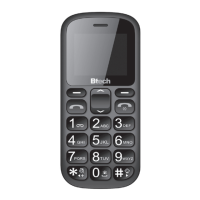
Note! During call „up/down” buttons will adjust
volume. If you want to enter „+” when enterin-
gUżywanie telefonu
■ IncomIng calls
Press „call” button to receive incoming call.
■ Reject/finish call.
To nish call or reject incoming call press „nish”
button.Blokowanie/odblokowanie
klawiatury
■ lock/Unlock keyboaRd
Press „menu” button and then „#” button to
lock keyboard. Repeat this action to unlock
keyboard.
■ MUte fUnction
Press and hold „*” to disable all sounds, repeat
this action to enable sounds.
■ Using MenU
Press „menu” button in standby mode to enter
menu icons. Use navigation buttons and
OK button to enter options. You can also use
le and right function buttons to enter context
menu options.
Before use
Charge phone for few hours before rst use
until on “Charging complete” appear on the
display.
Power on/Power off
Press and hold „nish/power” button for 3
seconds to power on the device. Repeat this
action to power o the device.
flashlIght functIon
When phone is in standby mode press and
hold „OK” button for 3 seconds, ashlight LED
will be on. To switch o press and hold again
“OK” button for 3 seconds.
usIng the Phone
■ dialing
Use numeric buttons to enter phone number
or select contact from phonebook, press “call”
button to dial number. If you have installed
two SIM cards a question will pop-up, then
use „up/down” buttons to select SIM card you
want to use for dialing.


 To Next Page