Ph: 905.636.9865 Fax: 905.636.9879
E-Mail info@bti-chargers.com Web: www.bti-chargers.com
1
July 01 2015
Elite PRO
Model CBHF2-PFC
HIGH FREQUENCY ELECTRONIC
BATTERY CHARGER
Attention: Carefully read this operating manual before using the
battery charger.
OPERATING MANUAL
GENERAL INFORMATION ABOUT THIS CHARGER
This device is an electronic battery charger with microprocessor control suitable for any lead
acid battery type when correctly set.
Fully automatic charging with electronic setting; protected against overload, short-circuit and
reversed polarity.
WARNINGS
Never disconnect the battery while charging: this could cause sparks.
Never use the equipment in the rain, in areas used for washing or in damp areas.
Caution: the gases generated during charging are explosive. Do not smoke in the vicinity of
the batteries. When working with cables and electrical equipment, avoid open flames and
sparks.
Before starting to charge, make sure the voltage of the equipment suits the voltage of the
battery, that the charging current suits the capacity of the battery and that the selected
charging curve (for lead-acid wet batteries or VRLA -
i.e. gel or agm - batteries) is correct for the
type of battery to be charged. In addition, make sure the rated input voltage of the charger suits
the available supply voltage and the system is grounded.
If necessary, replace the fuse with another of the same type and value as indicated on the
rating plate.
Use battery chargers only in well ventilated areas.
Pay attention to any remarks of the battery manufacturer.
Attention: Use protective glasses and gloves during battery maintenance. Battery acid
causes injuries. In case of contact with battery acid, wash the affected parts with fresh water
and consult a doctor if necessary.
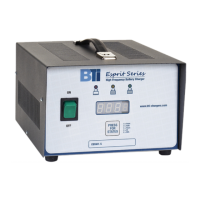
CONTROLS (SEE DIAGRAM ON PAGE 4)
1. Three-digit display + symbol (1), to show:
A = the charging current
U = the battery voltage
h = the charging time elapsed
C = the charging ampere-hours [Ah] absorbed by the battery
E = the energy in kilowatt hours [KWh] absorbed by the battery
2. `Press for Status”`button for the selection of the display mode (2) noted above: A, U, h, C, E.
After about 10 seconds the display returns to a display of the charging current.
3. Red control indicator (3): when it is on, the charging cycle has started.
4. Yellow control indicator (4): when it is on, the final phase of the charging cycle has started.
5. Green control indicator (5): when it is on, the charging cycle has finished.
6. Programmed setting of the charger (6): shown on an adhesive label



 To Next Page
 General